18
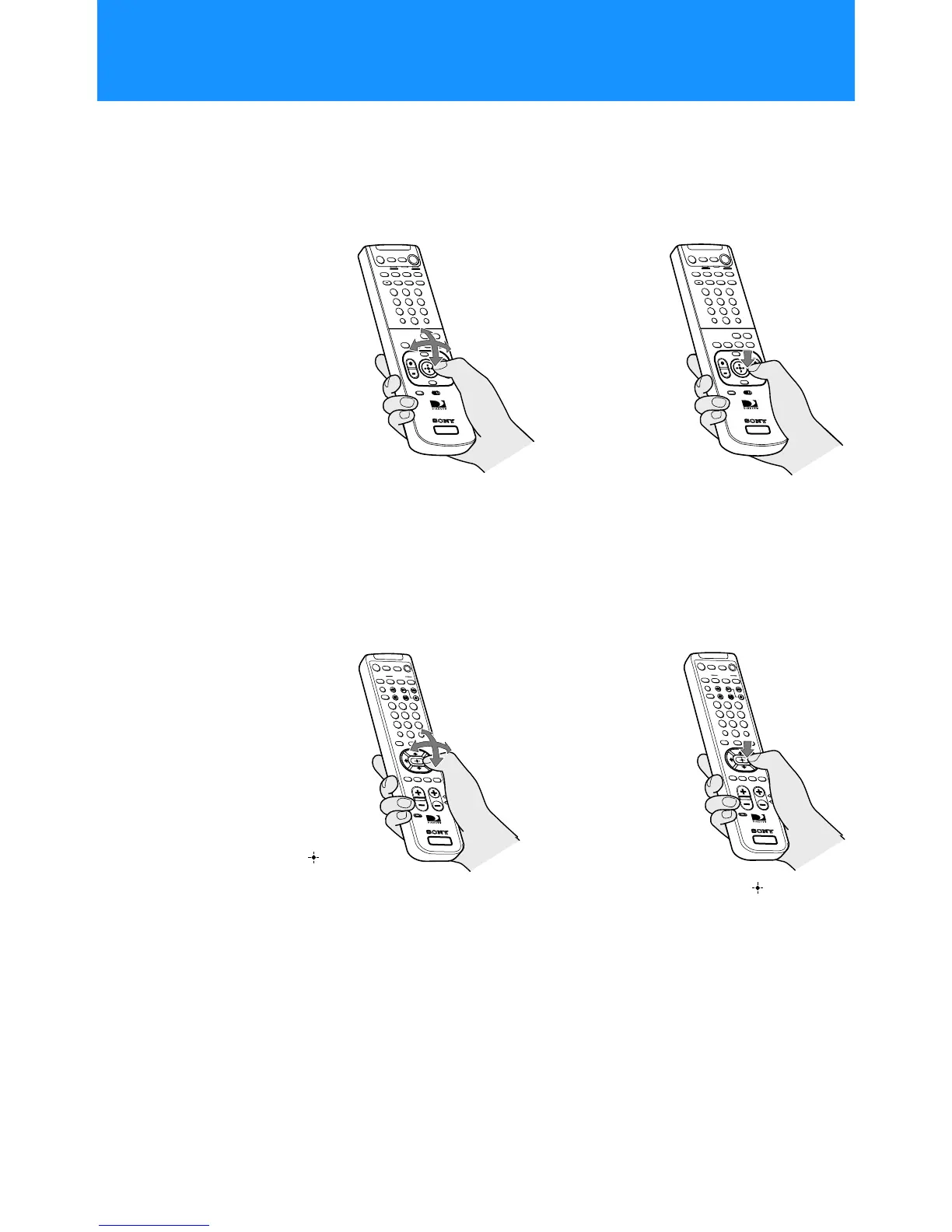
In on-screen displays such as the Main Menu and program guides, you
must first move the highlight to the item you want, then select the item.
RM-Y802 Remote Control (SAT-A55 model)
RM-Y139 Remote Control (SAT-B55 model)
SATELLITE
RECEIVER
+
2
8
3
4
5
6
9
1
7
0
SATELLITE
RECEIVER
+
2
8
3
4
5
6
9
1
7
0
2 Pressdownonthejoystickto
select the item.
1
Move the joystick in any
direction to move the
highlight to the item you
want.
0
123
456
87
9
SATELLITE
RECEIVER
0
123
456
879
SATELLITE
RECEIVER
1
Press the V/v/B/b buttons
to move the highlight to the
item you want.
2
Press the button to
select the item.
Note (SAT-B55 model)
Whenever these Operating Instructions
refer to using the joystick, use the arrow
V/v/B/b buttons surrounding the
button.
z
Tip
Be sure to press the SAT FUNCTION
button before operating the Digital
Satellite Receiver with the remote control.
Selecting Items

 To Next Page
 Loading...