14
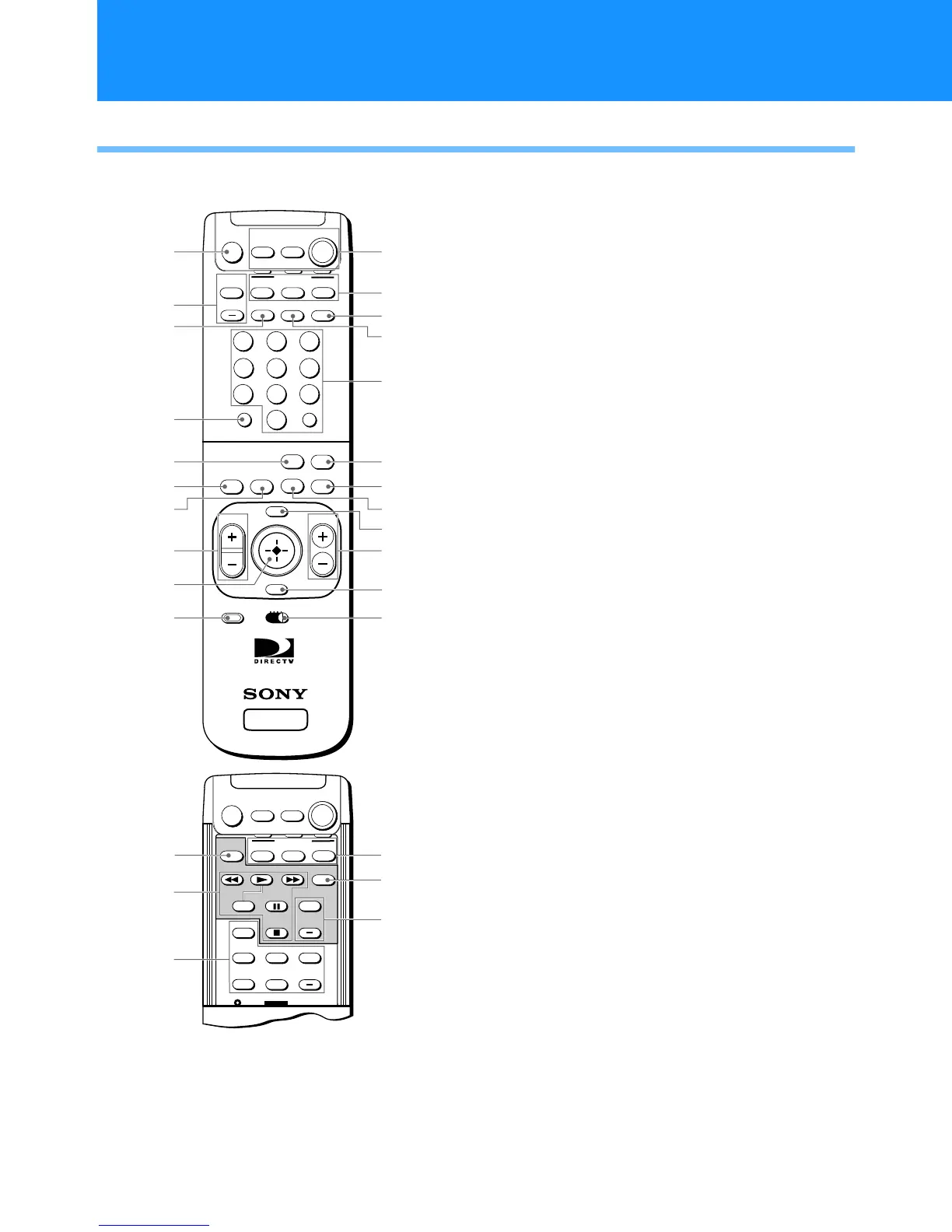
RM-Y802 Remote Control (SAT-A55 model)
Note
You may need to set up the remote control to operate your
other audio/video equipment. See “Setting Up the Remote
Control” on page 65 for details.
1 MUTING button
Mutes the volume. Press again to restore the
volume. To operate your TV, you must first set
up the remote control (see page 65).
2 AUDIO VOLUME buttons
Adjust the volume of your audio receiver. To
operate your audio receiver, you must first set up
the remote control (see page 65).
3 SLEEP button
Sets the TV to turn off automatically after a
certain amount of time (if your TV has the Sleep
feature). To operate your TV, you must first set
up the remote control (see page 65).
4 DISPLAY button
Opens the program information display for the
current program.
5 ALT AUDIO button
Switches among the available audio broadcasts.
6 FAVORITE button
Opens the Favorite Stations guide.
7 INDEX button
Opens the Station Index.
8 VOL buttons
Adjust the volume. To operate your TV, you
must first set up the remote control (see page 65).
9 Joystick
Moving the joystick up, down, left, and right
moves the highlight in on-screen displays. Press
the joystick to select the highlighted item.
q; CODE SET button
Lets you program the remote control to operate
your TV and other audio/video equipment (see
page 65).
SLEEP
TV/SAT
TV/VIDEO
SATELLITE
RECEIVER
ALT AUDIO
JUMP
GUIDE
INDEXFAVORITE
VOL
RM-Y802
VTR3 2 DVD AMP
MENU
EXIT
CH
CATEGORY
CODE SET
+
2
8
3
4
5
6
9
FUNCTION
SAT
CABLE
AUDIO
VOLUME
ENTERDISPLAY
1
7
TV
0
MUTING
CABLE TV
POWER
1
2
3
4
5
6
8
9
0
7
qs
qd
qg
qh
qj
ql
w;
ws
qk
qf
qa
SAT
wa
-
-
POSITION
CH
SWAP PIP
+
TV
SAT
CABLETV/VTR
FUNCTION
-
-
AUDIO OFF
CH
+
POWER
MUTING
CABLE
TV
POWER
wh
wj
wk
wd
wg
wf
SAT
Viewing Pictures From Your DIRECTV PLUS™ Digital Satellite Receiver
Using Your Remote Control


 To Next Page