65
Other Information
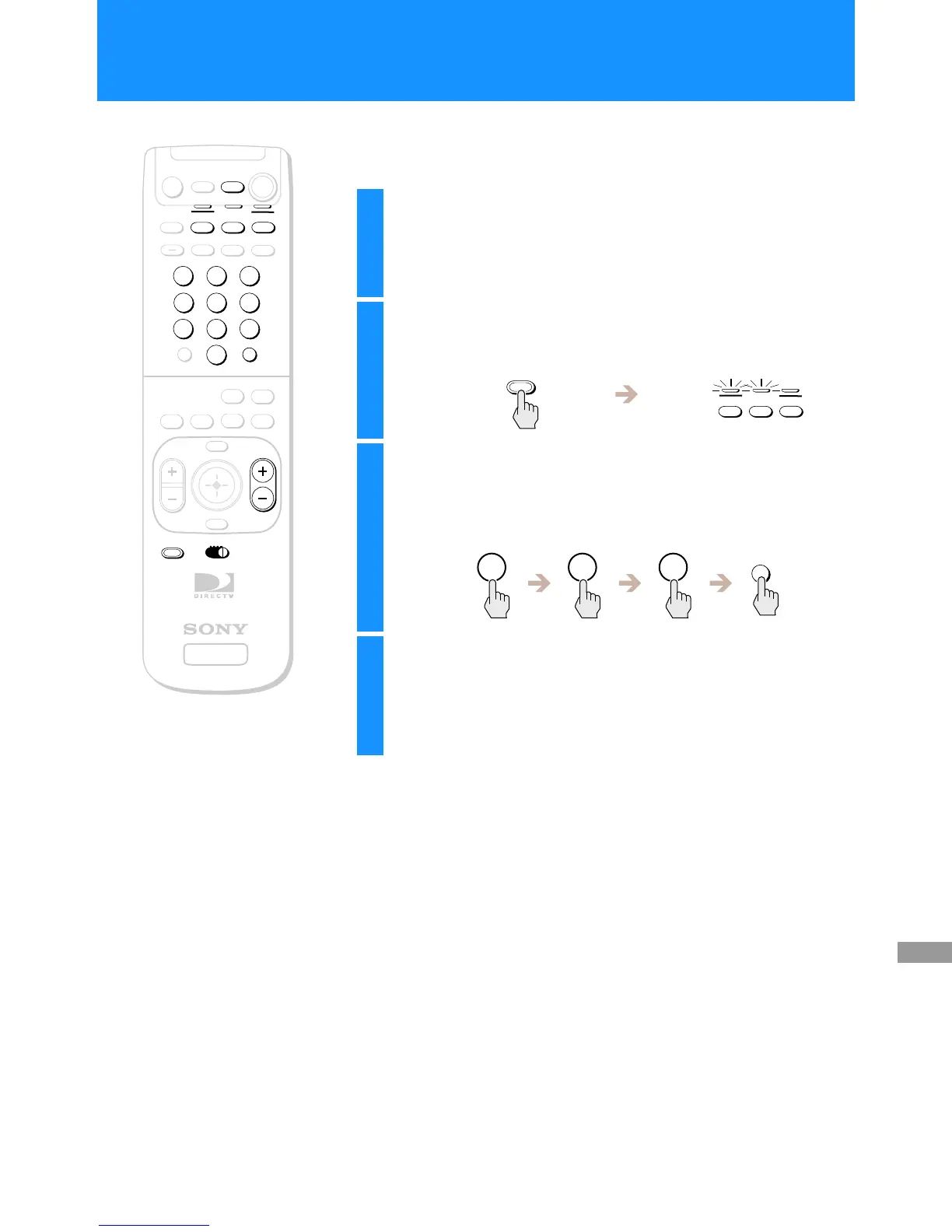
The RM-Y139 and RM-Y802 remote controls can be programmed to
operate your other audio/video equipment.
+
SATELLITE
RECEIVER
2
8
3
4
5
6
9
SLEEP
TV/SAT
TV/VIDEO
FUNCTION
SAT
CABLE
AUDIO
VOLUME
ENTERDISPLAY
MUTING
CABLE
ALT AUDIO
JUMP
GUIDE
INDEXFAVORITE
VOL
RM-Y802
VTR3 2 DVD AMP
MENU
EXIT
CH
1
7
TV
TV
CATEGORY
CODE SET
0
POWER
SAT
z
Tips
• Remember to aim the remote control at
thedeviceyouaretryingtooperate.
• To control extra VTRs (VCRs), a DVD
player or an amplifier with the
RM-Y802 remote control, slide the
device switch to VTR2, 3, DVD or AMP
after you have set up the remote with
the correct manufacturer code.
RM-Y802
Remote Control
1
Find the code(s) for the manufacturer of the
device you want to operate with this remote
control.
You can find these codes on pages 66 and 67.
2
Press the CODE SET button.
The function indicators begin flashing.
3
Press the 0–9 buttons to input the manufacturer
code, then press the ENTER button.
The function indicator goes off, and the remote is setup to operate
that device.
4
Test the remote control.
Press the POWER button for that equipment, then press other
operation controls such as the CH +/– buttons.
If the device does not respond to the remote control, repeat from
step 2 and enter a different manufacturer code in step 3.
CODE SET
FUNCTION
SAT
CABLE
TV
1 0 1
ENTER
Other Information
Setting Up the Remote Control

 To Next Page
 Loading...