48
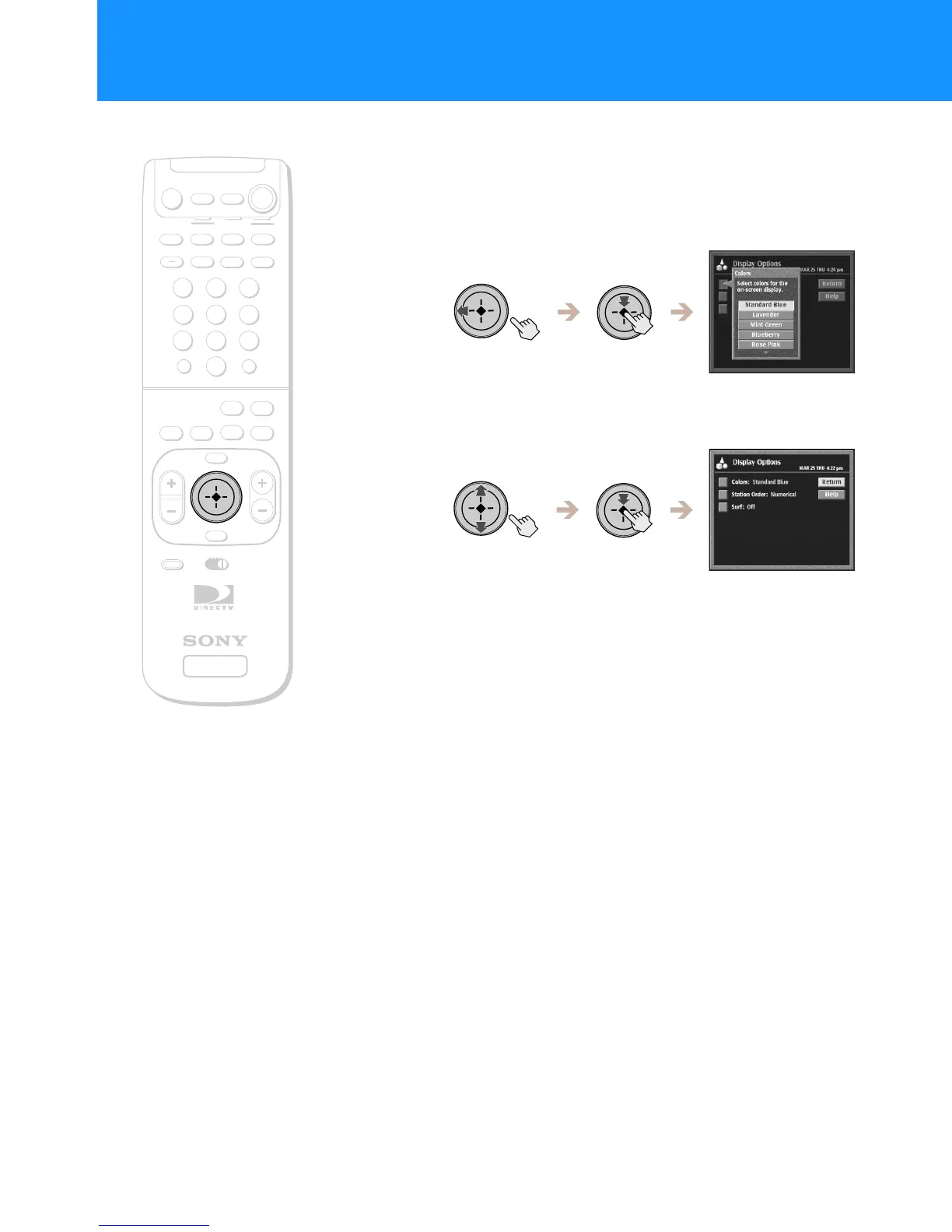
Changing the Color Scheme
1
Highlight and select “Colors” from the Display Options
display (see page 47).
The Colors pop-up appears.
2
Highlight and select the color scheme you like.
The display changes colors as you highlight each color scheme.
+
SATELLITE
RECEIVER
2
8
3
4
5
6
9
SLEEP
TV/SAT
TV/VIDEO
FUNCTION
SAT
CABLE
AUDIO
VOLUME
ENTERDISPLAY
MUTING
CABLE
ALT AUDIO
JUMP
GUIDE
INDEXFAVORITE
VOL
RM-Y802
VTR3 2 DVD AMP
MENU
EXIT
CH
1
7
TV
TV
CATEGORY
CODE SET
0
POWER
SAT
Adjusting the Displays (PREFERENCES) (continued)
RM-Y802
Remote Control


 To Next Page
 Loading...