55
Using the On-Screen Displays
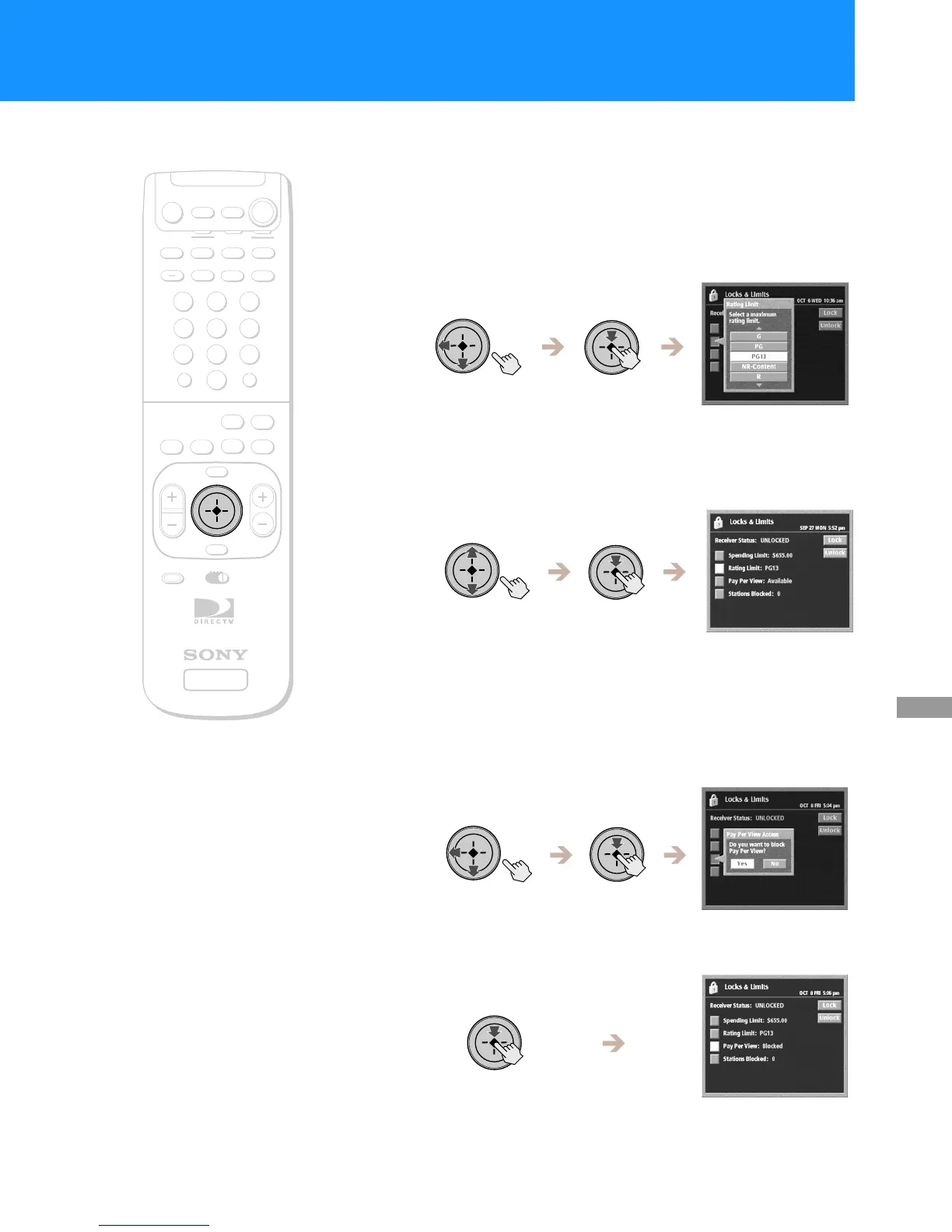
Changing the Rating Limit
The Rating Limit pop-up lets you limit programs according to the content
rating.
1
Highlight and select “Rating Limit” from the Locks &
Limits edit display (see page 53).
The Rating Limit pop-up appears.
2
Highlight and select the highest content rating you want
your Digital Satellite Receiver to access.
The Rating Limit pop-up closes to show the Locks & Limits edit
display.
Changing the Pay Per View Access Setting
The pay per view access setting lets you block access to pay per view
stations.
1
Highlight and select “Pay Per View” from the Locks &
Limits edit display (see page 53).
The Pay Per View Access pop-up appears.
2
Select “Yes” to block access to pay per view programs.
Select “No” to allow access to pay per view programs.
+
SATELLITE
RECEIVER
2
8
3
4
5
6
9
SLEEP
TV/SAT
TV/VIDEO
FUNCTION
SAT
CABLE
AUDIO
VOLUME
ENTERDISPLAY
MUTING
CABLE
ALT AUDIO
JUMP
GUIDE
INDEXFAVORITE
VOL
RM-Y802
VTR3 2 DVD AMP
MENU
EXIT
CH
1
7
TV
TV
CATEGORY
CODE SET
0
POWER
SAT
RM-Y802
Remote Control


 To Next Page