Playing Tracks in Random
Order
(Shuffle Play)
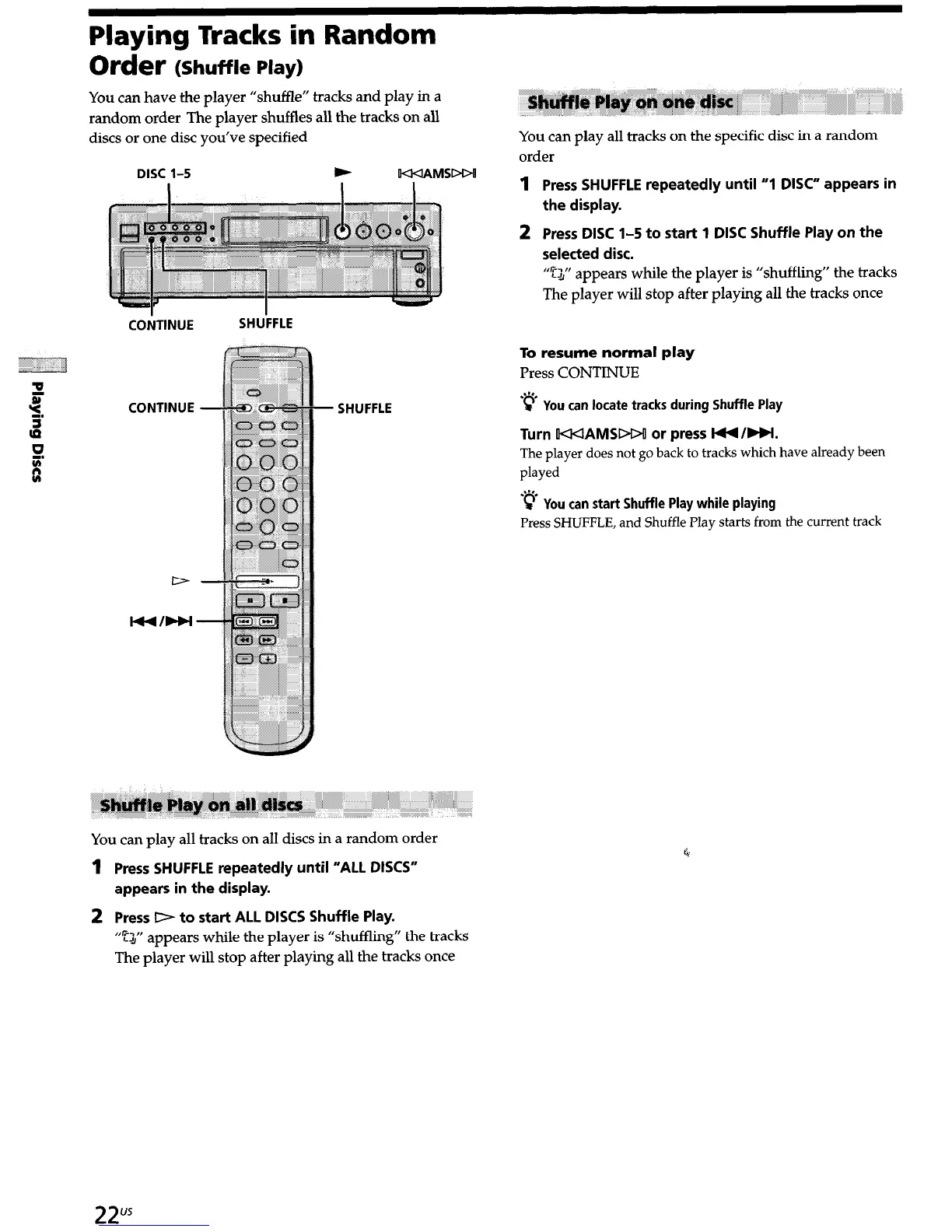
You can have the player “shuffle” tracks and play in a
random order The player shuffles all the tracks on all
discs or one disc you’ve specified
DISC 1-S
w
W<IAMSDDU
COiTINUE
SHU’FFLE
CONTINUE - SHUFFLE
You can play all tracks on all discs in a random order
1
Press SHUFFLE
repeatedly until “ALL DISCS”
appears in the display.
2 Press D to start ALL DISCS Shuffle Play.
“52” appears while the player is “shuffling” the tracks
The player will stop after playing all the tracks once
l,l
,; ,,
You can play all tracks on the specific disc in a random
order
1
2
Press SHUFFLE repeatedly until “1 DISC” appears in
the display.
Press DISC 1-S to start 1 DISC Shuffle Play on the
selected disc.
“$” appears while the player is “shuffling” the tracks
The player will stop after playing all the tracks once
To resume normal play
Press CONTINUE
.“‘.
9 You can locate tracks during Shuffle Play
Turn KKIAMSDDU or press l44 /HI.
The player does not go back to tracks which have already been
played
.“‘.
9 You can start
Shuffle Play while playing
Press SHUFFLE, and Shuffle Play starts from the current track
c


 To Next Page