Labeling Discs (Disc Name)
You can label discs using up to 14 characters and have the
player display the Disc Name each time you select the
disc The Disc Name can be anything you like, such as a
title, musician’s name, category or date of purchase
*p When you select a TEXT disc
The disc title is stored as the Disc Name automatically In this
case, it is not counted as the stored Disc Name (up to 255 discs)
If the disc title has more than 15 characters, the first 14 characters
of the disc title are stored (see page 17)
Note that you cannot change the Disc Name of the TEXT disc
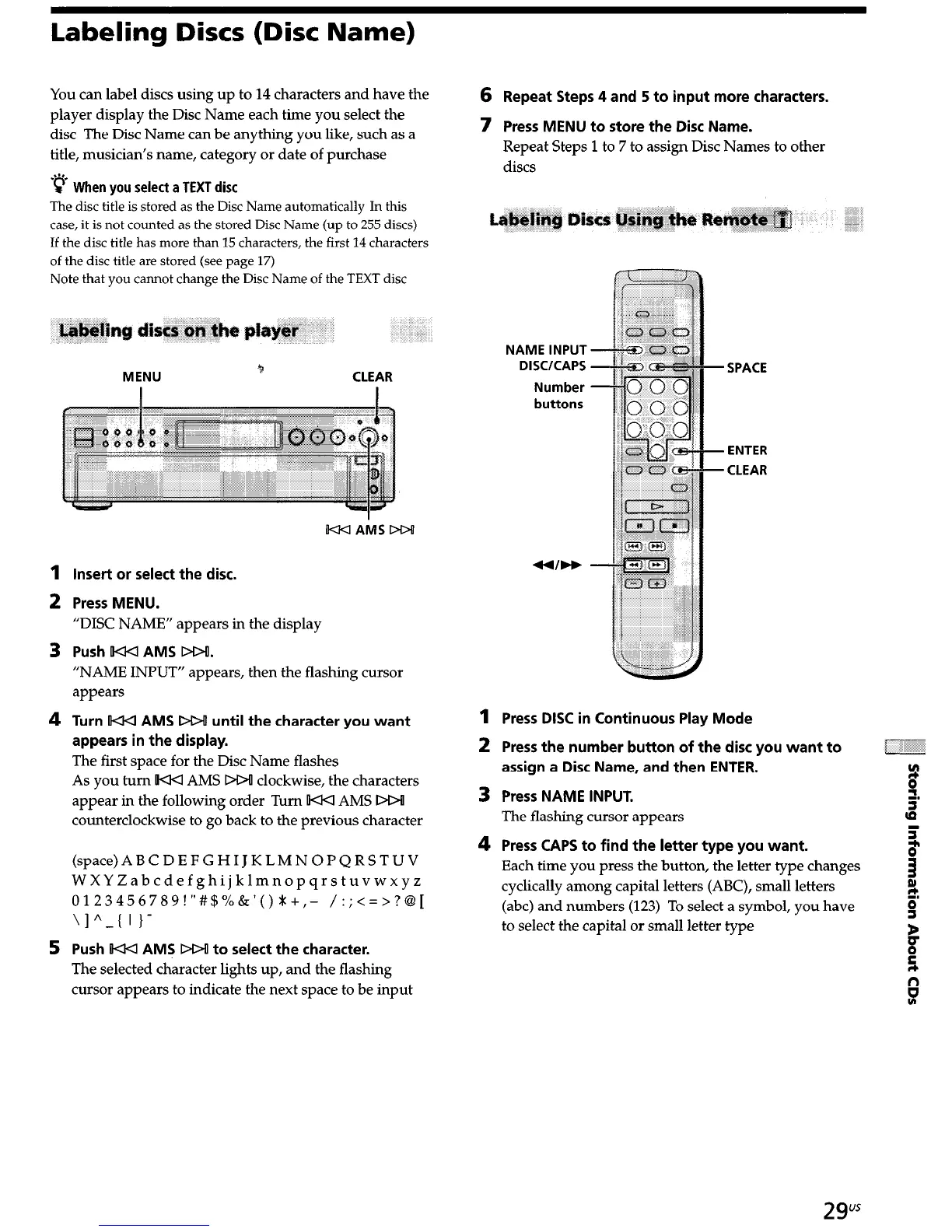
MENU
b
CLEAR
1
2
3
4
5
Insert or select the disc.
Press MENU.
“DISC NAME” appears in the display
Push KKI AMS DD!.
“NAME INPUT” appears, then the flashing cursor
appears
Turn KICI AMS DOU until the character you want
appears in the display.
The first space for the Disc Name flashes
As you turn OKKl AMS DO! clockwise, the characters
appear in the following order Turn IKKI AMS DOO
counterclockwise to go back to the previous character
(space)ABCDEFGHIJKLMNOPQRSTUV
WXYZabcdefghijklmnopqrstuvwxyz
0123456789!“#$%&‘()1+,- /:;<=>?@I
\I^-( 1 I-
Push IKKI AMS DD! to select the character.
The selected character lights up, and the flashing
cursor appears to indicate the next space to be input
6
Repeat Steps 4 and 5 to input more characters.
7 Press MENU to store the Disc Name.
Repeat Steps 1 to 7 to assign Disc Names to other
discs
1
2
3
4
NAME INPUT
DISC/CAPS
Number
buttons
SPACE
ENTER
CLEAR
Press DISC in Continuous Play Mode
Press the number button of the disc you want to
assign a Disc Name, and then ENTER.
Press NAME INPUT.
The flashing cursor appears
Press CAPS to find the letter type you want.
Each time you press the button, the letter type changes
cyclically among capital letters (ABC), small letters
(abc) and numbers (123) To select a symbol, you have
to select the capital or small letter type
2gus


 To Next Page