To Enable the Notification Light
1
From your Homescreen, tap .
2
Find and tap Settings > Sound & notification.
3
Drag the slider beside Notification light to the right.
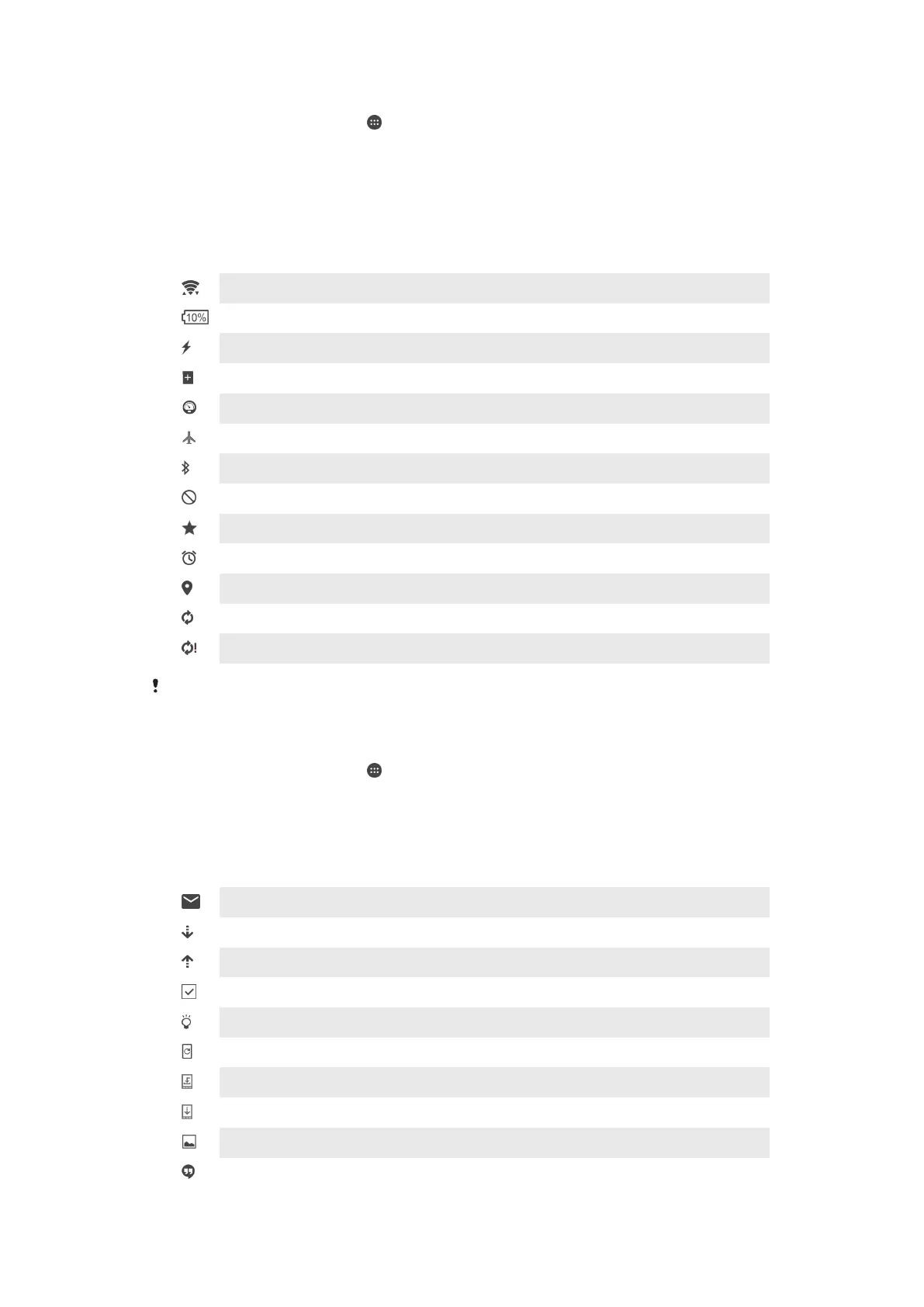
Icons in the status bar
Status Icons
A Wi-Fi® connection is enabled and data is being transmitted
Battery status
The battery is charging
STAMINA mode is activated
Low battery mode is activated
Airplane mode is activated
The Bluetooth® function is activated
Silent mode
Allow exceptions in silent mode
An alarm is set
GPS is activated
Synchronization is ongoing
Problem with sign-in or synchronization
Depending on your service provider and/or region, the functions or services represented by
some icons in this list may not be available.
To Manage Status Bar Icons
1
From your Homescreen, tap .
2
Find and tap
Settings
>
Personalization
>
System icons
.
3
Mark the checkboxes for the system icons that you want to appear in the status
bar.
Notification Icons
New email message
Downloading data
Uploading data
Perform a basic setup of your device
A software update is available
System updates are available
Downloading system updates
Tap to install the downloaded system updates
Screenshot captured
A new Hangouts™ chat message has arrived
22
This is an internet version of this publication. © Print only for private use.














 To Next Page