EasyManua.ls Logo

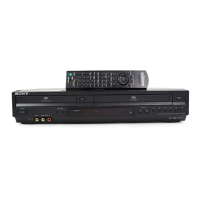
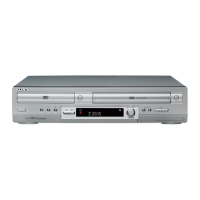
Sony SLV-D370P - User Manual

Sony SLV-D370P
132 pages
Print Icon
To Next Page IconTo Next Page
Loading...
2-671-544-11 (1) US/ES
DVD Player/
Video Cassette
Recorder
Operating Instructions
Manual de instrucciones
For customers in the USA
If you have any questions about your Sony DVD-VCR, you may call Sony Customer
Information Center at 1-800-VHS-SONY (847-7669).
For all other Sony product questions, please call Sony Customer Information Center at
1-800-222-SONY (7669).
Or write to: Sony Customer Information Center 12451 Gateway Boulevard Ft. Myers,
FL 33913
For Customers in Canada
If this product is not working properly, please call 1-877-602-2008 for Peace of Mind
Warranty Replacement service.
For other product related questions please contact our Customer Information Service
Center at 1-877-899-7669 or write to us at: Customer Information Service 115 Gordon
Baker Road, Toronto, Ontario, M2H 3R6
SLV-D370P
© 2006 Sony Corporation
US
ES

Table of Contents

Other manuals for Sony SLV-D370P

Questions and Answers

  • G
    gjordanAug 30, 2025
    What to do if the disc does not play on Sony SLV-D370P?
    • C
      cherylmooreAug 30, 2025
      If your Sony DVD VCR Combo disc does not play, check the following: * Ensure the disc is inserted with the playback side facing down on the disc tray. * The player cannot play certain discs. * The region code on the DVD does not match the player. * Moisture has condensed inside the player. * The player cannot play a recorded disc that is not correctly finalized. * Make sure the TV / DVD·VIDEO switch is set correctly. * Select correctly VIDEO or DVD with SELECT DVD/ VIDEO button.
  • C
    Cassandra WilliamsSep 6, 2025
    How to fix TV reception that is poor on Sony DVD VCR Combo?
    • O
      omorrisSep 6, 2025
      If TV reception is poor on your Sony DVD VCR Combo, adjust the TV antenna.
  • N
    Nicolas SimonAug 29, 2025
    Why does my Sony SLV-D370P remote commander not function?
    • M
      Maria CarsonAug 29, 2025
      If your Sony DVD VCR Combo remote commander isn't working, make sure of the following: * Point the remote commander at the remote sensor on the DVD-VCR. * Replace all the batteries in the remote commander with new ones if they are weak. * Make sure the TV / DVD·VIDEO switch is set correctly. * Select correctly VIDEO or DVD with the SELECT DVD/ VIDEO button.
  • B
    beanmelissaSep 16, 2025
    Why is the tape ejected when I press z REC on my Sony SLV-D370P?
    • W
      woodsjenniferSep 16, 2025
      If your Sony DVD VCR Combo tape is ejected when you press z REC, check that the safety tab has not been removed.
  • W
    William DavidsonSep 7, 2025
    Why doesn't the tracking meter appear on my Sony DVD Player screen?
    • K
      Kevin HarrisSep 7, 2025
      The tracking meter may not appear on the screen of your Sony DVD Player if the recording condition of the tape is very poor and tracking cannot be adjusted.
  • L
    Lisa JonesSep 12, 2025
    How to control other TVs with my Sony DVD Recorder?
    • R
      Ryan ManningSep 12, 2025
      If you cannot control other TVs, set your TV’s code number.
  • V
    Vincent PetersonSep 15, 2025
    Why does the tape start playing as soon as it is inserted in Sony DVD VCR Combo?
    • K
      kimberly76Sep 15, 2025
      If your Sony DVD VCR Combo tape starts playing as soon as it is inserted, the safety tab has been removed. To record on this tape, cover the tab hole.
  • S
    Shannon ObrienNov 27, 2025
    What to do if there is no picture or picture noise on Sony DVD VCR Combo?
    • A
      Ashley AnthonyNov 28, 2025
      If there's no picture or noise appears in the picture, try these steps: * Securely reconnect the connecting cord. * If the connecting cords are damaged, check the connection to your TV and switch the input selector on your TV so that the signal from the player appears on the TV screen. * If the disc is dirty or flawed, the copy-protection signal applied to some DVD programs could affect picture quality. * If you still experience problems even when you connect your player directly to your TV, try connecting your player to your TV’s S-VIDEO input. * If you have set the player to progressive format even though your TV cannot accept the progressive signal, change the setting. * Even if your TV is compatible with progressive format (480p) signals, the image may be affected when you...
  • R
    Ricardo WellsAug 26, 2025
    How to fix a Sony DVD Player remote that's not working?
    • D
      Douglas KlineAug 26, 2025
      If your Sony DVD Player remote isn't working, make sure you are pointing it at the remote sensor on the DVD-VCR. If that doesn't work, replace the batteries with new ones. Also, ensure the TV / DVD·VIDEO switch is set correctly, and that you've selected the correct mode (VIDEO or DVD) using the SELECT DV VIDEO button.
  • J
    Jennifer MartinezAug 25, 2025
    Why is there no picture on my Sony DVD Player?
    • L
      Lindsay PhillipsAug 26, 2025
      If you're experiencing a blank screen or picture noise with your Sony DVD Player, try these steps: First, ensure the connecting cords are securely re-connected. Then, verify the connection to your TV and ensure the input selector on your TV is correctly set. If you have set the player to progressive format, but your TV doesn't support it, set “Progressive” to “Off.” Alternatively, set the player to normal (interlace) format. Finally, check the setting and connection of COMPONENT VIDEO OUT jack if the PROGRESSIVE indicator is lit. The connecting cords may be damaged. Also, the disc may be dirty or flawed. You can try connecting your player to your TV’s S-VIDEO input.

Sony SLV-D370P Specifications

General IconGeneral
BrandSony
ModelSLV-D370P
CategoryDVD VCR Combo
LanguageEnglish

Related product manuals