Getting Started
12
• MENU
Press > /. to set the date.
MENU
OK
> /. /? //
4 Press / to flash the month and set the
month using > /. .
SETTINGS
OPTIONS
TUNER
CLOCK
LANGUAGE
SELECT : Vv
SET : OK
PAUSE
STOP
FFREW
PLAY
OK
PAUSE
STOP
FFREW
PLAY
OK
PAUSE
STOP
FFREW
PLAY
OK
PAUSE
STOP
FFREW
PLAY
OK
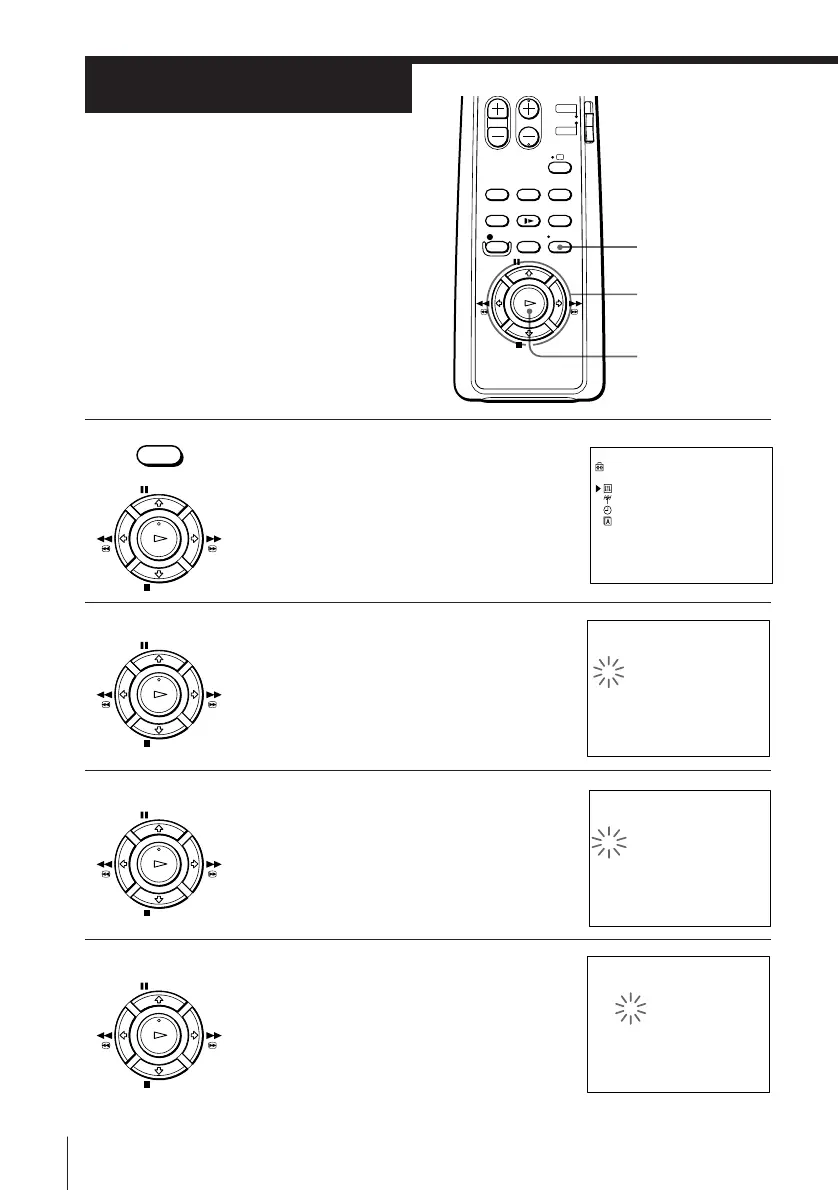
Step 6
Setting the clock
You must set the time and date on the
VCR to use the timer recording features
properly.
Before you start…
• Turn on the VCR and the TV.
• Set the TV to the video channel.
1 Press MENU, then press > /. to select
SETTINGS and press OK.
2 Press > /. to select CLOCK and press OK.
3
tCLOCK
1. 1. 1998 TH 0 : 00
AUTO ADJUST [OFF]
CLOCK PROG [ 1 ]
SELECT : Bb
SET : Vv
OK : OK
tCLOCK
11. 1. 1998 SU 0 : 00
AUTO ADJUST [OFF]
CLOCK PROG [ 1 ]
SELECT : Bb
SET : Vv
OK : OK
tCLOCK
11. 1. 1998 SU 0 : 00
AUTO ADJUST [OFF]
CLOCK PROG [ 1 ]
SELECT : Bb
SET : Vv
OK : OK



 To Next Page