Getting Started
7
Getting Started
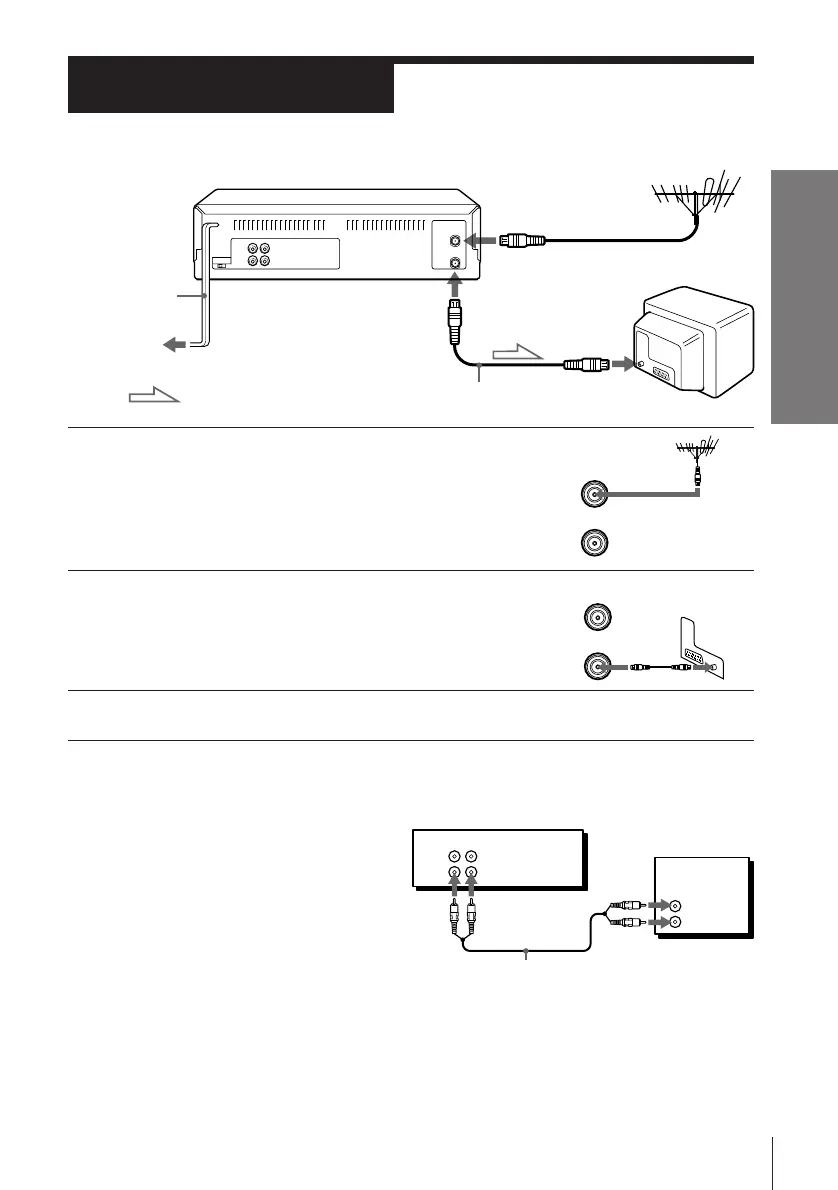
1 Disconnect the aerial cable from your TV
and connect it to AERIAL IN on the rear
panel of the VCR.
2 Connect AERIAL OUT of the VCR and
the aerial input of your TV using the
supplied aerial cable.
3 Connect the mains lead to the mains.
Step 3
AERIAL OUT
Connecting the VCR
AERIAL IN
to mains
: Signal flow
AERIAL IN
Mains
lead
Aerial cable
To a TV that has phono type audio/
video input jacks
This additional connection improves
picture and sound quality. Connect the
TV as shown on the right using a
commercially available connecting cable
like the Sony VMC-710M/720M. If your
TV has left and right audio input jacks,
use a connecting cable like the Sony
VMC-910MS.
IN
ENTREE
OUT
SORTIE
AERIAL
ANTENNE
IN
ENTREE
OUT
SORTIE
AERIAL
ANTENNE
TV
This VCR
VMC-710M/720M audio/video cable
(not supplied)
AUDIO VIDEO
LINE-1 IN
LINE OUT
IN
VIDEO
AUDIO



 To Next Page