EasyManua.ls Logo

Sony SPP-A250 - Page 15

Sony SPP-A250
86 pages
Print Icon
To Next Page IconTo Next Page
To Previous Page IconTo Previous Page
Loading...
Preparing
the
battery
pack
The
supplied
battery
pack
must
be
charged
before
you
can
use
it.
Allow
the
battery
pack
to
charge
for
about
12
hours.
Clean
the
charge
terminals
with
a
soft
cloth
about
once
a
month;
otherwise,
the
battery
pack
may
not
be
fully
charged.
BWN
-=
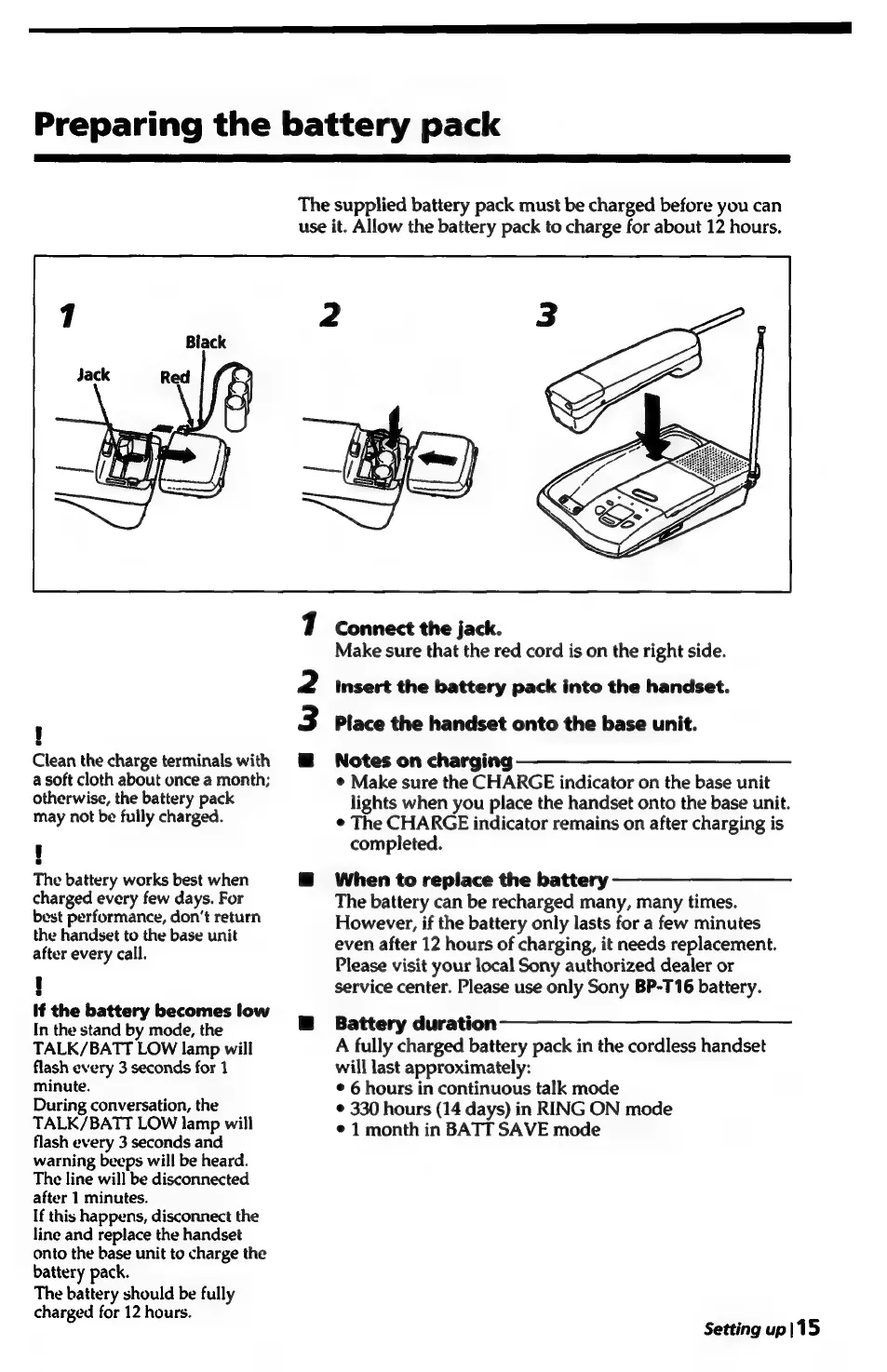
Connect
the
jack.
Make
sure
that
the
red
cord
is
on
the
right
side.
insert
the
battery
pack
into
the
handset.
Place
the
handset
onto
the
base
unit.
Notes
on
charging
—_——_________—
¢
Make
sure
the
CHARGE
indicator
on
the
base
unit
lights
when
you
place
the
handset
onto
the
base
unit.
¢
The
CHARGE
indicator
remains
on
after
charging
is
completed.
The
battery
works
best
when
@
When
to
replace
the
battery
charged
every
few
days.
For
The
battery
can
be
recharged
many,
many
times.
ray
Uaabtatieaded
ae
treturn
However,
if
the
battery
only
lasts
for
a
few
minutes
pene
e:
to
the
beet
ene
even
after
12
hours
of
charging,
it
needs
replacement.
after
every
call.
ae
:
Please
visit
your
local
Sony
authorized
dealer
or
!
service
center.
Please
use
only
Sony
BP-T16
battery.
if
the
battery
becomes
low
A
In
the
stand
by
mode,
the
@
Battery
duration
TALK/BATT
LOW
lamp
will
A
fully
charged
battery
pack
in
the
cordless
handset
flash
every
3
seconds
for
1
will
last
approximately:
minute.
:
©
6
hours
in
continuous
talk
mode
During
conversation,
the
¢
330
hours
(14
days)
in
RING
ON
mode
TALK/BATT
LOW
lamp
will
¢
1
month
in
BATT
SAVE
mode
flash
every
3
seconds
and
warning
beeps
will
be
heard.
The
line
will
be
disconnected
after
1
minutes.
If
this
happens,
disconnect
the
line
and
replace
the
handset
onto
the
base
unit
to
charge
the
battery
pack.
The
battery
should
be
fully
charged
for
12
hours.
Setting
up
|15

Table of Contents

Related product manuals