EasyManua.ls Logo

Sony STR-AV1000 - Direct Tuning

Sony STR-AV1000
42 pages
Print Icon
To Next Page IconTo Next Page
To Previous Page IconTo Previous Page
Loading...
I
Re
ceiving
Radio
B
r
oadcast
Proc
IIBITIS
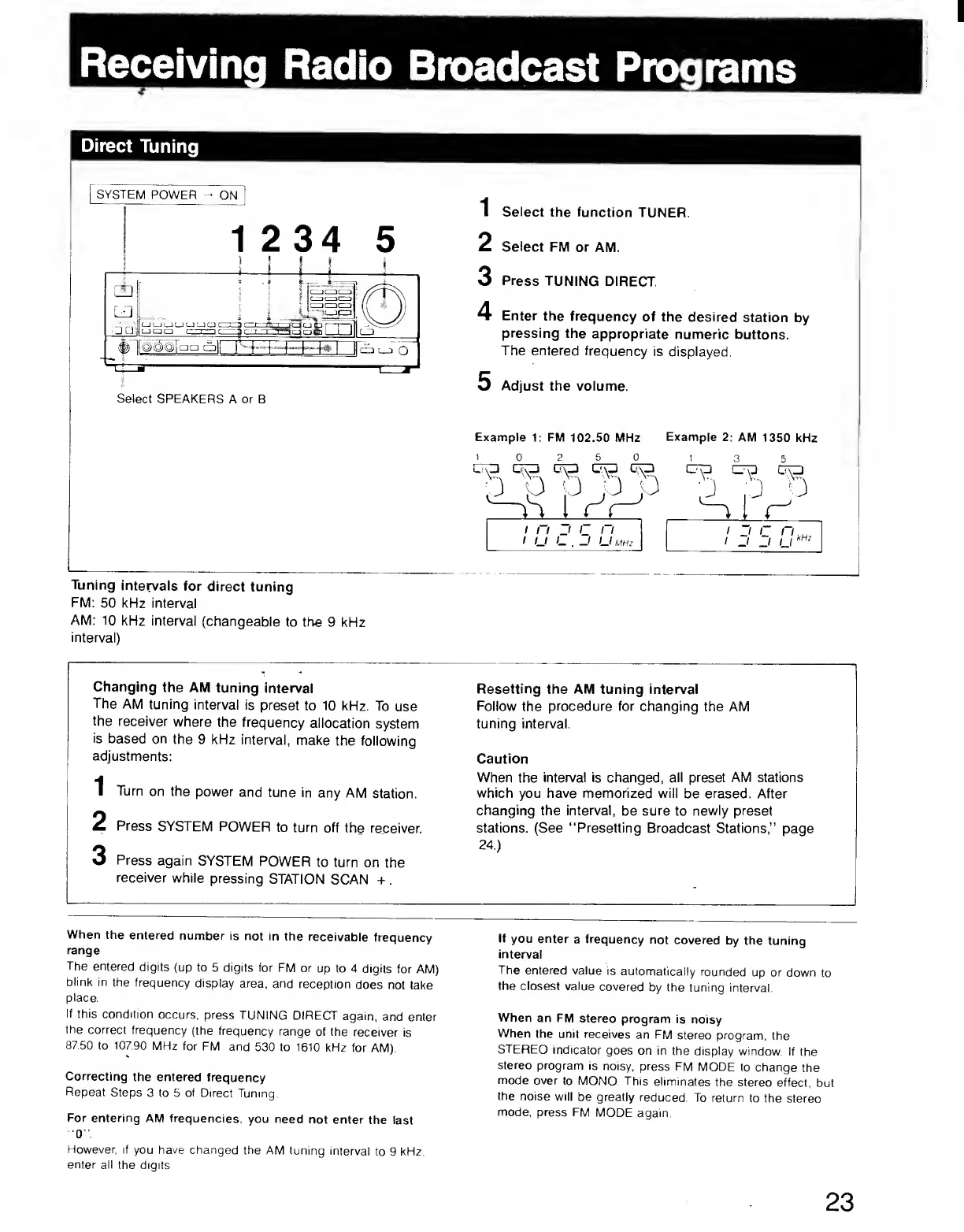
Direct
Tuning
SYSTEM
POWER
^
ON
1
2
3
4
Select
the
function
TUNER.
Select
FM
or
AM.
Press
TUNING
DIRECT.
Enter
the
frequency
of
the
desired
station
by
pressing
the
appropriate
numeric
buttons.
The
entered
frequency
is
displayed.
Adjust
the
volume.
Example
1;
FM
102.50
MHz
1
0
_
...
M
Example
2:
AM
1350
kHz
2
5_
0
CTO
L',\_l
U\_J
D
b
b
P
3
J
:b
5
o
/
-
j
I
kHz
*
MHz
Tuning
intervals
for
direct
tuning
FM:
50
kHz
interval
AM:
10
kHz
interval
(changeable
to
the
9
kHz
interval)
Changing
the
AM
tuning
interval
Resetting
the
AM
tuning
interval
The
AM
tuning
interval
is
preset
to
10
kHz.
To
use
Follow
the
procedure
for
changing
the
AM
the
receiver
where
the
frequency
allocation
system
tuning
interval.
is
based
on
the
9
kHz
interval,
make
the
following
adjustments:
Caution
1
Turn
on
the
power
and
tune
in
any
AM
station.
When
the
interval
is
changed,
all
preset
AM
stations
which
you
have
memorized
will
be
erased.
After
2
Press
SYSTEM
POWER
to
turn
off
the
receiver.
changing
the
interval,
be
sure
to
newly
preset
stations.
(See
“Presetting
Broadcast
Stations,”
page
3
Press
again
SYSTEM
POWER
to
turn
on
the
24.)
receiver
while
pressing
STATION
SCAN
+
.
-
When
the
entered
number
is
not
in
the
receivable
frequency
range
The
entered
digits
(up
to
5
digits
for
FM
or
up
to
4
digits
for
AM)
blink
in
the
frequency
display
area,
and
reception
does
not
take
place.
If
this
condition
occurs,
press
TUNING
DIRECTT
again,
and
enter
the
correct
frequency
(the
frequency
range
of
the
receiver
is
87.50
to
107.90
MHz
for
FM
and
530
to
1610
kHz
for
AM).
Correcting
the
entered
frequency
Repeat
Steps
3
to
5
of
Direct
Tuning.
For
entering
AM
frequencies,
you
need
not
enter
the
last
■
0
".
However,
if
you
have
changed
the
AM
tuning
interval
to
9
kHz.
enter
all
the
digits.
If
you
enter
a
frequency
not
covered
by
the
tuning
interval
The
entered
value
is
automatically
rounded
up
or
down
to
the
closest
value
covered
by
the
tuning
interval.
When
an
FM
stereo
program
is
noisy
When
the
unit
receives
an
FM
stereo
program,
the
STEREO
indicator
goes
on
in
the
display
window.
If
the
stereo
program
is
noisy,
press
FM
MODE
to
change
the
mode
over
to
MONO.
This
eliminates
the
stereo
effect,
but
the
noise
will
be
greatly
reduced.
To
return
to
the
stereo
mode,
press
FM
MODE
again
23