EasyManua.ls Logo

Sony STR-AV1000 - Troubleshootingguide

Sony STR-AV1000
42 pages
Print Icon
To Next Page IconTo Next Page
To Previous Page IconTo Previous Page
Loading...
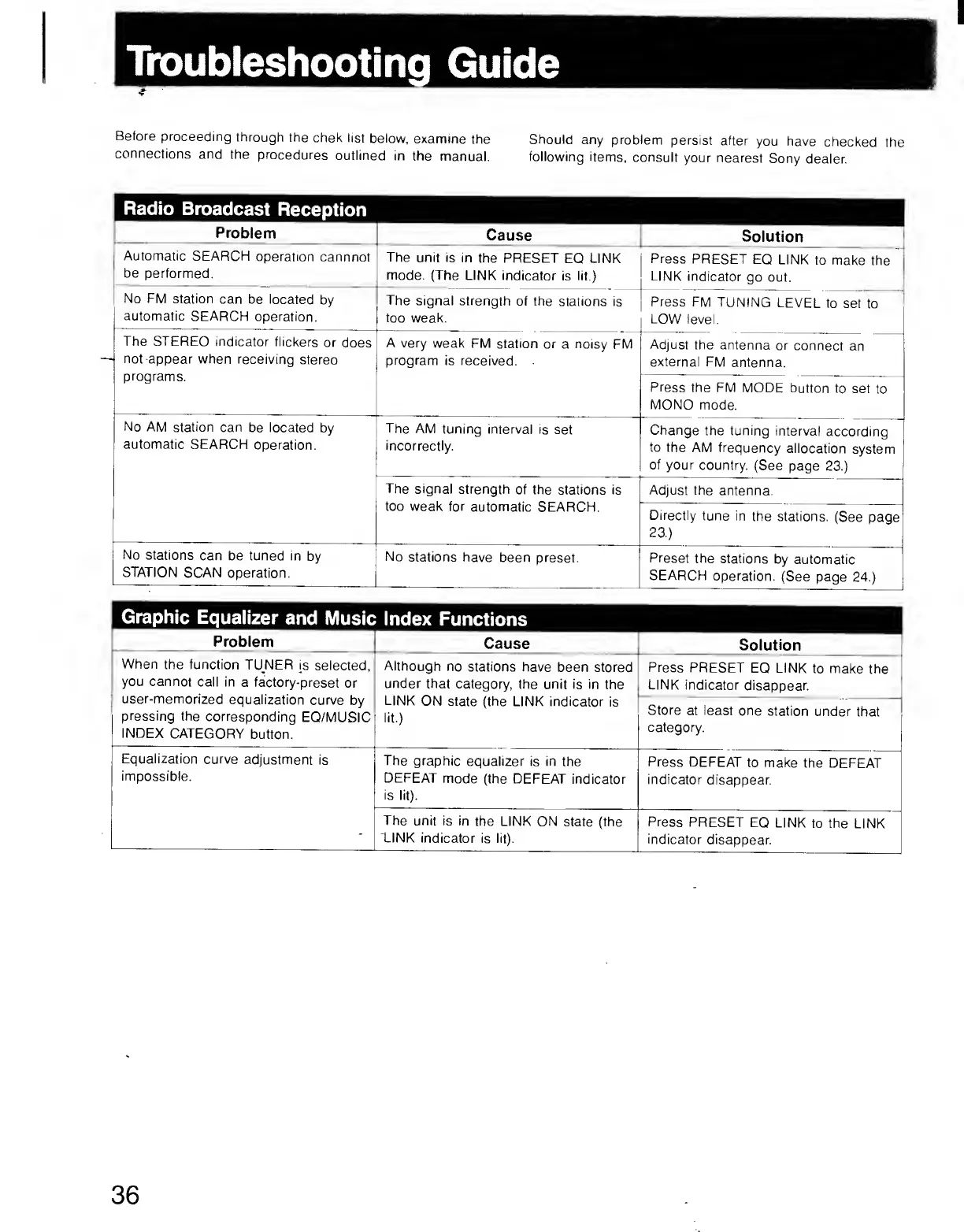
Troubleshooting
G
u
i
d
e
Before
proceeding
through
the
chek
list
below,
examine
the
Should
any
problem
persist
after
you
have
checked
the
connections
and
the
procedures
outlined
in
the
manual.
following
items,
consult
your
nearest
Sony
dealer.
Radio
Broadcast
Reception
Problem
Cause
Solution
Automatic
SEARCH
operation
cannnot
be
performed.
The
unit
is
in
the
PRESET
EQ
LINK
mode.
{The
LINK
indicator
is
lit.)
Press
PRESET
EQ
LINK
to
make
the
LINK
indicator
go
out.
No
FM
station
can
be
located
by
automatic
SEARCH
operation.
The
signal
strength
of
the
stations
is
too
weak.
Press
FM
TUNING
LEVEL
to
set
to
LOW
level.
The
STEREO
indicator
flickers
or
does
not
appear
when
receiving
stereo
programs.
A
very
weak
FM
station
or
a
noisy
FM
program
is
received.
Adjust
the
antenna
or
connect
an
external
FM
antenna.
Press
the
FM
MODE
button
to
set
to
MONO
mode.
No
AM
station
can
be
located
by
automatic
SEARCH
operation.
The
AM
tuning
interval
is
set
incorrectly.
Change
the
tuning
interval
according
to
the
AM
frequency
allocation
system
of
your
country.
(See
page
23.)
The
signal
strength
of
the
stations
is
too
weak
for
automatic
SEARCH.
Adjust
the
antenna.
Directly
tune
in
the
stations.
(See
page
23.)
No
stations
can
be
tuned
in
by
STATION
SCAN
operation.
No
stations
have
been
preset.
Preset
the
stations
by
automatic
SEARCH
operation.
(See
page
24.)
Graphic
Equalizer
and
Music
Index
Functions
Problem
Cause
Solution
When
the
function
TUNER
is
selected,
you
cannot
call
in
a
factory-preset
or
user-memorized
equalization
curve
by
pressing
the
corresponding
EQ/MUSIC
INDEX
CATEGORY
button.
Although
no
stations
have
been
stored
under
that
category,
the
unit
is
in
the
LINK
ON
state
(the
LINK
indicator
is
lit.)
Press
PRESET
EQ
LINK
to
make
the
LINK
indicator
disappear.
Store
at
least
one
station
under
that
category.
Equalization
curve
adjustment
is
impossible.
The
graphic
equalizer
is
in
the
DEFEAT
mode
(the
DEFEAT
indicator
is
lit).
Press
DEFEAT
to
make
the
DEFEAT
indicator
disappear.
The
unit
is
in
the
LINK
ON
state
(the
TINK
indicator
is
lit).
Press
PRESET
EQ
LINK
to
the
LINK
indicator
disappear.
36