@]
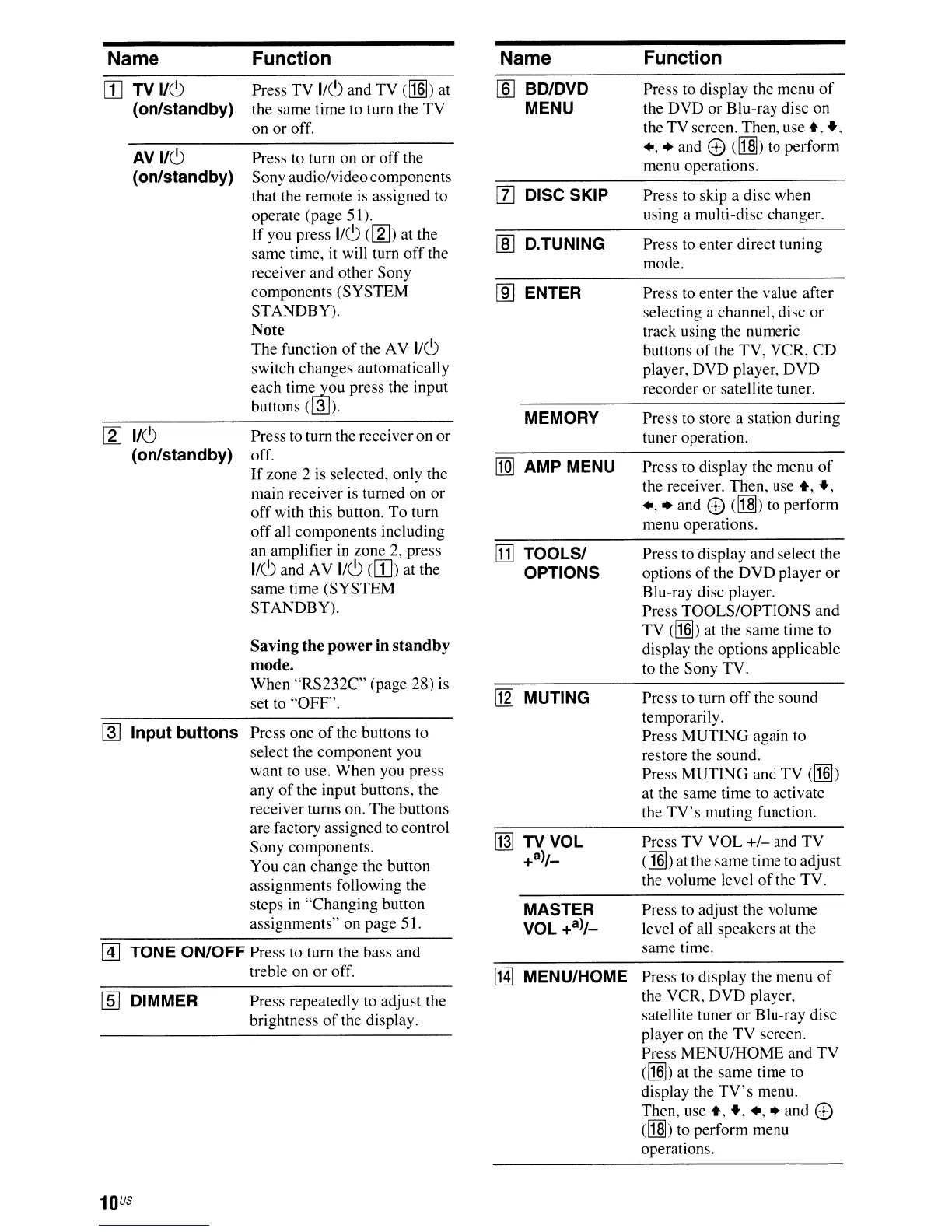
TONE ON/OFF Press to turn the bass and
treble on
or
off.
~
Input
buttons
Press one
of
the buttons to
select the component you
want to use. When you press
any
of
the input buttons, the
receiver turns on. The buttons
are factory assigned to control
Sony components.
You can change the button
assignments following the
steps
in
"Changing button
assignments" on page 5 I.
Name
ITJ
TV
1/6
(on/standby)
AVI/6
(on/standby)
[gJ
1/6
(on/standby)
[[]
DIMMER
10
US
Function
Press TV
1/6
and TV
<IN])
at
the same time to turn the
TV
on
or
off.
Press to turn on
or
off
the
Sony audio/video components
that the remote is assigned to
operate (page 51).
If
you press
1/6
([g])
at the
same time, it will turn
off
the
receiver and other Sony
components (SYSTEM
STANDBY).
Note
The function
of
the AV
1/6
switch changes automatically
each
time,..1,ou
press the input
buttons (@J).
Press to turn the receiver on
or
off.
If
zone 2 is selected, only the
main receiver is turned on
or
off
with this button.
To
turn
off
all components including
an amplifier in zone
2,
press
1/6
and AV
1/6
([1])
at the
same time (SYSTEM
STANDBY).
Saving
the
power
in
standby
mode.
When
"RS232C"
(page 28) is
set to
"OFF'.
Press repeatedly to adjust the
brightness
of
the display.
Name
[ID
BD/DVD
MENU
rn
DISC SKIP
[ID
D.TUNING
[ID
ENTER
MEMORY
[IQ]
AMP MENU
[D]
TOOLS/
OPTIONS
[g] MUTING
MASTER
VOL
+a)/_
l.HJ
MENU/HOME
Function
Press to display the menu
of
the DVD
or
Blu-ray disc on
the
TV
screen. Then. use
+.
+,
.,
• and e
<lI§))
to perform
menu operations.
Press to skip a disc when
using a multi-disc changer.
Press to enter direct tuning
mode.
Press to enter the value after
selecting a channel, disc
or
track using the numeric
buttons
of
the TV, VCR,
CD
player, DVD player,
DVD
recorder or satellite tuner.
Press to store a station during
tuner operation.
Press to display the menu
of
the receiver. Then, use
+,
+,
.,
• and e ([j]]) to perform
menu operations.
Press to display and select the
options
of
the
DVD
player
or
Blu-ray disc player.
Press TOOLS/OPTIONS and
TV
<IN])
at
the same time to
display the options applicable
to the Sony TV.
Press to turn
off
the sound
temporari
Iy.
Press
MUTING
again to
restore the sound.
Press MUTING and
TV
(I1§])
at the same time to activate
the
TV's
muting function.
Press TV
VOL
+/-
and
TV
<IN])
at the same time to adjust
the volume level
of
the TV.
Press to adjust the volume
level
of
all speakers at the
same time.
Press to display the menu
of
the VCR,
DVD
player,
satellite tuner
or
BIu-ray disc
player on the
TV
screen.
Press
MENU/HOME
and
TV
(I1§])
at the same time to
display the
TV's
menu.
Then, use
+,
+,.,.and e
([j]))
to perform menu
operations.




 To Next Page