Co;nnect,inga
Blu
..
ray'disc
play~rf
a"Oplayer
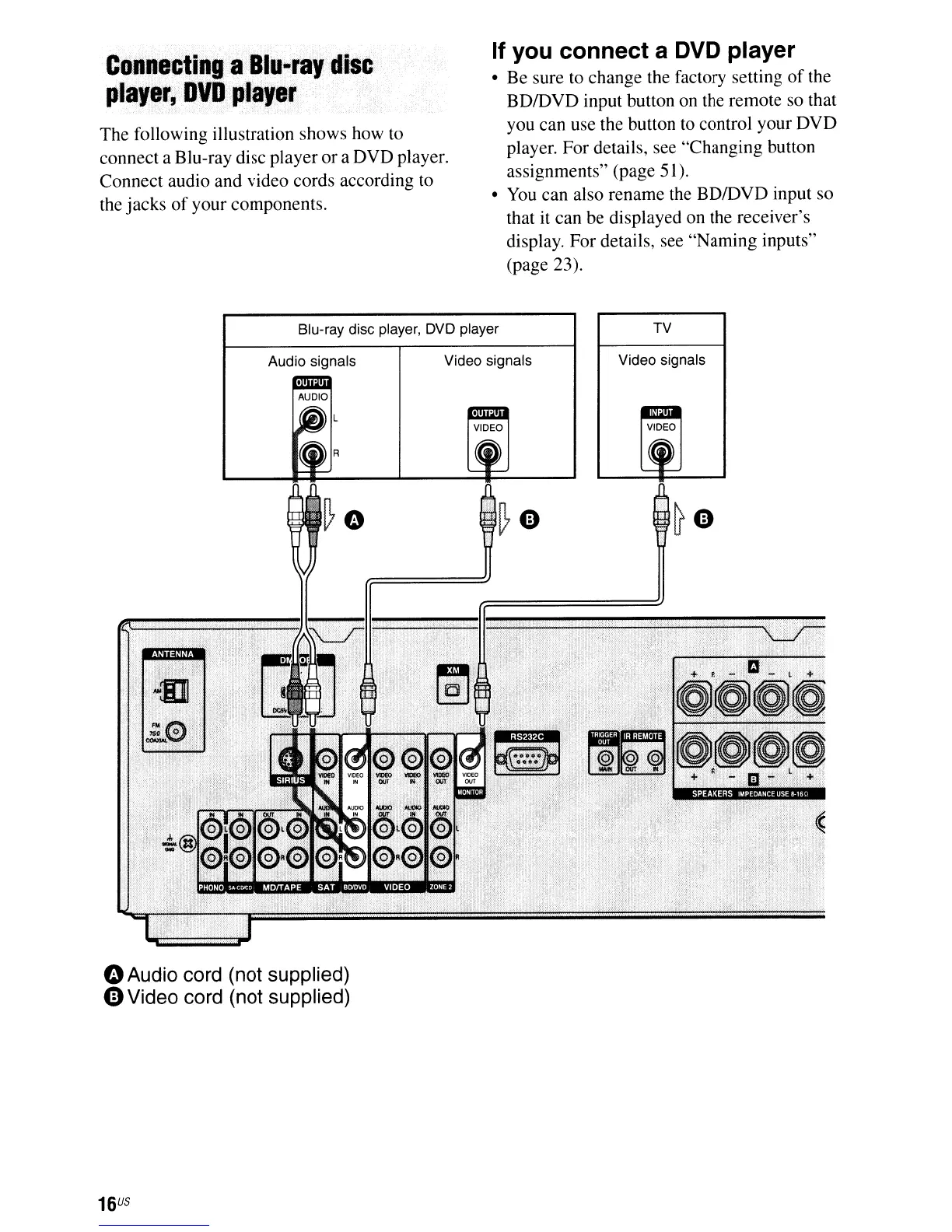
The following illustration shows how to
connect a Blu-ray disc player
or
a DVD player.
Connect audio and video cords according to
the jacks
of
your components.
If you connect a DVD player
• Be sure to change the factory setting
of
the
BDfDVD input button on the remote so that
you can use the button to control your DVD
player.
For
details, see "Changing button
assignments" (page 51).
•
You
can also rename the BDfDVD input so
that it can be displayed on the receiver's
display. For details, see "Naming inputs"
(page 23).
Blu-ray disc player,
DVD
player TV
Audio signals Video signals
Video signals
oAudio cord (not supplied)
eVideo cord (not supplied)
16
US













 To Next Page