Operating
the·
receiver
froAl
zone
2 .
The following operations are described for
connecting an
IR
repeater and operating the
receiver in zone 2. When an
IR
repeater
is
not
connected, use this receiver
in
the main zone.
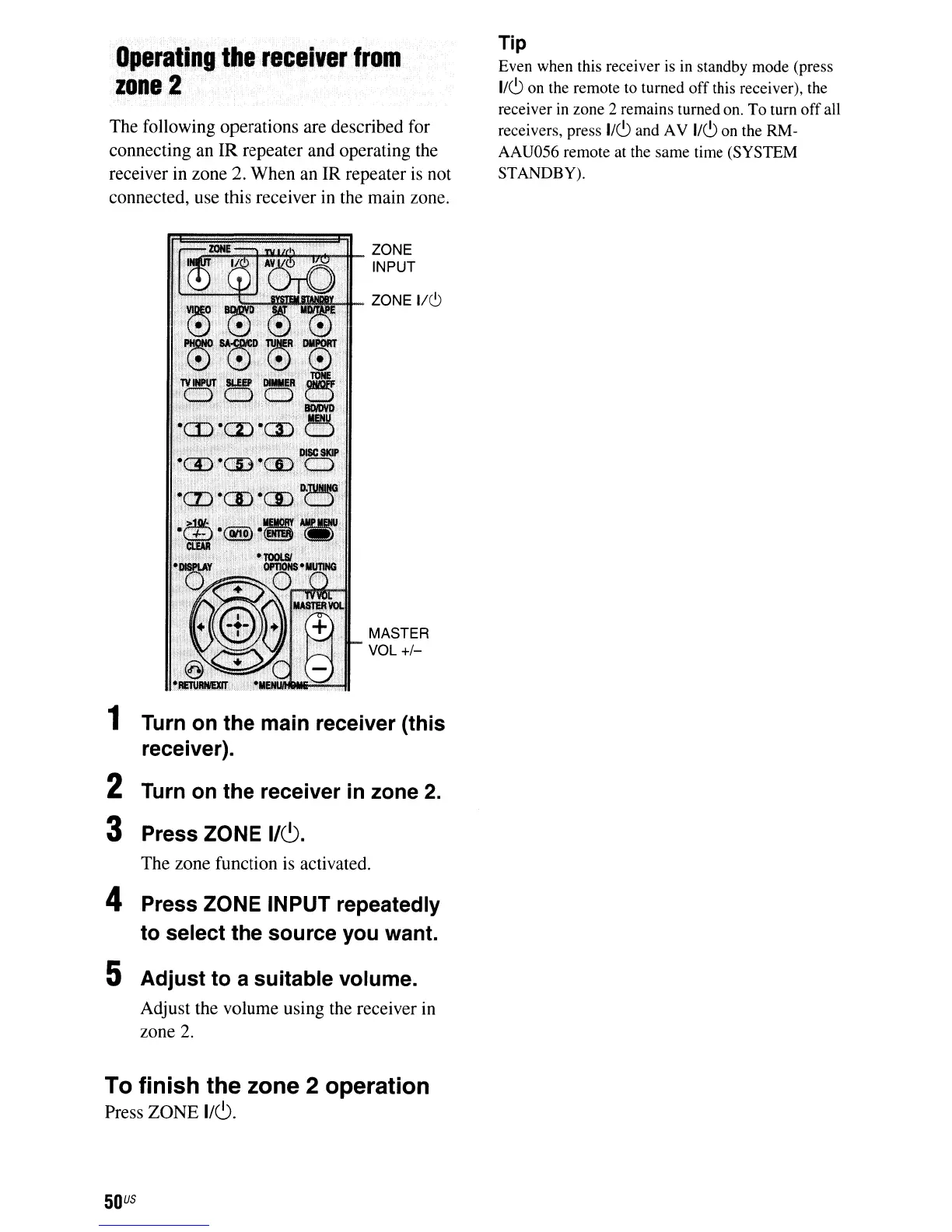
ZONE
INPUT
ZONE
1/6
,_",
...
_ MASTER
'11'.1"
VOL +/_
1 Turn on the main receiver (this
receiver).
2 Turn on the receiver
in
zone 2.
3 Press ZONE
1/(9.
The zone function
is
activated.
4 Press ZONE INPUT repeatedly
to select the source you want.
5 Adjust to a suitable volume.
Adjust the volume using the receiver in
zone
2.
To finish the zone 2 operation
Press ZONE
I/C).
50
US
Tip
Even when this receiver is in standby mode (press
I/CJ
on the remote to turned
off
this receiver), the
receiver
in
zone 2 remains turned on.
To
turn
off
all
receivers, press
IICJ
and AV
IICJ
on the RM-
AAU056 remote at the same time (SYSTEM
STANDBY).













 To Next Page