Name
Function
Name Function
[I]
1/(9
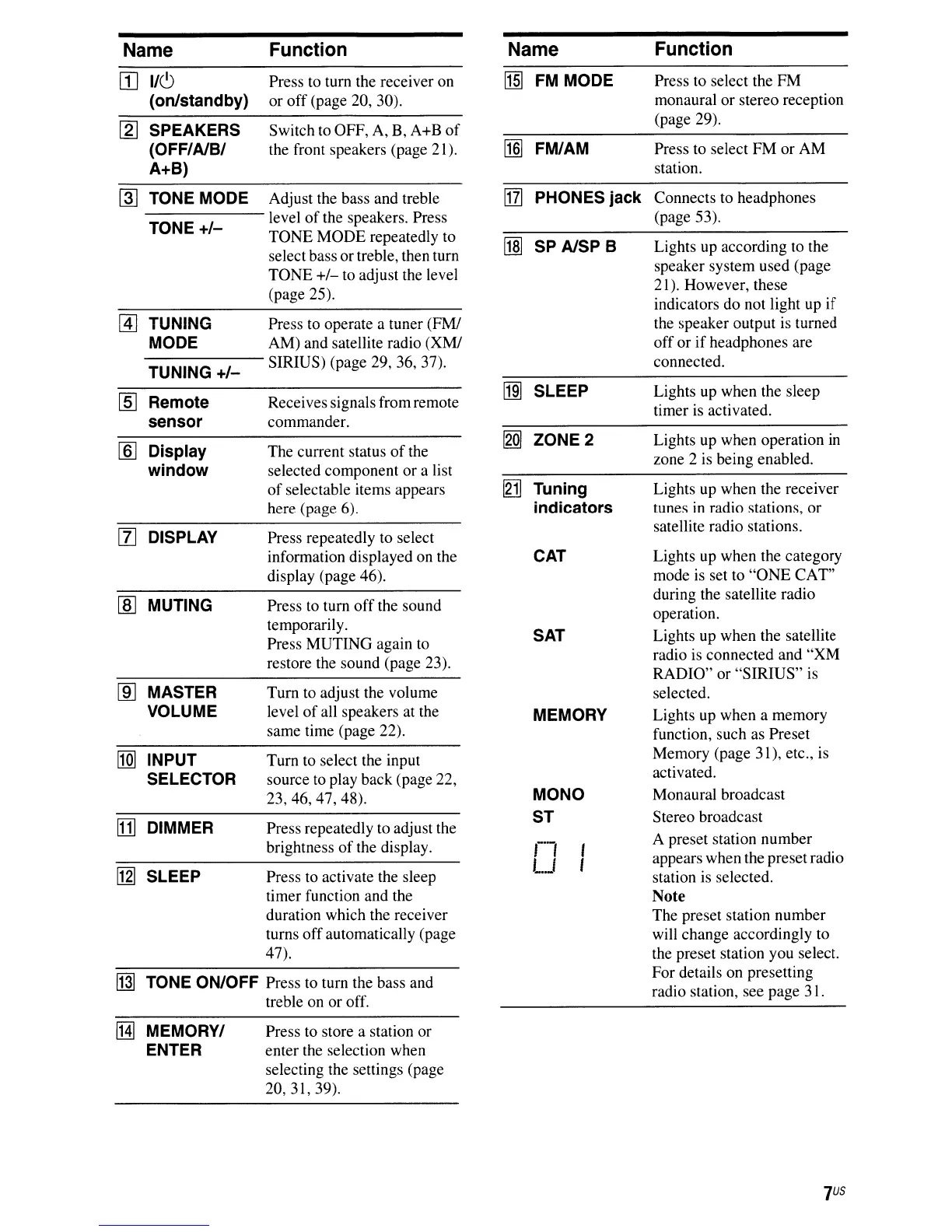
Press to turn the receiver on
MJ
FM MODE Press to select the FM
(on/standby) or
off
(page 20, 30). monaural or stereo reception
~
SPEAKERS Switch to OFF, A,
B,
A+B
of
(page 29).
(OFF/AlB/
the front speakers (page 21).
[§]
FM/AM Press to select FM or AM
A+B)
station.
lliJ
TONE MODE Adjust the bass and treble
l111
PHONES jack Connects to headphones
TONE
+/-
level
of
the speakers. Press
(page 53).
TONE MODE repeatedly to
lIm
SP AlSP B Lights up according to the
select bass ortreble, then turn
TONE
+/-
to adjust the level
speaker system used (page
(page 25).
21). However, these
indicators do not light up if
@]
TUNING Press
to
operate a tuner (FM!
the
speaker
output
is
turned
MODE AM) and satellite radio (XM/
off or
if
headphones are
TUNING
+/-
SIRIUS) (page 29, 36, 37). connected.
[j]]
SLEEP Lights
up
when the sleep
[§]
Remote Receives signalsfrom remote
timer is activated.
sensor commander.
~
ZONE 2
Lights up when operation in
[ID
Display The current status
of
the
window selected component or a list
zone 2
is
being enabled.
of
selectable items appears
[g1J
Tuning Lights up when the receiver
here (page 6).
indicators tunes in radio stations, or
[I]
DISPLAY
Press repeatedly to select
satellite radio stations.
information displayed on the
CAT Lights up when the category
display (page 46).
mode
is
set to
"ONE
CAT"
lID
MUTING Press
to
turn
off
the sound
during the satellite radio
temporarily.
operation.
Press MUTING again to
SAT
Lights up when the satellite
restore the sound (page 23).
radio is connected and
"XM
RADIO" or "SIRIUS"
is
[ID
MASTER
Tum
to
adjust the volume
selected.
VOLUME level
of
all speakers at the
MEMORY Lights up when a memory
same time (page 22).
function, such as Preset
nm
INPUT
Tum
to select the input
Memory (page 31), etc., is
SELECTOR source to play back (page 22,
activated.
23,46,47,48).
MONO
Monaural broadcast
[1]
DIMMER
Press repeatedly to adjust the
ST
Stereo broadcast
brightness
of
the display.
r1
,
A preset station number
~
LJ
,
appears when the preset radio
SLEEP Press to activate the sleep
station
is
selected.
timer function and the
Note
duration which the receiver
The preset station number
turns offautomatically (page
will change accordingly to
47).
the preset station you select.
[j]]
TONE ON/OFF Press to turn the bass and
For details on presetting
treble on or off.
radio station, see page 31.
!Hl
MEMORY/ Press
to
store a station or
ENTER enter the selection when
selecting the settings (page
20,31,39).













 To Next Page