12
US
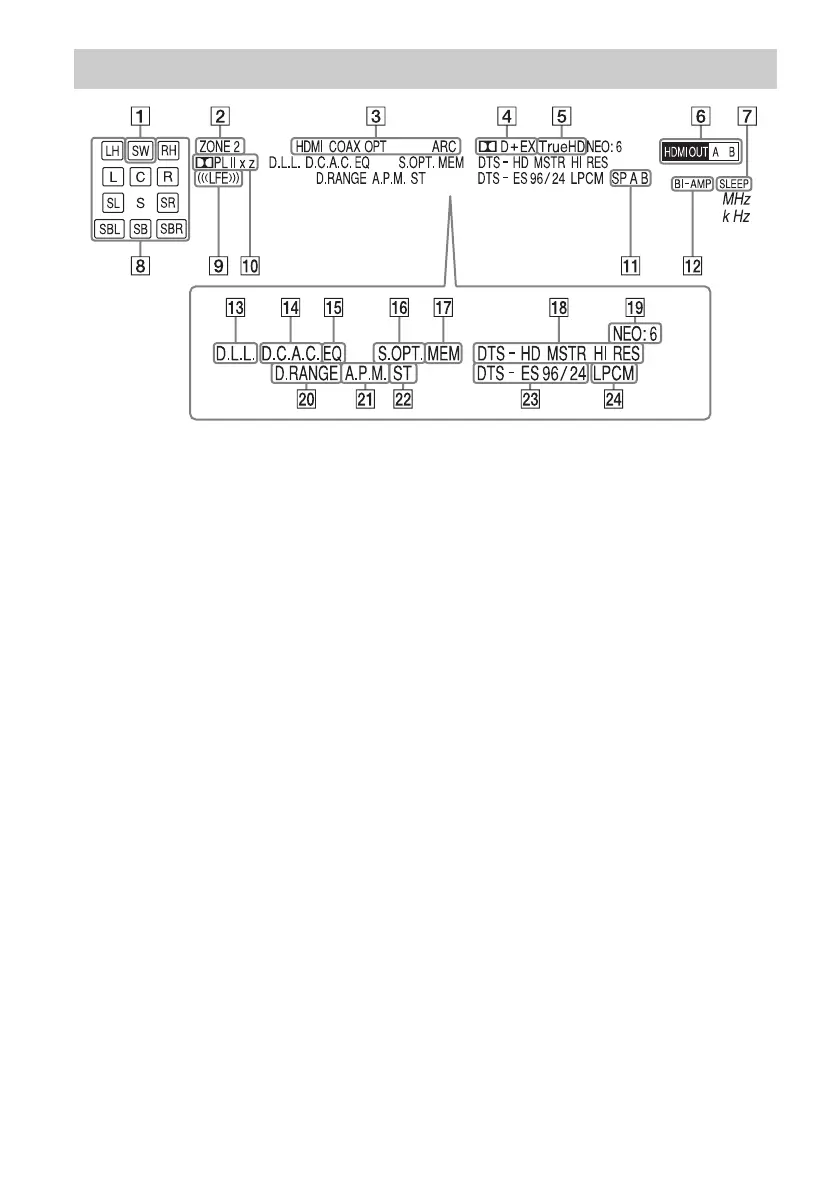
A SW
Lights up when subwoofer(s) is (are)
connected and the audio signal is output
from the SUBWOOFER jack(s).
B ZONE 2 (page 72)
C INPUT indicator
Lights up to indicate the current input.
HDMI
COAX
OPT
ARC (page 82)
D Dolby Digital Surround indicator
Lights up with one of the respective
indicators when the receiver is decoding
the corresponding Dolby Digital format
signals.
;D
Dolby Digital
;D+
Dolby Digital Plus
;D EX
Dolby Digital Surround EX
E ;TrueHD
Lights up when the receiver is decoding
Dolby TrueHD.
F HDMI OUT A/B (page 81)
G SLEEP (page 86)
H Playback channel indicator
Indicates the speaker that is designated to
output sound. Shows how the receiver
down-mixes or up-mixes the source
sound, based on the speaker settings.
L
Front Left
R
Front Right
C
Center
LH
Left High
RH
Right High
SL
Surround Left
SR
Surround Right
SBL
Surround Back Left
SBR
Surround Back Right
Indicators on the display















 To Next Page