85
US
Using Other Features
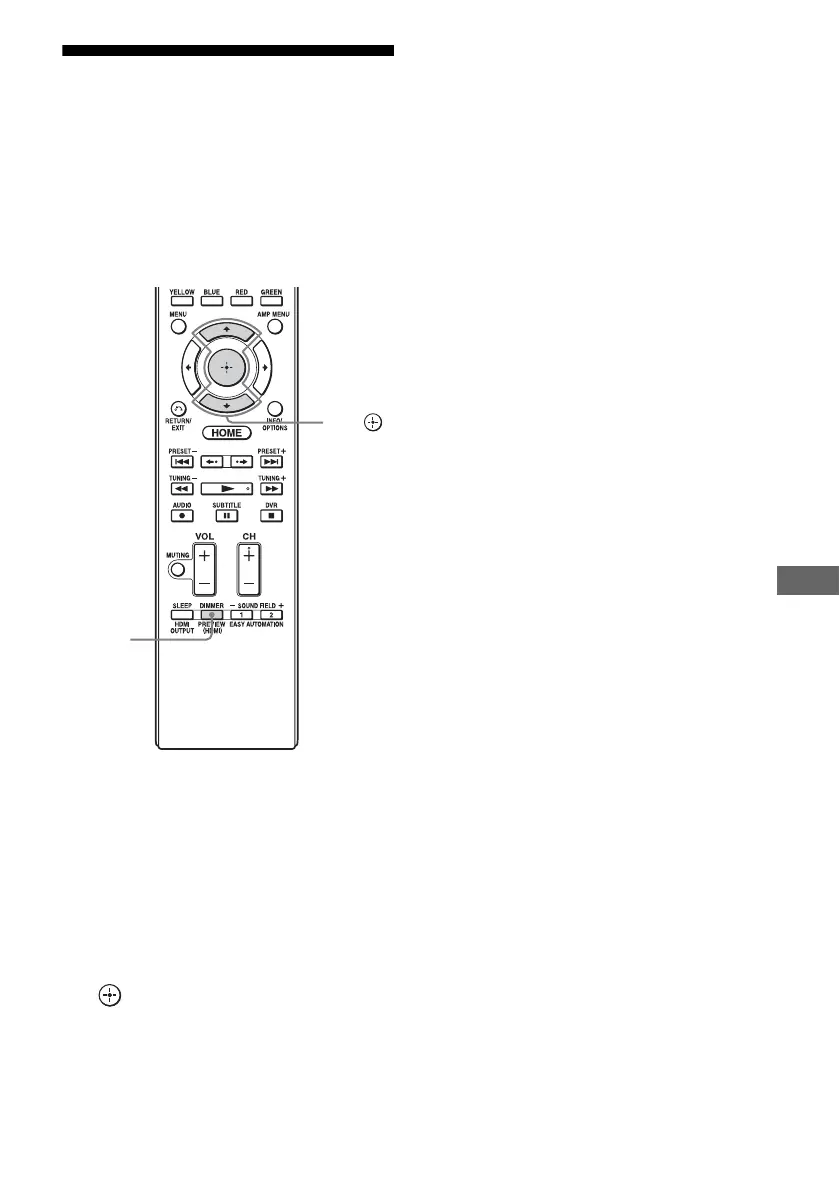
Preview for HDMI
You can turn on a live picture-in-picture
preview of HDMI inputs connected to this
receiver. Up to four preview windows are
displayed for HDMI IN 1/IN 2/IN 3/IN 4
Input.
You can select each preview HDMI input by
using the remote.
1 Press PREVIEW (HDMI).
Up to 4 PIP windows appear, each of
them showing input pictures from HDMI
IN jacks.
2 To switch the pictures in a PIP
window with those on the main
screen, press V/v to select the
desired PIP window, then press
.
The HDMI input of the selected PIP
window is displayed in the main window.
Tips
• This function does not work under the following
conditions:
– An HDMI device is not connected.
– A specific HDMI device is connected while its
power is off.
– An unsupported HDMI video format is input.
– The current input is not HDMI input.
– When the GUI menu is displayed
– When “Zone2 Out” is set to “On”
– When “Fast View” is set to “Off”
• This function is made possible by Silicon Image
InstaPrevue™ technology.
PREVIEW
(HDMI)
V/v,















 To Next Page