72
US
What you can do with the
Multi-zone function
You can enjoy images and sounds from a
device connected to the receiver in a zone
other than the main zone. For example, you
can watch the DVD in the main zone and listen
to the CD in zone 2.
When using an IR repeater (not supplied), you
can operate both a device in the main zone and
Sony receiver in zone 2 from zone 2 using the
remote control.
Use an IR repeater when you install the
receiver in a place where signals from the
remote control cannot reach.
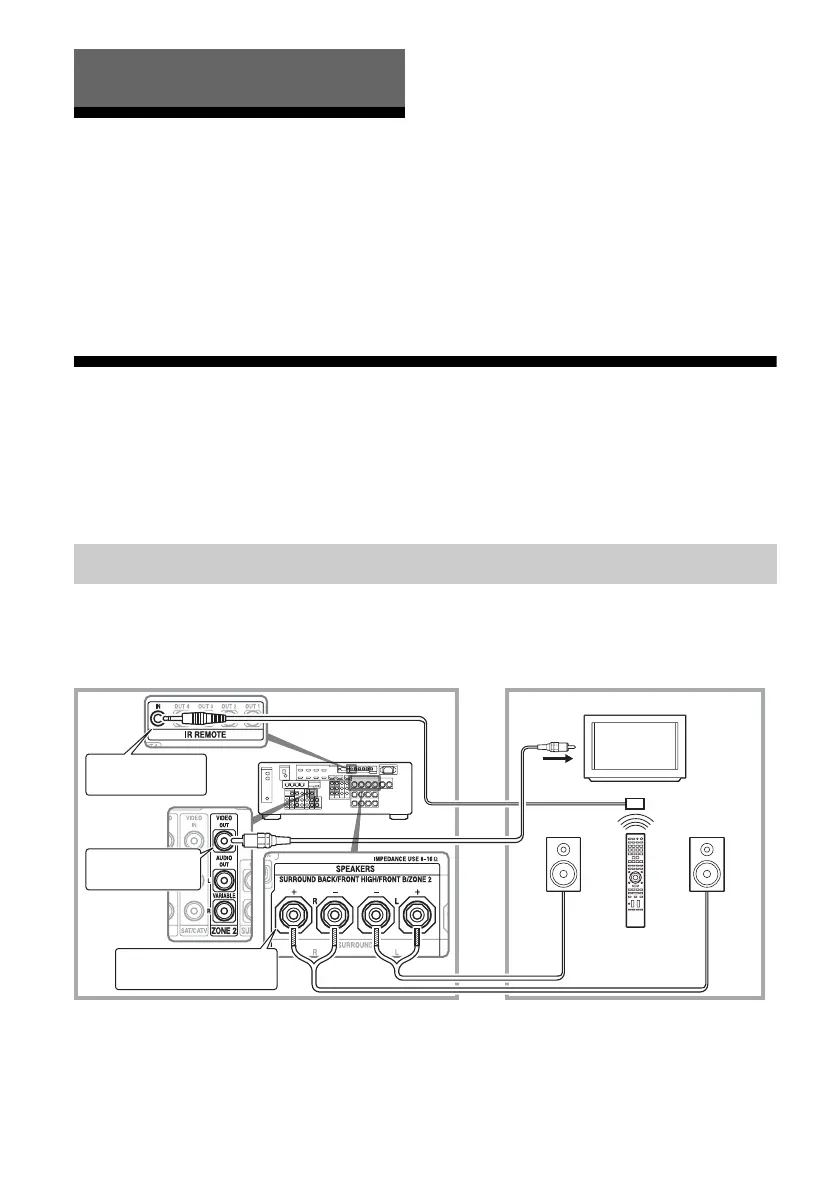
Making a multi-zone connection
Signals from equipment connected to analog input jacks are output through the ZONE 2 VIDEO/
AUDIO OUT or ZONE 2 OUT component jacks. The ZONE 2 VIDEO/AUDIO OUT or ZONE 2
OUT component jacks cannot output the signals from HDMI IN jacks. To output the HDMI signals,
use HDMI ZONE 2 OUT jacks.
1 Outputs sound from speakers in zone 2 using the SURROUND
BACK/FRONT HIGH/FRONT B/ZONE 2 terminals of the receiver.
Using Multi-zone Features
Zone 2 connections
Main zone Zone 2
TV
monitor
ZONE 2 VIDEO
OUT*
B
STR-DA2800ES
B
SURROUND BACK/FRONT
HIGH/FRONT B/ZONE 2
A
Remote control
IR REMOTE IN















 To Next Page