52
US
iPhone/iPod
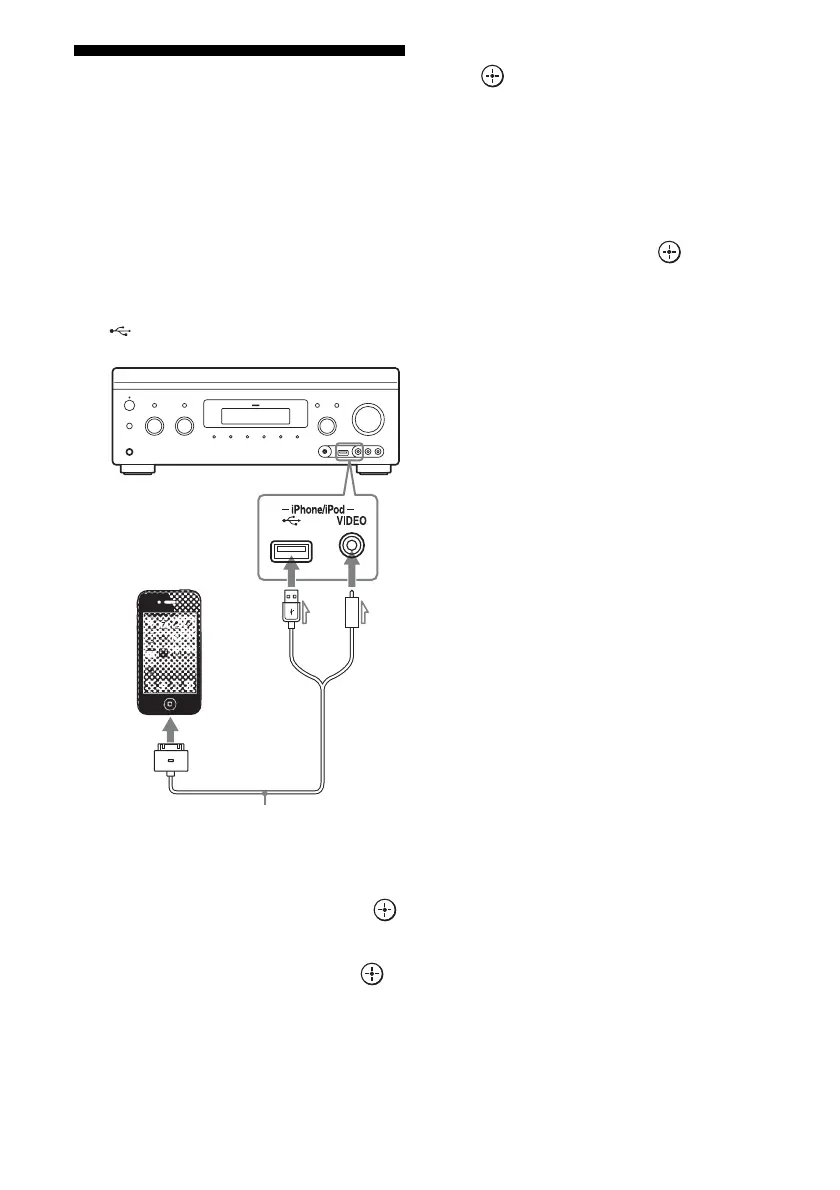
You can enjoy the music/video/photo and
charge the battery of an iPhone/iPod via the
receiver.
For details on the compatible iPhone/iPod
models with this function, see page 56.
Note
You cannot use headphones during playback.
1 Connect the iPhone/iPod to the
(USB) port on the receiver.
2 Select “Watch” or “Listen” from
the home menu, then press .
3 Select “My Video,” “My Music,”
or “My Photo,” then press .
Note
If no picture is output, change the setting for
“Playback Resolution” (page 101).
4 Select “iPod (front),” then press
.
The video/music files are listed on the TV
screen.
If you select “iPod (front)” on “My
Photo,” select a photo file using the
controls on the iPhone/iPod (you do not
need to proceed to step 5).
5 Press V/v/B/b and to select
the file that you want to play.
The image or sound from the iPhone/iPod
is played back on the receiver.
You can operate the iPhone/iPod using
the buttons on the remote control
(page 56).
For operation details of the iPhone/iPod,
also refer to the operating instructions of
the iPhone/iPod.
iPhone/iPod
(not supplied)
Apple Composite AV Cable
(not supplied)

















 To Next Page