15
GB
You can use the supplied remote to operate the
receiver and to control the Sony audio/video
components that the remote is assigned to
operate.
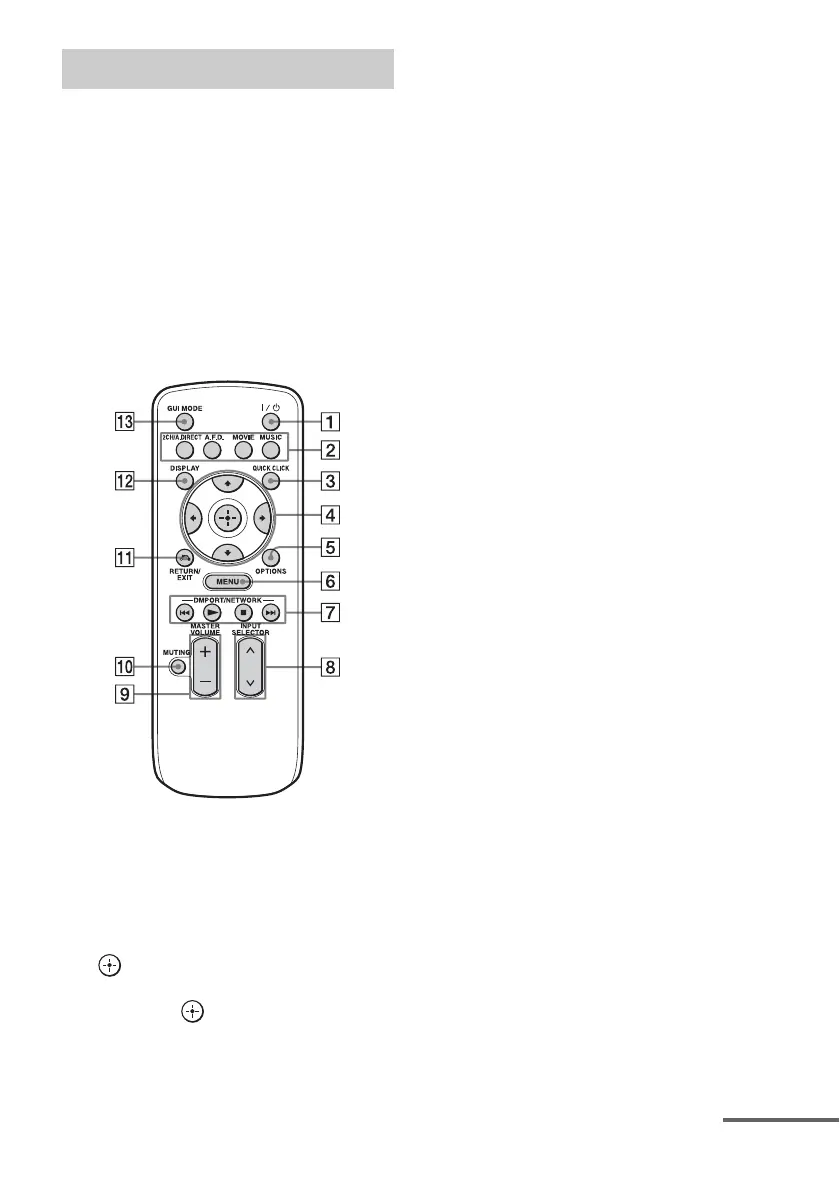
Simple remote commander
(RM-AAU061)
This remote can only be used to operate the
receiver. You can control the main functions of
the receiver with simple operations using this
remote.
A ?/1 (on/standby)
Press to turn a receiver on or off.
B 2CH/A.DIRECT, A.F.D., MOVIE,
MUSIC (page 74, 75, 76, 78)
C QUICK CLICK (page 143)
D V/v/B/b
Press V/v/B/b to select the menu item.
Then press to enter the selection.
E OPTIONS (page 56)
F MENU (page 44, 55)
G DMPORT/NETWORK, N, x,
./> (page 60, 83)
H INPUT SELECTOR
Press to select the input source to play
back.
I MASTER VOLUME +/– (page 58)
J MUTING (page 58)
K RETURN/EXIT O (page 55)
L DISPLAY
Press repeatedly to select information
displayed on the display.
M GUI MODE (page 55)
Remote commander
continued















 To Next Page