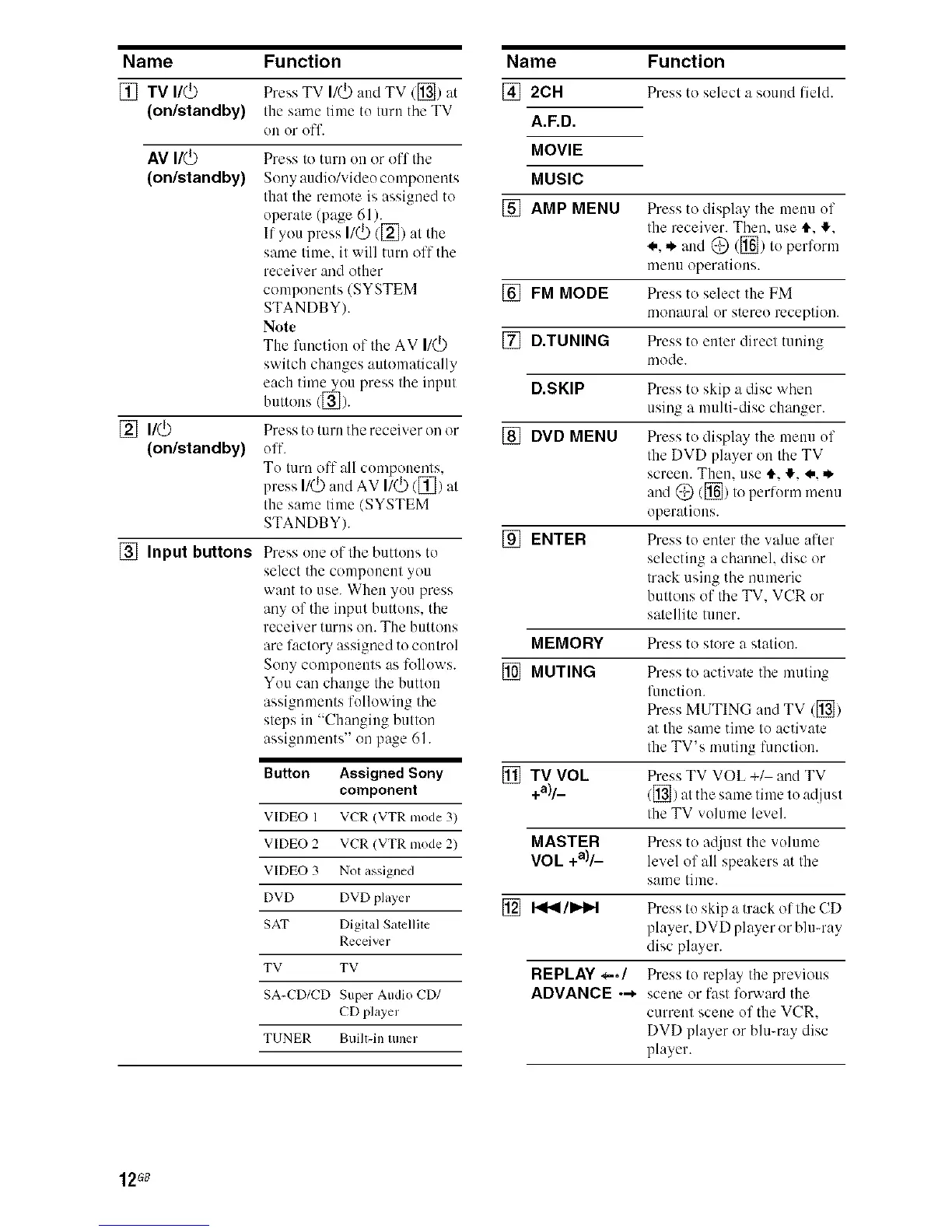
Name
[] TV I/(_
(on/standby)
AVt/_
(on/standby)
[] n/O
(on/standby)
[] Input buttons
Function
Press TV I/(_) :rodTV (_) at
the same time to turn the TV
OU OF off.
Press to turn 1111or off the
Sony audio/video components
that the remote is assigned to
operate (page 61).
If you press I/(_) ([_) at the
same time. it will turn oft the
receiver and other
components (SYSTEM
STANDBY).
Note
The function of the AV I1(_
switch changes automatically
each time you press the input
buttous ([]).
Press to turn the receiver on or
off.
To lure off till componeuls.
press I/(_) and AV I/(_) ([_) al
the same time (SYSTEM
STANDBY).
Press one of the buttons to
select the componem you
want to use. When you press
any of the input buttons, the
receiver turns on. The buttons
are factory assigned to control
Sony components as lollows.
You can change the button
assignments following the
steps in "Changing button
assignments" on page 61.
Button Assigned Sony
component
VIDEO 1 VCR (VTR nlode 3)
VIDEO 2 VCR (VTR mode 2)
VIDEO 3 NOt assigned
DVD DVD player
SAT Digital Salcllile
Receiver
TV TV
SA-CD/CD Super Audio CD/
CD player
TUNER Built-in luner
Name Function
[] 2CH Pressto select a sound field.
A.F.D.
MOVIE
MUSIC
[] AMP MENU Press to display the mmm of
the receiver. Then. use It. _.
_,. ,,_and (_ ([_) to perl_)rm
menu operations.
[] FM MODE Press to select the FM
monaural or stereo reception.
[] D.TUNING Press to enter direct tuning
mode.
D.SKIP Press to skip a disc when
using a multi-disc changer.
[] DVD MENU Press to display the mmm of
the DVD player on the TV
screen. Them use It. _. _,. ,,_
and (_ ([_) to perh(rm menu
operations.
[] ENTER Press to enter the wflue after
selecting a channel, disc or
track using the numeric
buttons of the TV. VCR or
satellite tuner.
MEMORY Press to store a station.
[] MUTING Press to activate the muting
function.
Press MUTING :rod TV ([])
at the s:mm thne to activate
the TV's muting lhuction.
[] TV VOL Press TV VOL +_ and TV
+a)/_ ([]) atthe same lime 117atljusl
the TV volume level.
MASTER Press to adjust the volume
VOL +a)/_ level ol fill speakers at the
same time.
[] F<<I/I_D.,t Press to skip a track ofthe CD
player, DVD player or blu-ray
disc player.
REPLAY _*/ Press to replay the previous
ADVANCE .-* scene or fast forward the
currem scene of the VCR.
DVD player or blu-ray disc
player.
12G8



 To Next Page