3b:Connectingthevideocomponents
This section describes how to connect your
video components to this receiver. Before you
begin, refer to "Component to be connected"
below for the pages which describe how to
connect each component.
Alter connecting all your components,
proceed to "4: Connecting the antennas
(aerials)" (page 25).
Component to be connected
Component Page
With HDMI jack 18
TV 20
DVD player/DVD recorder 21
Satellite tuner/Set-top box 23
VCR 24
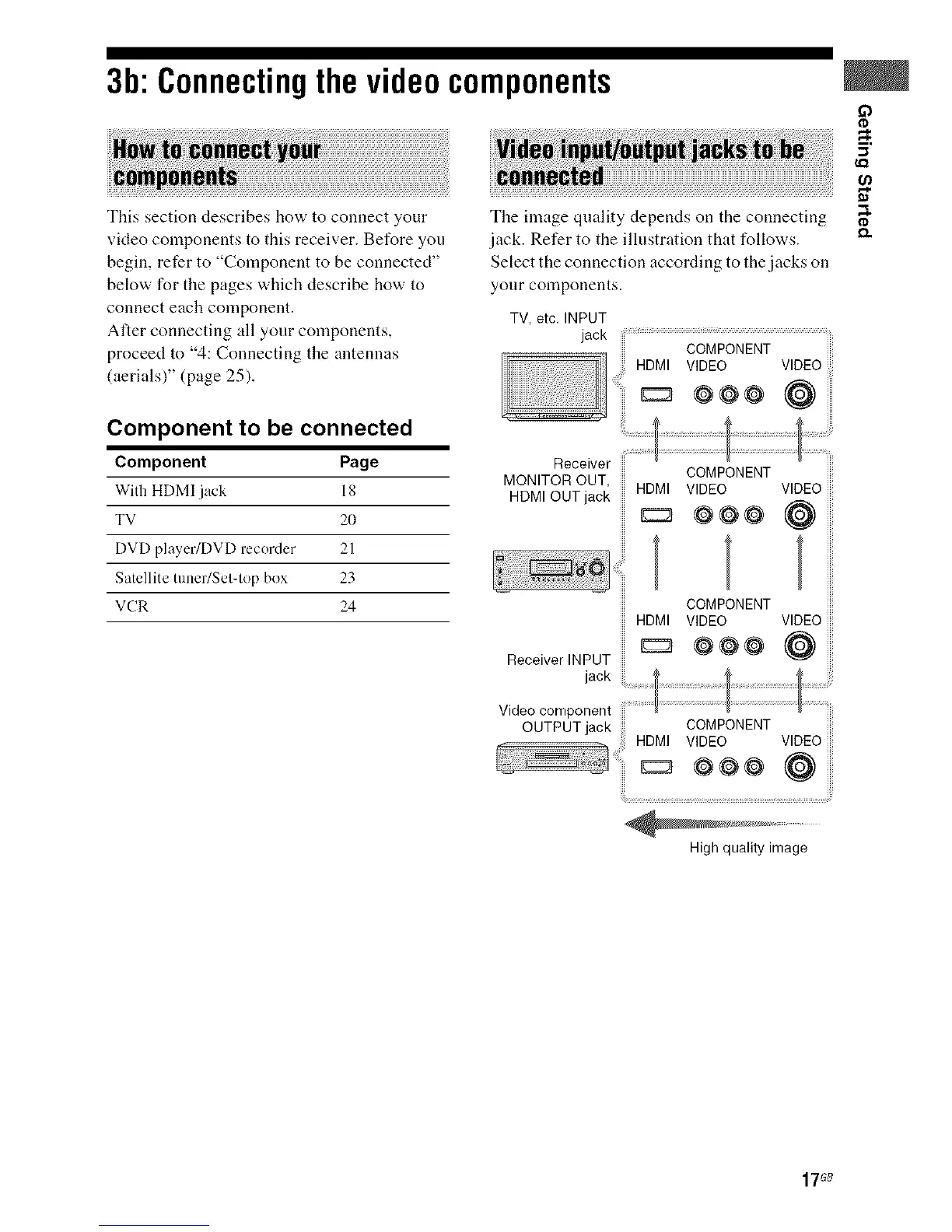
The linage quality depends on the connecting
jack. Refer to the illustration that follows.
Select the connection according to the jacks oil
your components.
TV, etc. INPUT
jack COMPONENT
COMPONENT
MONITOR OUT, HDMI VIDEO
HDMI OUT jack
VIDEO
@
Receiver INPUT
COMPONENT
HDMI VIDEO VIDEO
E:3 @@@ @
O
O
5'
¢Cl
o
HDMI VIDEO VIDEO
@@@ @
High quality image
17G8



 To Next Page