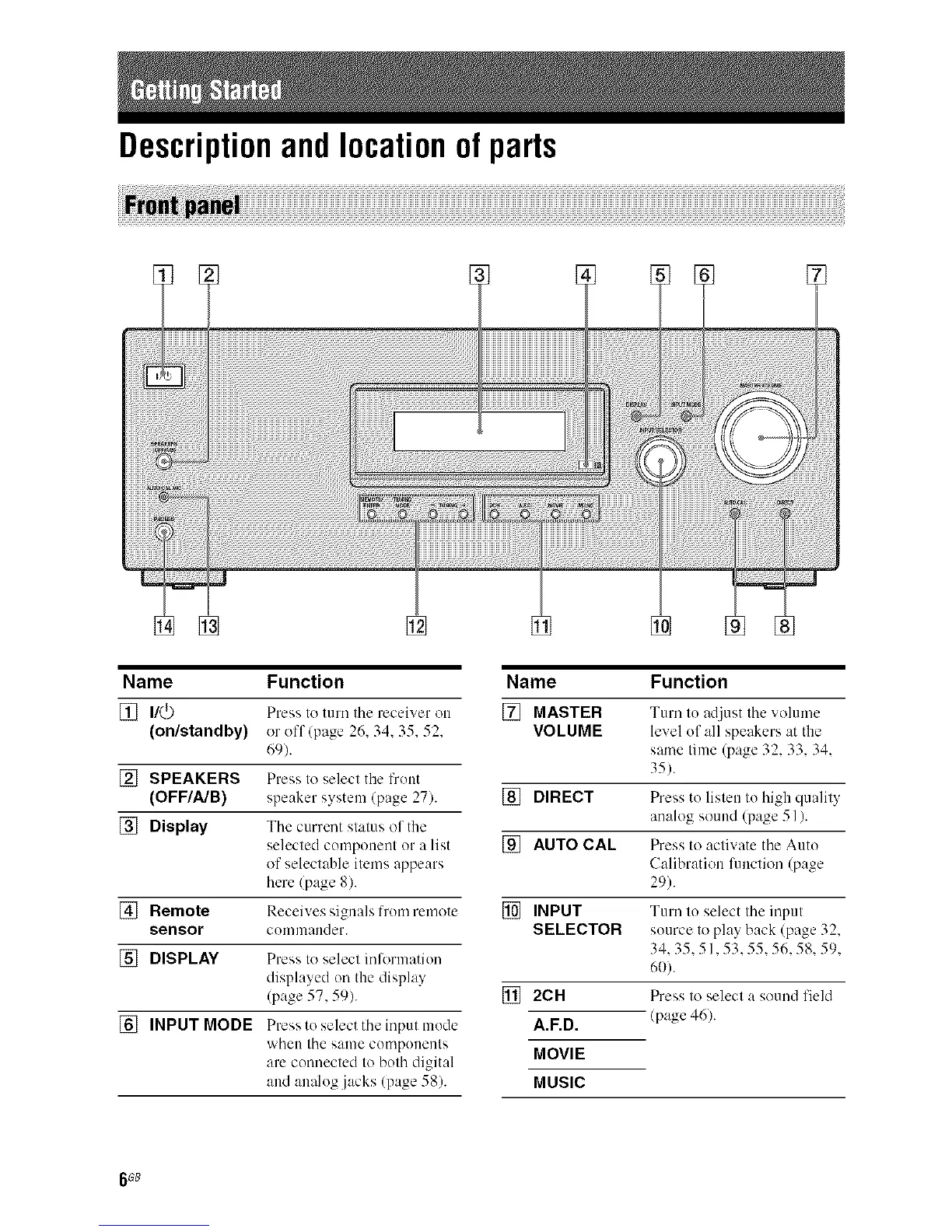
Descriptionandlocationof parts
Name Function
[] I/(_) Press to mm the receiver on
(on/standby) or off (page 26. 34.35.52.
69).
[] SPEAKERS Press to select the front
(OFF/A/B) speaker system (page 27).
[] Display The current status of the
selected compouent or a list
of selectable items appears
here (page 8).
[] Remote Receives signals from remote
sensor cummander.
[] DISPLAY Press to select informatiuu
displayed on the display
(page 57, 59).
[] INPUT MODE Press to select theinput mode
when the same cumpuueuts
are connected to both digital
and analog jacks (page 58).
Name Function
[] MASTER Turn tu adjust the vohmm
VOLUME level of all speakers at the
same time (page 32, 33, 34,
35).
[] DIRECT Press to listen to high qualit>
analog sound (page 51).
[] AUTO CAL Press to activate the Auto
Calibration luuctiou (page
29).
[] INPUT Turn to select the input
SELECTOR source to play back (page 32,
34,35,51,53,55,56,58,59,
60).
[] 2CH Press to select a sound field
A.F.D. (page 46).
MOVIE
MUSIC
6 G8



 To Next Page