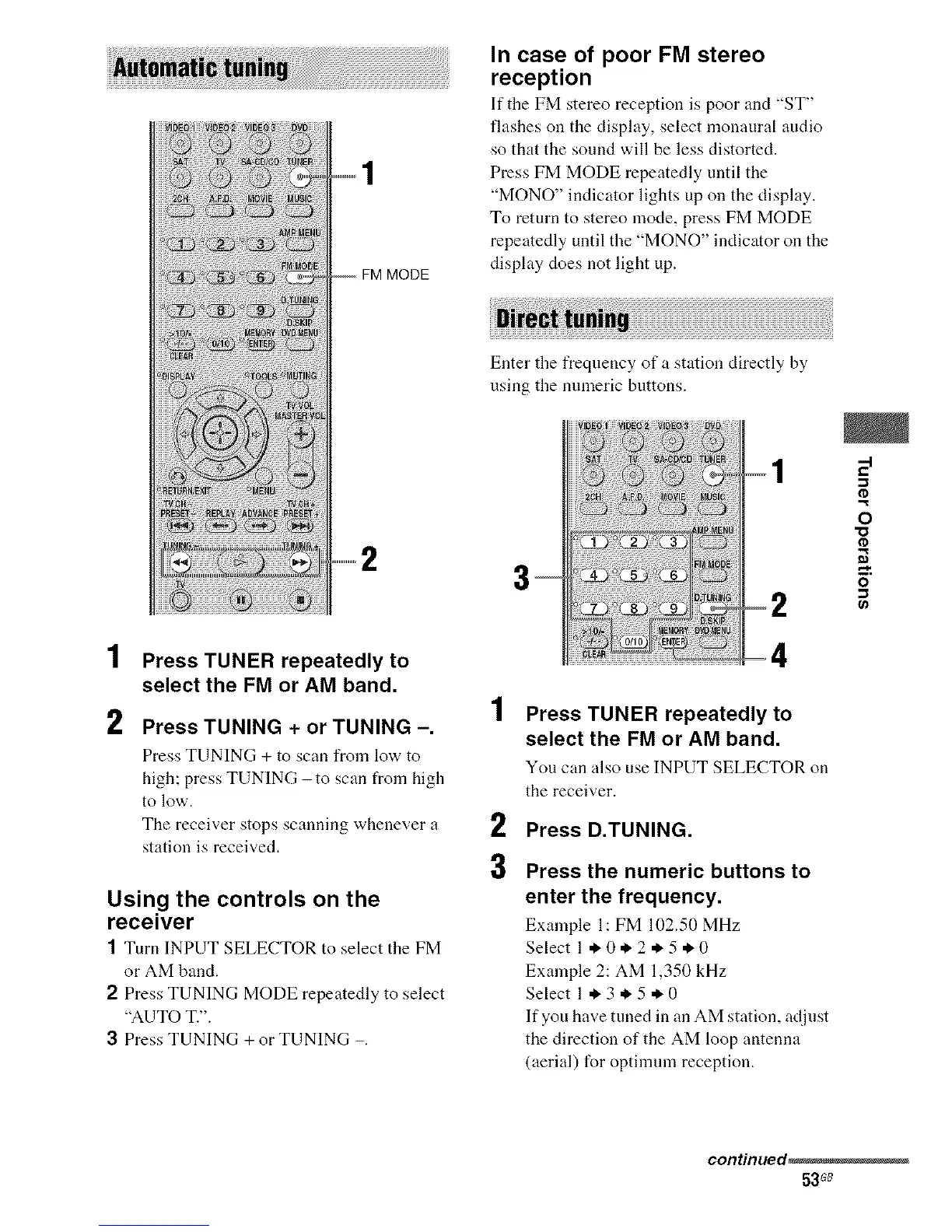
FM MODE
In case of poor FM stereo
reception
If tile FM stereo reception is poor and "ST"
flashes on the display, select monaural audio
so that the sound will be less distorted.
Press FM MODE repeatedly until the
"MONO" indicator lights up on the display.
To return to stereo mode, press FM MODE
repeatedly until the "MONO" indicator on the
display does not light up.
Enter the frequency of a station directly by
using the nmneric buttons.
2
Press TUNING + or TUNING -.
Press TUNING + to scan from low to
high; press TUNING -to scan from high
to low.
The receiver stops scanning whenever a
station is received,
Using the controls on the
receiver
1 Turn INPUT SELECTOR to select tile FM
or AM band.
2 Press TUNING MODE repeatedly to select
"AUTO T.".
3 Press TUNING + or TUNING -.
1 Press TUNER repeatedly to
select the FM or AM band.
You can also use INPUT SELECTOR on
the receiver.
2 Press D.TUNING.
3 Press the numeric buttons to
enter the frequency.
Example 1: FM 102.50 MHz
Select 1 ._. 0._. 2 ._.5 * 0
Example 2: AM 1,350 kHz
Select 1.3.5.0
If you have tuned in an AM station, adjust
the direction of the AM loop antenna
(aerial) for optilmnn reception.
0
o
continued_
53s_



 To Next Page