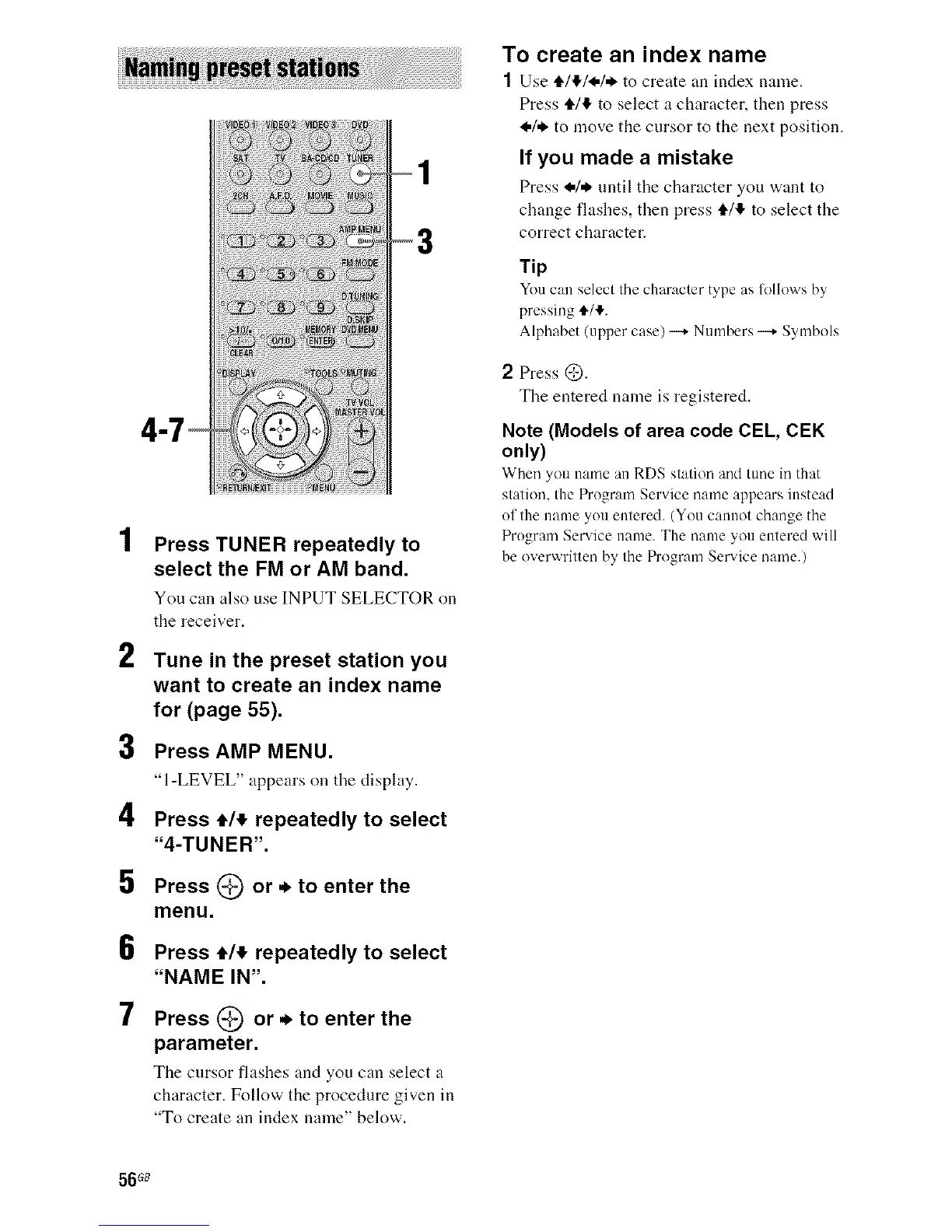
2
3
4
5
6
7
Press TUNER repeatedly to
select the FM or AM band.
You can also use INPUTSELECTOR on
the receiver.
Tune in the preset station you
want to create an index name
for (page 55).
Press AMP MENU.
"l-LEVEL" appears on tiledisplay.
Press €/_ repeatedly to select
"4-TUNER'.
Press (_) or ._ to enter the
menu.
Press ,14, repeatedly to select
"NAME IN".
Press (_ or ._ to enter the
parameter.
Tile cursor fhtshes and you can select a
character. Follow the procedure given in
"To create an index name" below.
To create an index name
1 Use €141_,!,1, to create an index name.
Press €/1!, to select a character, then press
_,1,_to move the cursor to the next position.
If you made a mistake
Press _,/,_ until tile character you want to
change flashes, then press €14, to select the
correct character.
Tip
Youcan select the character type as lollows hy
pressing _./_'.
Alphabet (upper case) --_ Numbers --_ Symbols
2 Press _:).
The entered name is registered.
Note (Models of area code CEL, CEK
only)
When you nanle ;111RDS station and tune in that
statkm, the Program Service immeappears instead
of the name you entered. (You cannot change the
Program Service name. The name you entered will
be overwritten by the Program Service name.)
56 G8



 To Next Page