35
GB
Basic Operations
To operate the iPod/iPhone
using the remote control
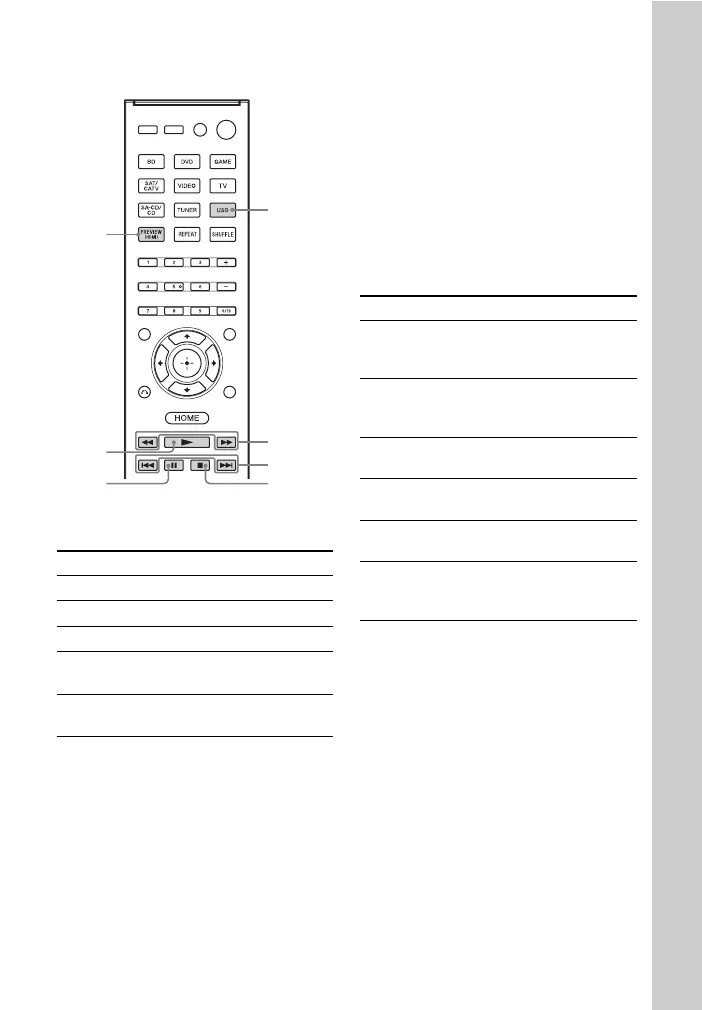
Press USB before you use the following
buttons.
Notes on iPod/iPhone
• The iPod/iPhone is charged when
connected to the receiver while the
receiver is turned on.
• You cannot transfer songs onto the iPod/
iPhone from this receiver.
• Do not remove the iPod/iPhone during
operation. To avoid data corruption or
damage to the iPod/iPhone, turn the
receiver off when connecting or
removing the iPod/iPhone.
iPod/iPhone message list
Press Operation
N Starts play.
X, x Pauses play.
m/M Fast reverses or forwards.
./> Goes to the previous/next
track.
iPhone CTRL Selects the iPod/iPhone
control mode.
./>
m/M
x
X
N
USB
iPhone
CTRL
Message and explanation
Reading
The receiver is recognizing and reading
information of the iPod or iPhone.
Loading
The receiver is loading information of the
iPod or iPhone.
Not supported
An unsupported iPod or iPhone is connected.
No device is connected
No iPod or iPhone is connected.
No music
No music was found.
Headphones not supported
No sound is output from the headphones when
iPod or iPhone is connected.



 To Next Page