39
GB
Tuner Operations
Listening to FM/AM
radio
You can listen to FM and AM broadcasts
through the built-in tuner. Before
operation, be sure you have connected the
FM and AM antennas (aerials) to the
receiver (page 27).
The tuning scale for direct tuning is shown below.
* The AM tuning scale can be changed (page 40).
1 Select “Listen” from the home
menu, then press .
2 Select “FM” or “AM” from the
menu, then press .
The FM or AM menu list appears on
the TV screen.
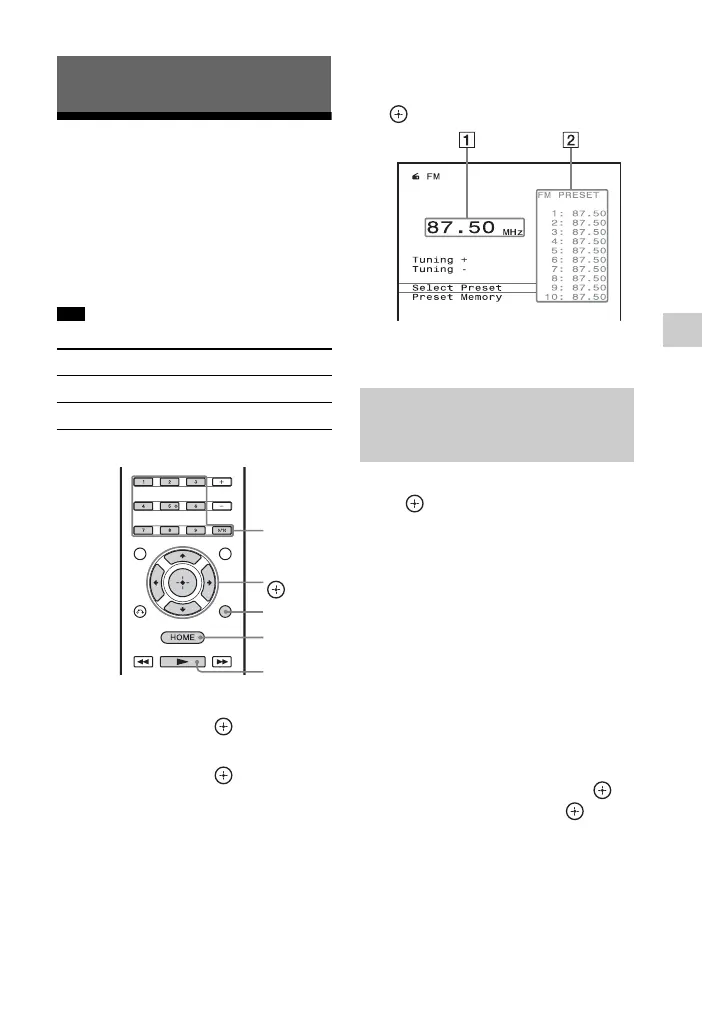
FM/AM screen
You can select and operate each item
on the screen by pressing V/v/B/b and
.
1 Frequency indication (page 40)
2 Preset station list (page 41)
Select “Tuning +” or “Tuning –”, then
press
.
Select “Tuning +” to scan from lower to
higher frequency stations, select
“Tuning –” to scan from higher to lower
stations.
The receiver stops scanning whenever a
station is received.
In case of poor FM stereo
reception
1
Tune in the station you want to listen
to using Auto Tuning, Direct Tuning
(page 40), or select the preset
station you want (page 41).
2 Press OPTIONS.
3 Select “FM Mode”, then press .
4 Select “Mono”, then press .
Tuner Operations
Tip
Area FM AM
USA, Canada 100 kHz 10 kHz*
Europe, Australia 50 kHz 9 kHz
V/v/B/b,
HOME
OPTIONS
Numeric
buttons
D.TUNING
Tuning to a station
automatically (Auto
Tuning)



 To Next Page