10
GB
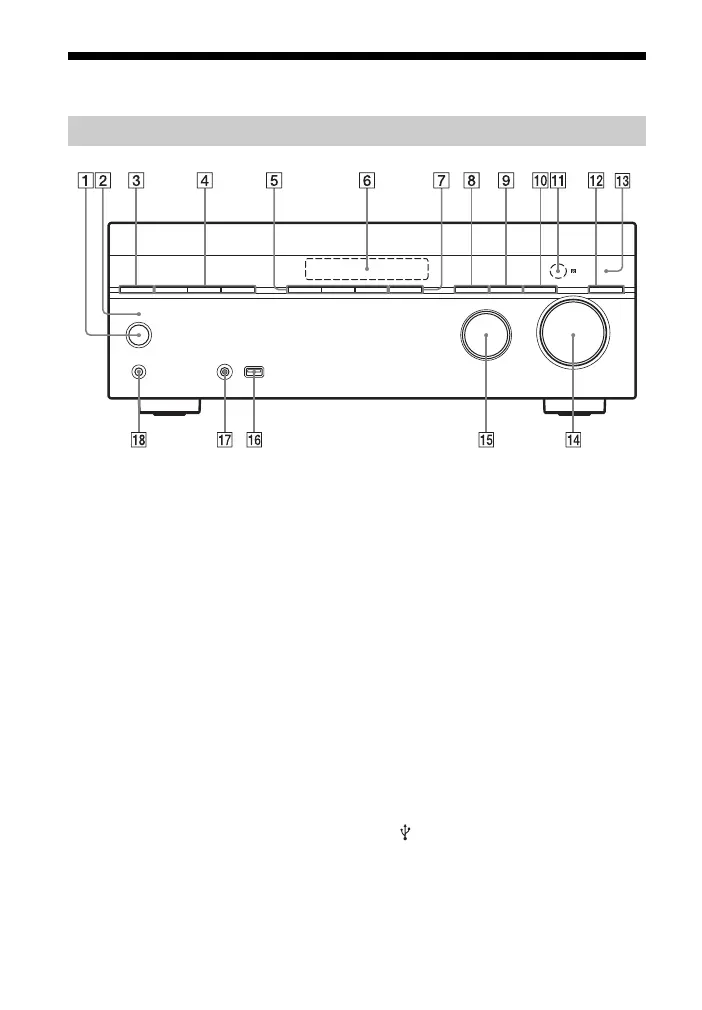
Description and location of parts
A ?/1 (on/standby) (page 28, 40, 46,
52)
B ?/1 (on/standby) indicator
Lights up as follows:
Green: The receiver is turned on.
Amber: The receiver is in standby
mode, and
– “Control for HDMI” (page 59) is set
to “On”.
– “Pass Through” (page 60) is set to
“On”* or “Auto”.
Lights off when the receiver is in
standby mode and “Control for
HDMI” and “Pass Through” are set to
“Off”.
* For USA, Canada and Australia models
only.
C SPEAKERS (page 20)
Press repeatedly to turn on or off the
speaker system.
D TUNING MODE, TUNING +/–
Press to operate a tuner (FM/AM).
Press TUNING +/– to scan a station.
E A.F.D./2CH, MOVIE, MUSIC
(page 42)
F Display panel (page 11)
G NIGHT MODE (page 45)
H INPUT MODE (page 51)
I DIMMER
Adjusts the brightness of the display
panel in 3 levels.
J DISPLAY (page 66)
K Remote control sensor
Receives signals from remote control.
L PURE DIRECT (page 46)
M PURE DIRECT indicator
Lights up when Pure Direct function is
activated.
N MASTER VOLUME (page 32)
O INPUT SELECTOR (page 29, 32, 51)
P
(USB) port (page 26)
Q AUTO CAL MIC jack (page 29)
R PHONES jack
Connects to headphones.
Front panel



 To Next Page