Severe humming or noise. [287]
Cannot control the receiver using a SongPal device. [288]
“BRAVIA” Sync (Control for HDMI)
The Control for HDMI function does not work properly. [289]
TV sound cannot be heard from the speakers connected to the receiver. [290]
Remote control
The remote control does not function. [291]
If the problem is not solved
Reverting to the factory default settings [292]
Resetting sound fields to the default settings [293]
Customer support websites [294]
Other Information
Trademarks
Trademarks [295]
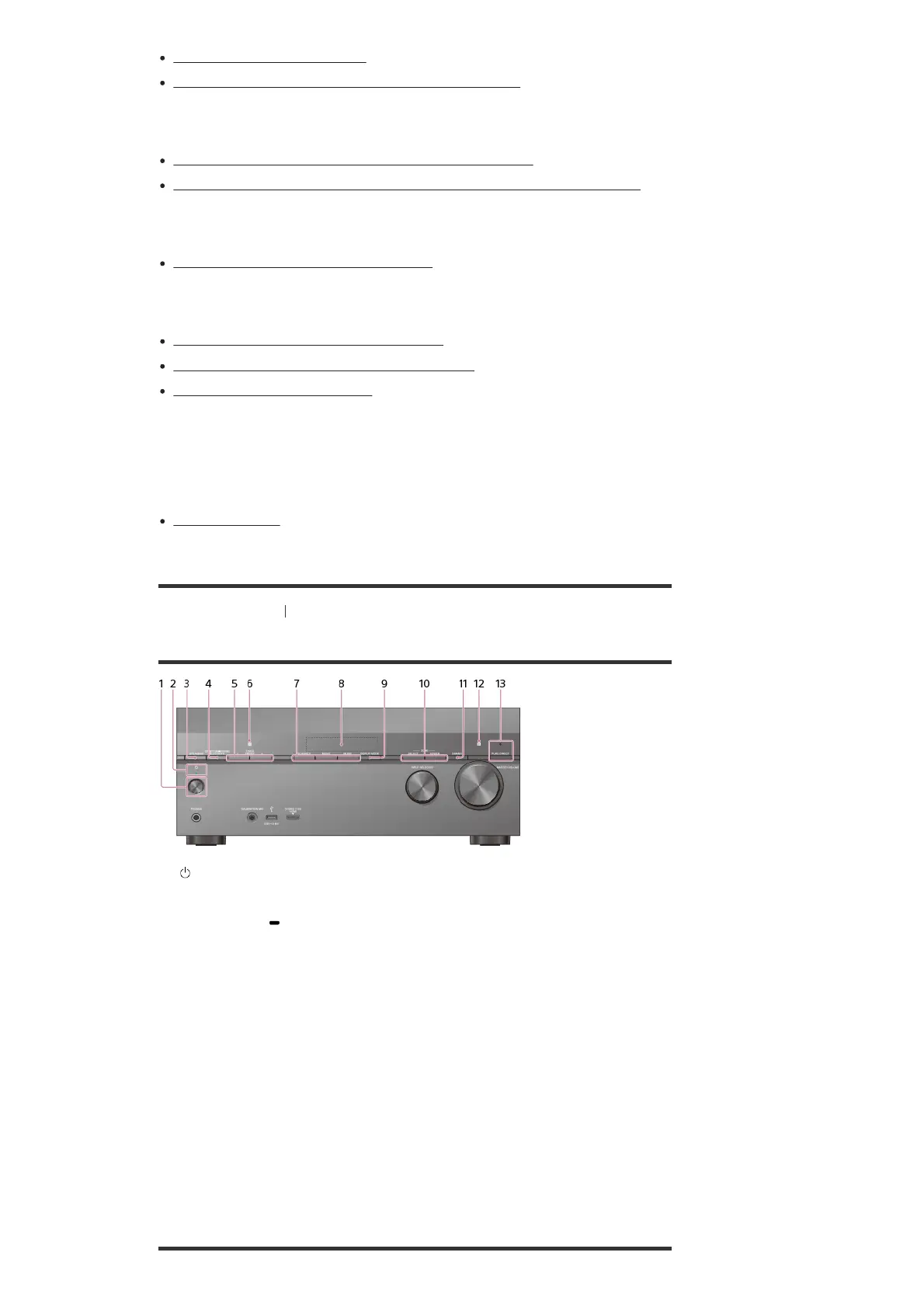
[1] Parts and Controls Receiver
Front panel (upper section)
(power)
1.
Power indicator
2.
SPEAKERS
3.
CONNECTION PAIRING BLUETOOTH
Operates the BLUETOOTH function.
4.
TUNER PRESET +/–
Select preset FM stations or channels.
5.
NFC sensor
6.
2CH/MULTI, MOVIE, MUSIC
7.
Display panel
8.
DISPLAY MODE
Switches information on the display panel.
9.
ZONE SELECT, ZONE POWER
10.
DIMMER
Adjusts the brightness of the display panel.
11.
Remote control sensor
Receives signals from remote control.
12.
PURE DIRECT
The indicator above the button lights up when the Pure Direct function is activated.
13.



 To Next Page