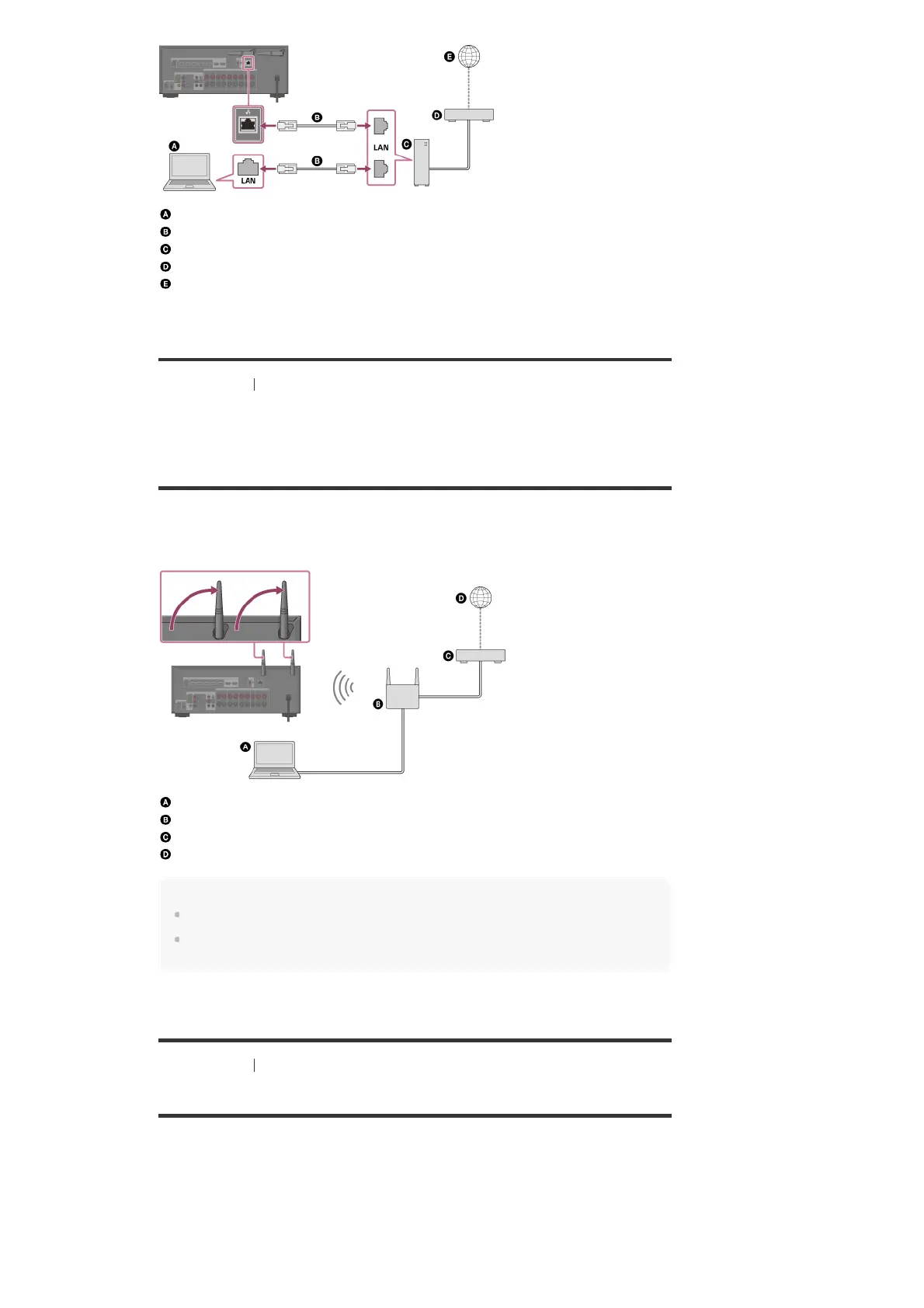
Server (computer, etc.)
LAN cable (not supplied)
Router
Modem
Internet
[38] Preparation 5. Connecting to the network
Connecting the receiver to the network using the
wireless LAN antenna (for wireless LAN connections
only)
The following illustration is an example configuration of a home network with the receiver and a
server.
We recommend that you connect the server to the router with a wired connection.
Server (computer, etc.)
Router
Modem
Internet
Note
Audio playback on a server may occasionally be interrupted if you use a wireless connection.
When using the Screen mirroring, BLUETOOTH TX or BLUETOOTH RX function, stand up both
wireless LAN antennas for better performance.
[39] Preparation 6. Turning on the receiver/preparing the remote control
Inserting batteries into the remote control
Insert two R03 (size AAA) batteries (supplied) into the remote control. Make sure that the + and
– ends are in the correct position when installing batteries.



 To Next Page