Adjusting the sound balance automatically (Auto
Calibration)
This receiver is equipped with a D.C.A.C. (Digital Cinema Auto Calibration) function which
allows you to perform automatic calibration. For details on performing this function, see the
following topics:
Before you perform Auto Calibration
Connecting the optimizer microphone
Selecting the front speakers
Performing automatic calibration (Auto Calibration)
[57] Using Other Features Configuring speaker settings
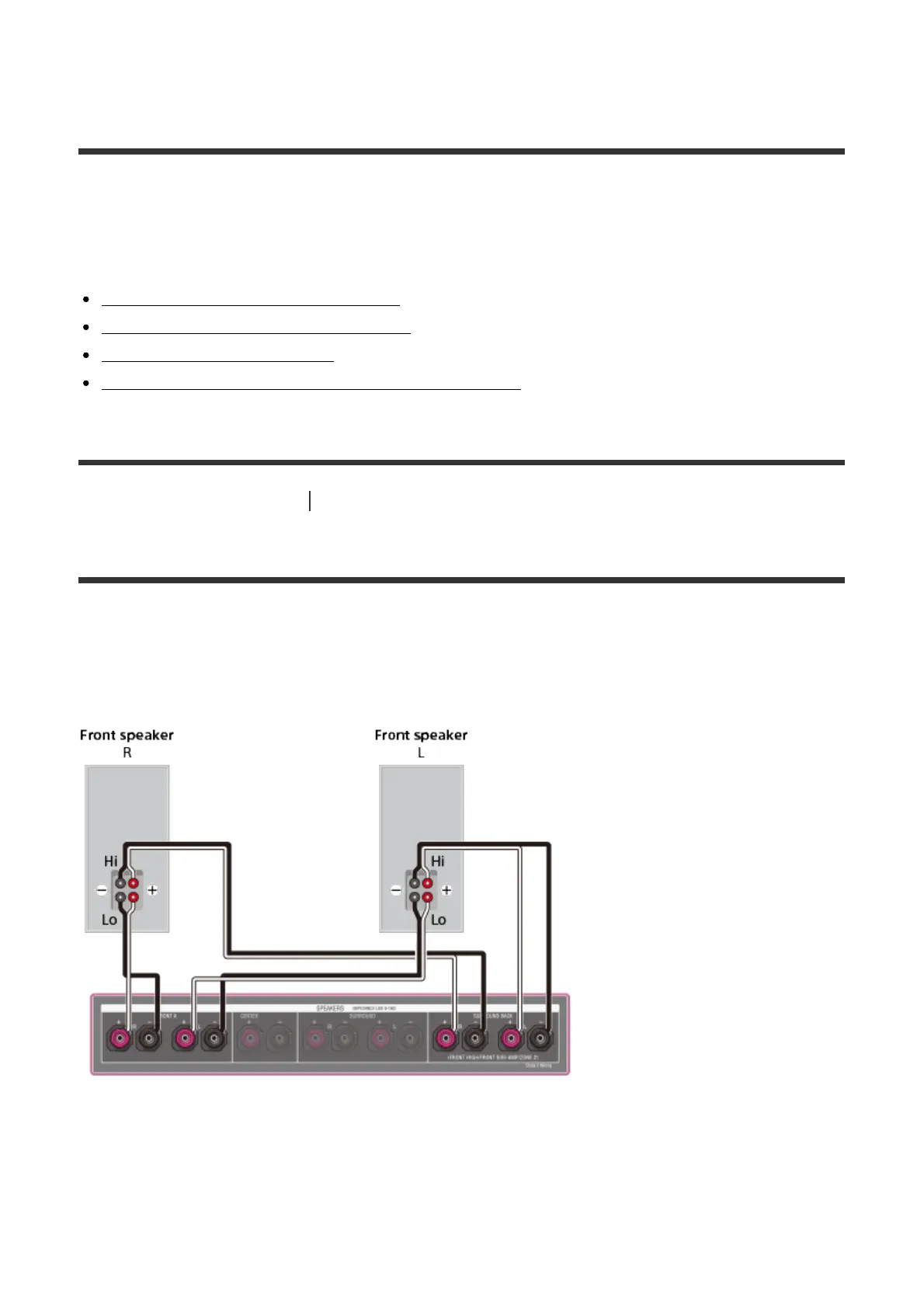
Using bi-amplifier connections
If you are not using surround back speakers or front high speakers, you can connect the
front speakers to the SPEAKERS SURROUND BACK/FRONT HIGH/FRONT B/BI-
AMP/ZONE 2 terminals using a bi-amplifier connection.
Connect the jacks on the Lo (or Hi) side of the front speakers to the SPEAKERS FRONT A
terminals, and connect the jacks on the Hi (or Lo) side of the front speakers to the
SPEAKERS SURROUND BACK/FRONT HIGH/FRONT B/BI-AMP/ZONE 2 terminals.
Make sure that metal fittings of Hi/Lo attached to the speakers have been removed from the
speakers to avoid receiver malfunction.



 To Next Page