2(E)
WARNING
To prevent fire or shock hazard, do not
expose the unit to rain or moisture.
To avoid electrical shock, do not open the
cabinet. Refer servicing to qualified
personnel only.
This symbol is intended to alert the user
to the presence of important operating
and maintenance (servicing) instructions
in the literature accompanying the
appliance.
For customers in the USA
This equipment has been tested and found to comply with
the limits for a Class A digital device, pursuant to Part 15 of
the FCC Rules. These limits are designed to provide
reasonable protection against harmful interference when
the equipment is operated in a commercial environment.
This equipment generates, uses, and can radiate radio
frequency energy and, if not installed and used in
accordance with the instruction manual, may cause harmful
interference to radio communications. Operation of this
equipment in a residential area is likely to cause harmful
interference in which case the user will be required to
correct the interference at his own expense.
You are cautioned that any changes or modifications not
expressly approved in this manual could void your authority
to operate this equipment.
The shielded interface cable recommended in this manual
must be used with this equipment in order to comply with
the limits for a digital device pursuant to Subpart B of Part
15 of FCC Rules.
For customers in Canada
This Class A digital apparatus meets all requirements of the
Canadian Interference-Causing Equipment Regulations.
Pour les utilisateurs au Canada
Cet appareil numérique de la classe A respecte toutes les
exigences du Règlement sur le matériel brouilleur du
Canada.
2(E)
Overview
The BKM-10R Monitor Control Unit is a control unit
for Sony BVM-series color video monitors. Use it to
power monitors on and off, perform menu operations,
and carry out monitor setup and adjustment.
Controlling monitor groups
You can control up to 32 monitors from the BKM-
10R. First, using the monitor menus, assign an address
number to each monitor, divide the monitors into
groups, and assign a group number to each group.
Then you can use the BKM-10R to control individual
monitors or monitor groups simply by entering
monitor address or group numbers. You can also
execute the same operation on all connected monitors,
or use the BKM-10R to put all connected monitors into
the same setup and adjustment state.
Setup and adjustment with the monitor
memory card
You can use an optional BKM-12Y Monitor Memory
Card to save and load monitor setup and adjustment
data. If your system includes more than one monitor,
you can use the monitor memory cards to exchange
data between monitors. This makes it easy to put all
monitors in your system into the same setup and
adjustment state.
Attach to 20-inch monitors
You can use an optional BKM-32H Monitor Control
Unit Attachment Kit to attach the BKM-10R to the
BVM-20F1U/20F1E and other BVM-series color
video monitors.
Rack Mounting
You can use an supplied rack mount attachment
screws and an optional MB-510 Rack Mount Kit to
mount the BKM-10R in an EIA standard 19-inch rack.
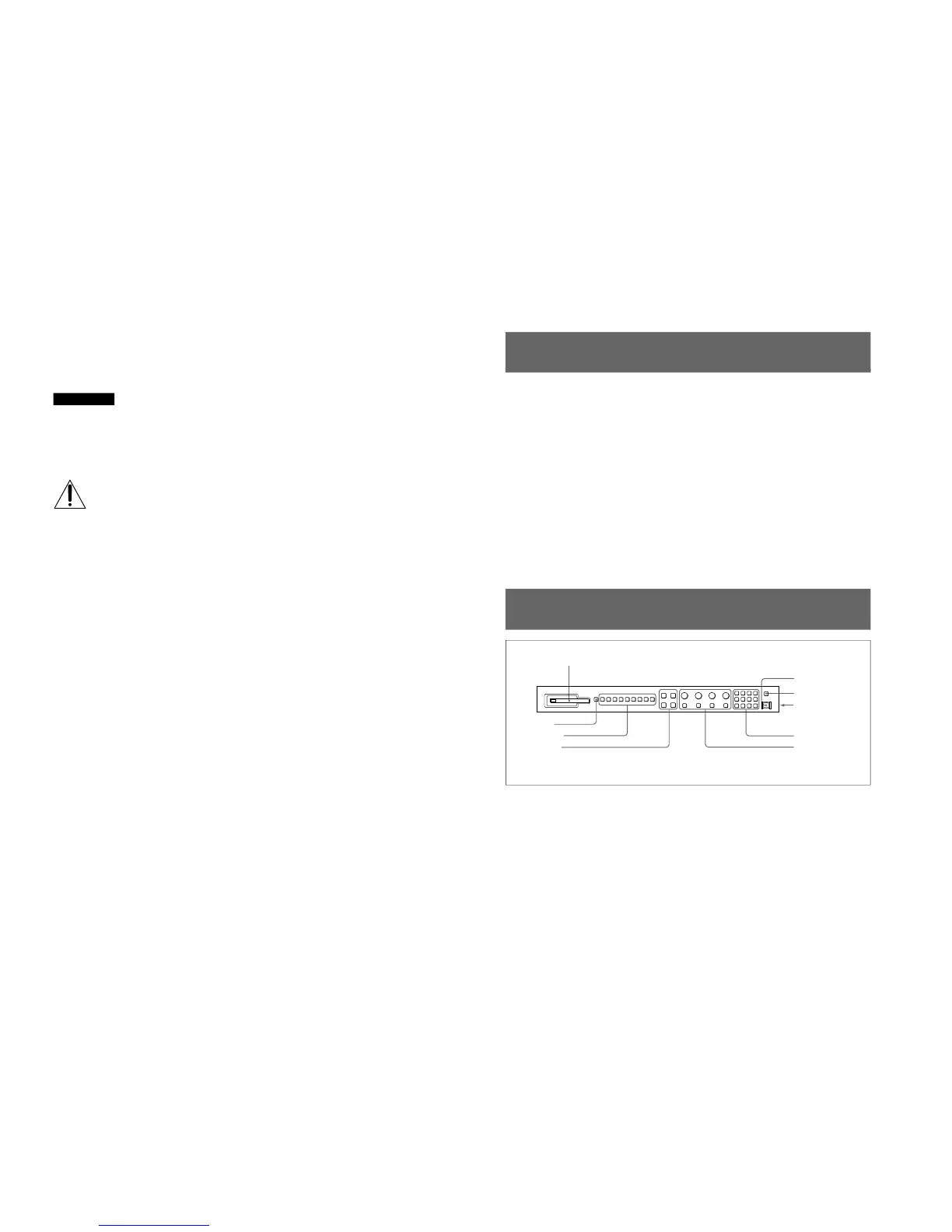
Location and Function of Parts
1 Monitor memory card insertion slot
Insert an optional BKM-12Y Monitor Memory Card.
2 SHIFT button
Each of the Function buttons 3 has a Shift On
function as well as a Shift Off function. Press this
button to select Shift On or Shift Off functions.
Each time you press this button, its orange LED lights
(Shift On) or goes out (Shift Off).
Shift On: Use the function indicated below the
Function button.
Shift Off: Use the function indicated above the
Function button.
1 Monitor memory card insertion slot
5 POWER switch
6 DEGAUSS button
7 DISPLAY UNIT
connector (rear)
8 Numeric keypad
9 MANUAL adjustment
buttons and knobs
2 SHIFT button
3 Function buttons
4 Menu operation
buttons







 To Next Page