3-7
Copy the data
H KEY
BAL
H KEY
H PIN
BAL
H PIN
• Common adjusting items for modes
H CENT, H PHASE, H LIN BALANCE, H LIN AMP,
H SEZE, ROTATION, ROTATION 2.
4:3 NORM → 16:9 NORM
4:3 UNDR → 16:9 UNDR
• Adjusting items differing between modes
V SIZE, H PIN BAL, H PIN, H KEY BAL, H KEY,
V LIN BALANCE, V LIN AMP
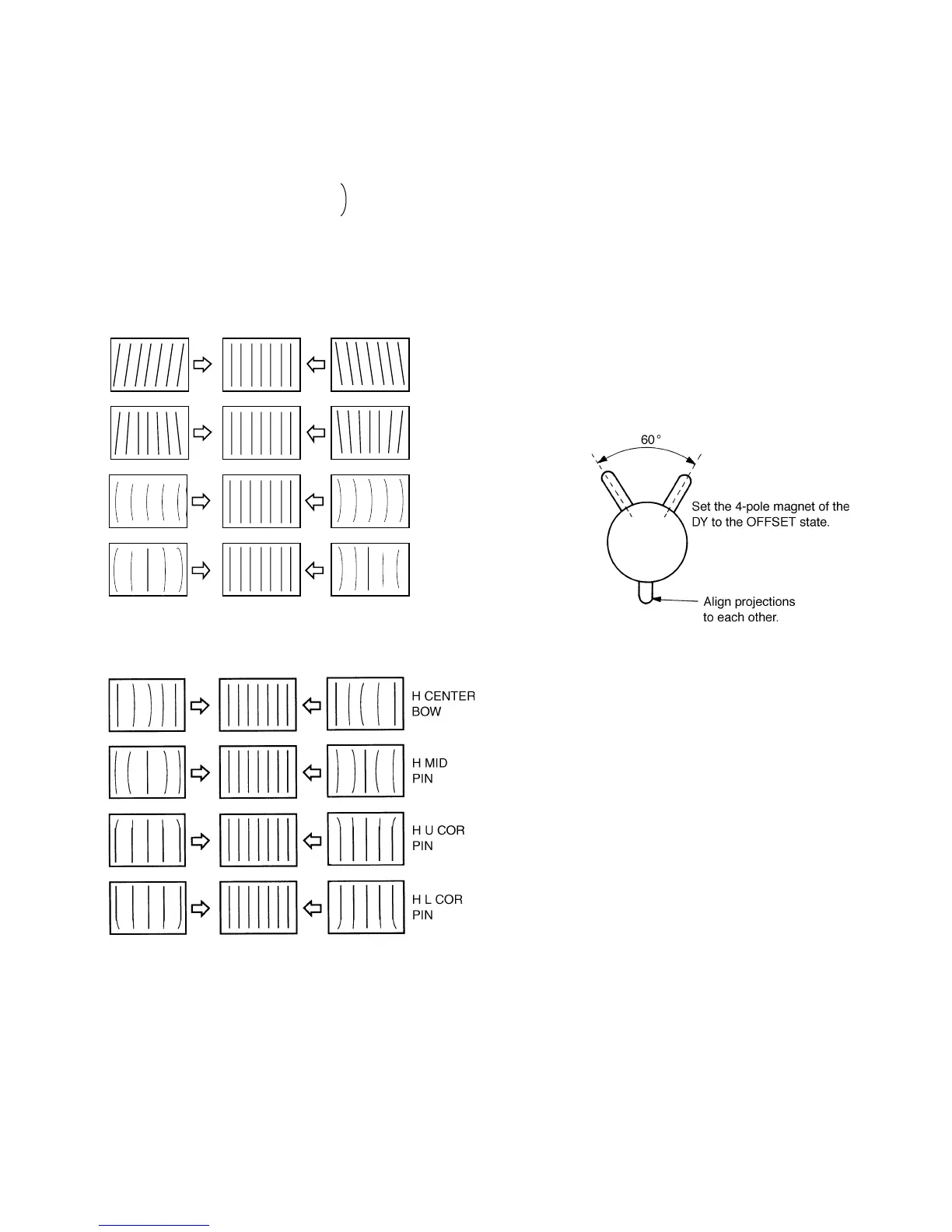
Fig. 1-11
Fig. 1-12
3-7. Convergence Adjustment
• Preparation
1. Set the SCREEN MODE to 4:3 NORM at the INPUT
CONFIGURATION menu.
2. Input the cross hatch signal.
3. Check that the H STATIC CONV data is the center value
(128).
Note: The H STATIC CONV adjustment menu is under
the E BOARD menu of the MAINTENANCE
menu.
4. For the 14 inch model, set the 4-pole magnet of the DY
to the OFFSET state. (See Fig. 1-2.)
5. For the 20 inch model, set the 6-pole magnet of the DY
to the OFFSET state. (See Fig. 1-2.)
Fig. 1-13







 To Next Page