5-11
5-3. E Board
5-3-1. Adjust Preparation
Set as follows at the INPUT CONFIGURATION menu of the SETUP menu.
FORMAT ............... COMPONENT YUV SMPTE/EBU N-10
SLOT NO............... 6
SYNC MODE ........ INT
Select E BOARD DATA LOAD from E BOARD menu of MAINTENANCE menu and execute.
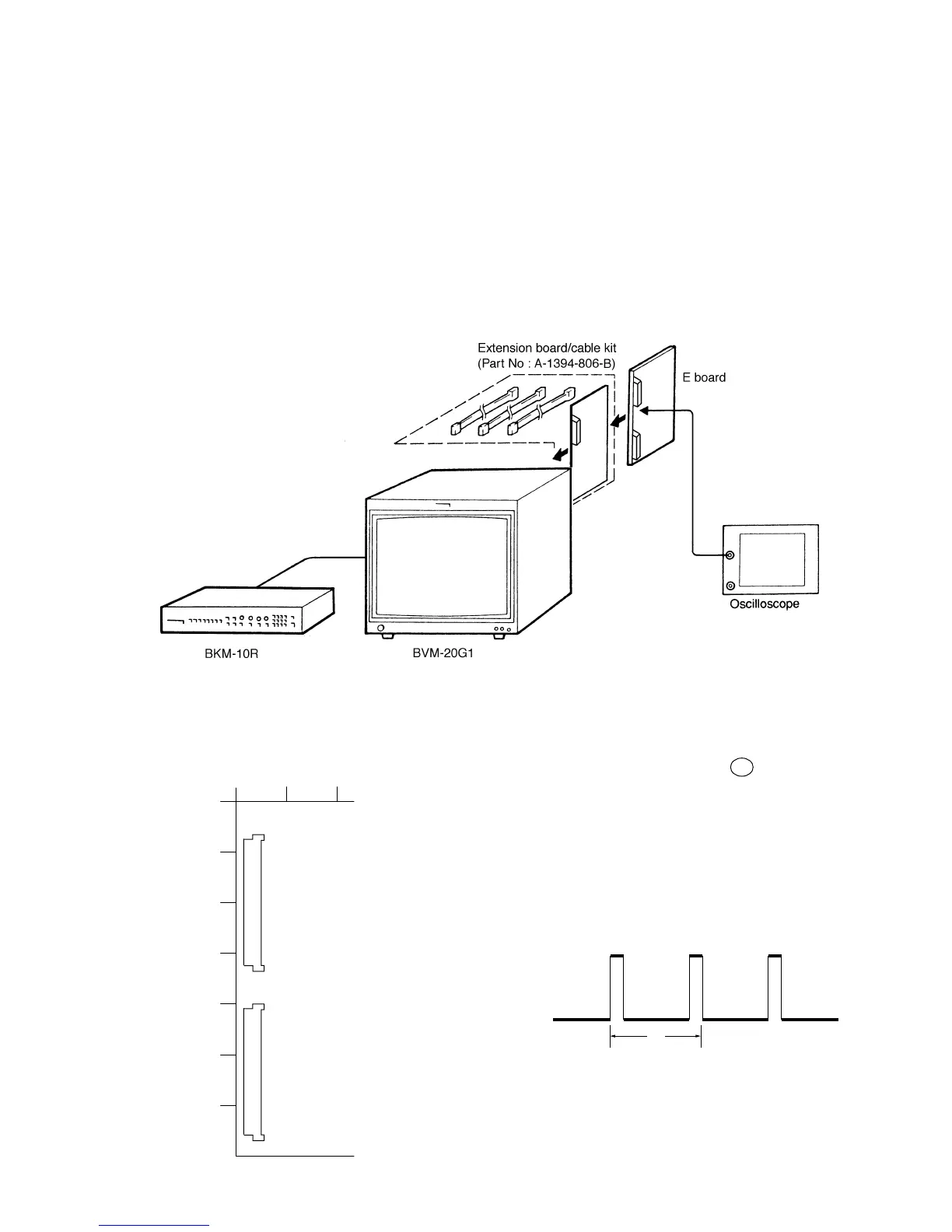
• Connection
• Arrangement Diagram for Adjustment Parts
12
A
B
C
D
E
F
G
CN801
CN802
E board –A SIDE–
32
1
32
1
5-3-2. V BLK Adjustment
1. Connect an oscilloscope to pin 9a of the E board.
2. Set the SCREEN MODE to 16:9 NORM at the INPUT
CONFIGURATION menu of the SETUP menu.
3. Adjust the V BLK data so that the V blanking pulse width
to the 520 ±30 µsec.
4. Copy the V BLK data to other mode.
Note: The V BLK adjustment menu is under the E
BOARD menu of the MAINTENANCE menu.
Fig. 5-22
Fig. 5-23
A
A = 520 ±30 µsec
Fig. 5-24







 To Next Page