EasyManua.ls Logo

Sony TRINITRON GDM-1601 - Page 27

Sony TRINITRON GDM-1601
67 pages
Print Icon
To Next Page IconTo Next Page
To Previous Page IconTo Previous Page
Loading...
1. PICTURE PROJECTION TEST
1·1. Picture Projection
I)
Connect
power
from an isolated-type variac
after
checking
that
the
power
switch
of
the
set is
turned
off.
2)
Adjust
the
AC
input
to
the
rated
voltage.
3)
Supply
signals
to
the
set.
4)
Adjust SCREEN
VR
so
that
the
raster brightness
is
at
an
appropriate
level.
S)
Check
that
the
picture
is
nqt
rolling.
6)
Rotate
RV207
(H
FREQ)
on
the
0
board
to
lock
the
picture,
if
there
is
slipping.
1·2. Checking
the
Operation
of
Individual Sections
I)
Check
that
the
POWER lamp (green) lights
when
the
POWER
switch
on
the
set is
turned
on.
2) Apply
input
signals.
3)
Rotate
the
following
VR's
and
check
that
the
circuits
are functioning.
(1)
CaNT
(contrast)
VR
(2)
V.
CENT
VR
(3)
V.
STAT
VR
(4)
H.
STAT
VR
(S)
SCREEN
VR
(6)
FOCUS
VR
(7)
R
DRV,
G DRV, B
DRV
VR's
(on
the
A
board)
(8)
G BKG, B BKG
VR's
(on
the
A
board)
4)
Checking Direction
of
Rotation
of
Contrast
YR.
Check
that
the
contrast
increases
when
the
contrast
VR
is
rotated
clockwise
and
that
it decreases
when
rotated
counterclockwise.
After
checking,
rotae
the
contrast
VR
clockwise fully
and
make
the
contrast
maximum.
S)
Checking R, G,
and
B
connection.
Alternately
switch
on
and
off
the
R, G,
and
B
switches
on
the
signal
generator
and
check
for
cor-
respondence
between
the
three
colors R, G,
and
B.
1·3. Checking Voltage
of
Individual Sections
Checking
that
the
following voltages are
present
on
each
board.
I)
+B Voltage
2)
+12
V
output
3)
-12
V
output
14S:~
V (GDM-1602:
120:~
V)
(D-I
pin
I -
pin
3
GND)
12.0
±0.3 V
(0-1
pin
® - pin
CD
GND)
-12.0
±0.6 V
(0-1
pin ® -
pin
CD
GND)
4)
The voltage
between
TP304
on
the
0
board
and
GND
is
9.00
±O.OS
V.
Readjust
by
rotating
RV30
I if
the
standard
is
not
met.
S) +B2 Voltage S9.0 ±3 V
(0-1
pin 0 -
GND)
4-1
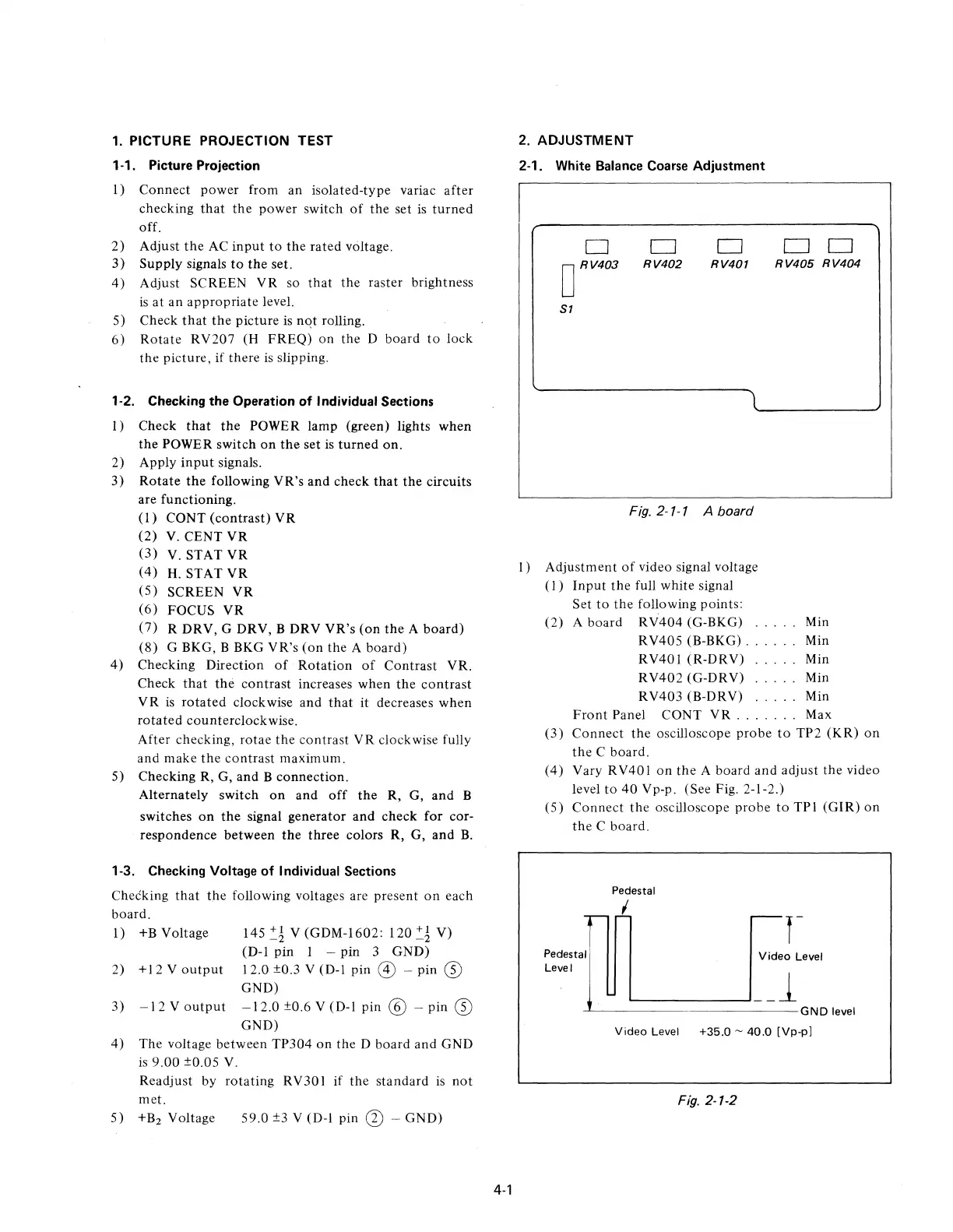
2. ADJUSTMENT
2-1. White Balance Coarse
Adjustment
o D
D
D D
o
RV403
RV402
RV401
RV405
RV404
51
Fig. 2-1-1 A board
l)
Adjustment
of
video signal voltage
(I)
Input
the
full white signal
Set
to
the
following points:
(2)
A
board
RV404
(G-BKG) Min
RV40S (B-BKG) . . . . Min
RV401
(R-DRV)
Min
RV402
(G-DRV)
.....
Min
RV403
(B-DRV)
.....
Min
Front
Panel
CaNT
VR
. . . . . . . Max
(3)
Connect
the
oscilloscope
probe
to
TP2
(KR)
on
the
C
board.
(4)
Vary RV401
on
the
A
board
and
adjust
the
video
level
to
40
Vp-p. (See Fig. 2-1-2.)
(S)
Connect
the
oscilloscope
probe
to
TPI
(GIR)
on
the
C
board.
Pedestal
Level
Pedestal
~.L
Video
Level
..L..-------------GND
level
Video
Level
+35.0
-
40.0
[Vp-p]
Fig.
2-1-2

Related product manuals