12
Installation
Connecting the Artisan
TM
Color Reference System
I. Display and Computer
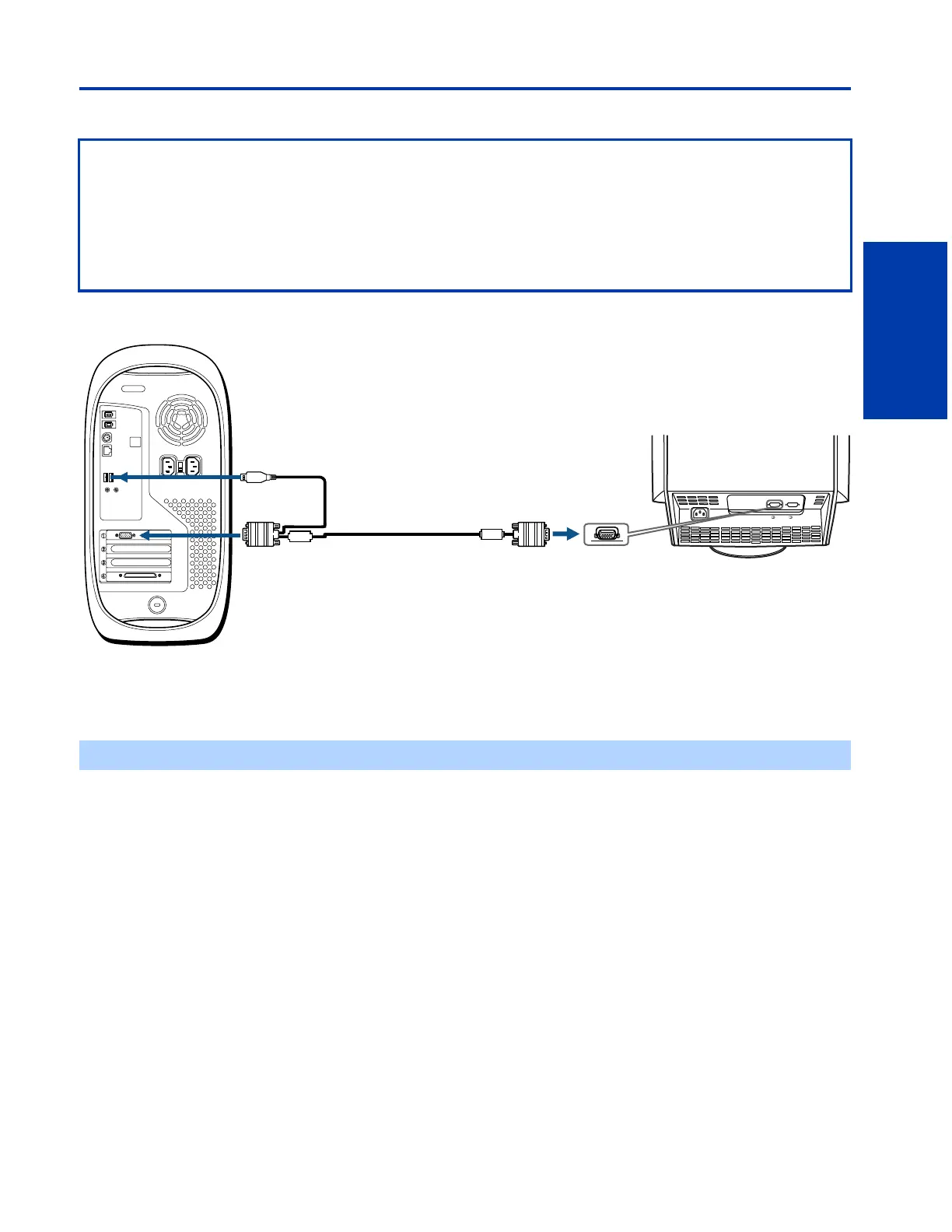
1 Connect and secure the HD15 connector that is on the same end as the USB connector to the VGA port on the back of
your computer.
2 Connect the USB connector on one end of the Artisan
TM
Signal Cable to a free USB port at the back of your computer.
3 Connect and secure the HD15 connector on the other end of the Artisan
TM
Signal Cable to the HD15 port on the back of
your GDM-C520.
Before Connecting
❑ To complete the connection between the display and your computer, make sure you have a free USB port at the back of
your computer, or on a USB hub placed near the back of your computer.
❑ Do not use the standard video signal cable that is included in the GDM-C520 box. Instead, use the Artisan
TM
Signal Cable
included in the GDM-CA20 Accessory Kit.
❑ The HD15 connector that is closer to the USB connector on your Artisan
TM
Signal Cable must be connected to the VGA
port on the back of your computer.
✍ You can also connect the Artisan
TM
Signal Cable to a USB hub. The hub must comply with USB standards.
AC IN
2
1
Rear of Display
Rear of Computer
to HD15
port
Artisan
TM
Signal Cable
(Supplied)
to HD15 port
to USB port
1
2
3











 To Next Page