14
Installation
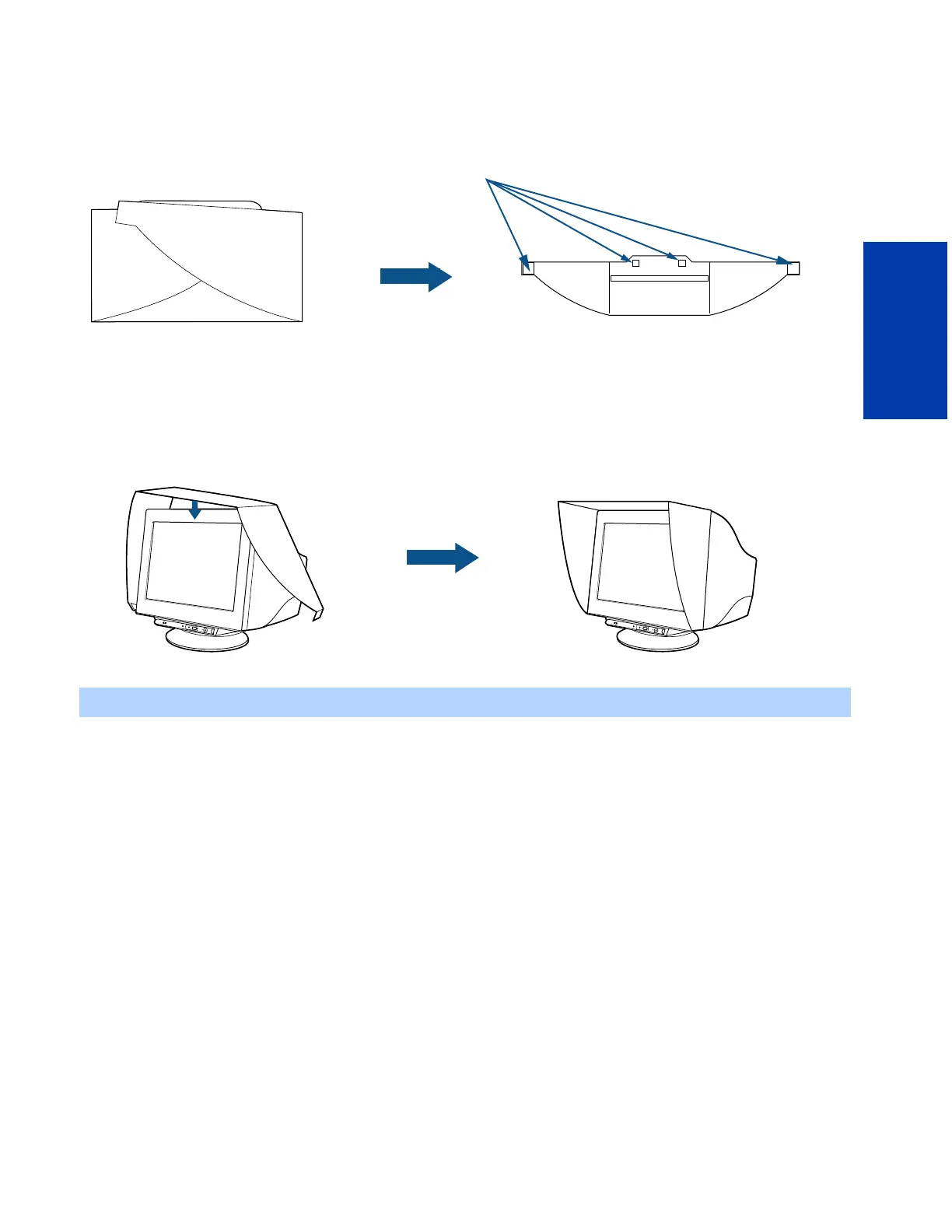
III. Mounting the Display Hood
This hood will help to reduce unwanted ambient light reflections on your display's screen.
1 Unfold the hood.
2 Attach the hook and loop tabs found in the Accessory Kit to the underside of the display hood, as shown above.
3 Remove the liners protecting the adhesive on each hook and loop tab. Be particularly careful not to touch the adhesive
once you’ve removed the liner, as this may hinder the tabs’ adhesion.
4 Wrap the display hood around the display as shown below. Align the hood carefully with your display, matching the
raised portion in the middle of the hood to the front edge of the top of the display.
✍ Be careful not to let the adhesive tabs touch the display or your fingers, as this may lessen the tabs’ adhesive properties.
1
2
hook and loop tabs
I
N
P
U
T
1
2
P
I
C
T
UR
E
EF
F
E
C
T
M
E
N
U
O
K
I
N
P
U
T
1
2
P
I
C
T
U
RE
E
F
F
E
C
T
MENU
OK
4











 To Next Page