EasyManua.ls Logo

Sony Trinitron KV-13VM30 - Page 25

Sony Trinitron KV-13VM30
116 pages
Print Icon
To Next Page IconTo Next Page
To Previous Page IconTo Previous Page
Loading...
Using
the
Timer-Activated
Functions
a>
[a
me
me
oA
&
=
=
5
OOO
TOROZORS
a a
SRE
2
zz
Ube
BM
?E
z
Fa
B
bl
a
Q
(
ffe)e
0
ed
08
0
bie
gm
INDEX
MARK
>
SLOW
——
RM-Y138/W
*
The
clock
cannot
be
set
automatically
if
you
don't
receive
a
channel
that
carries
a
time
signal
in
your
area.
If
so,
set
the
clock
manually
(pp28-29).
¢
If
there
are
only
a
few
channels
in
your
area
that
carry
time
signals,
setting
the
clock
automatically
may
take
up
to
about
30
minutes.
If
nothing
happens
even
after
you
wait
about
30
minutes,
set
the
clock
manually.
*
The
menu
disappears
automatically
if
you
don't
proceed
for
more
than
one
minute.
Setting
the
Clock
-
AUTO
CLOCK
SET
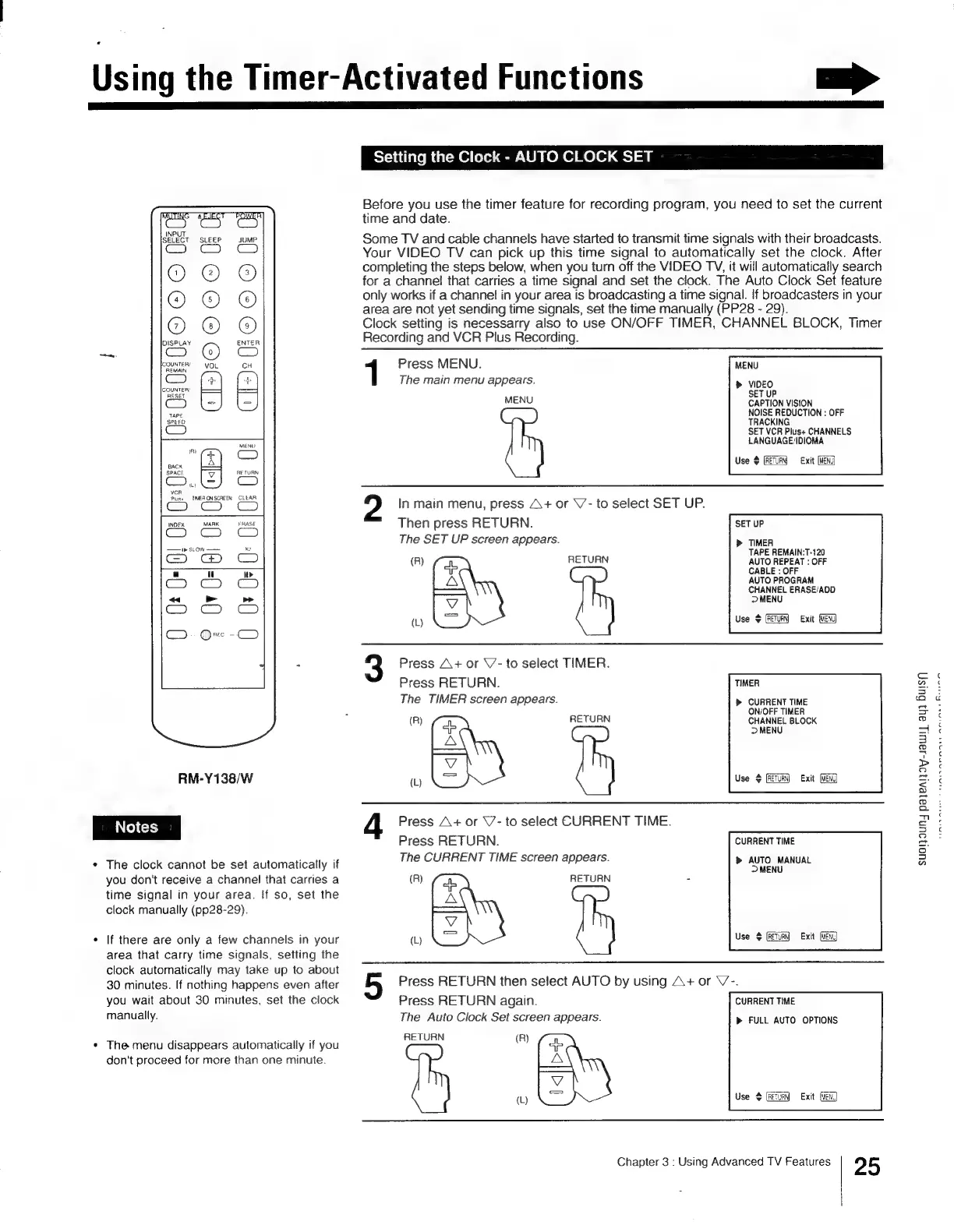
Before
you
use
the
timer
feature
for
recording
program,
you
need
to
set
the
current
time
and
date.
Some
TV
and
cable
channels
have
started
to
transmit
time
signals
with
their
broadcasts.
Your
VIDEO
TV
can
pick
up
this
time
signal
to
automatically
set
the
clock.
After
completing
the
steps
below,
when
you
turn
off
the
VIDEO
TY,
it
will
automatically
search
for
a
channel
that
carries
a
time
signal
and
set
the
clock.
The
Auto
Clock
Set
feature
only
works
if
a
channel
in
your
area
is
broadcasting
a
time
signal.
If
broadcasters
in
your
area
are
not
yet
sending
time
signals,
set
the
time
manually
(PP28
-
29).
Clock
setting
is
necessarry
also
to
use
ON/OFF
TIMER,
CHANNEL
BLOCK,
Timer
Recording
and
VCR
Plus
Recording.
1
Press
MENU.
MENU
The
main
menu
appears.
>
VIDEO
SET
UP
MENU
CAPTION
VISION
NOISE
REDUCTION
:
OFF
TRACKING
SET
VCR
Plus+
CHANNELS
LANGUAGE/IDIOMA
Use
4
RETURN
Exit
(MENG)
2
In
main
menu,
press
A+
or
V-
to
select
SET
UP.
Then
press
RETURN.
SET
UP
The
SET
UP
screen
appears.
>
TIMER
TAPE
REMAIN:T-120
(R)
RETURN
AUTO
REPEAT
:
OFF
CABLE
:
OFF
AUTO
PROGRAM
Lb
CHANNEL
ERASE/ADD
MENU
(L)
Use
$
Exit
3
Press
A+
or
V-
to
select
TIMER.
Press
RETURN.
TIMER
The
TIMER
screen
appears.
>
CURRENT
TIME
ON/OFF
TIMER
(R)
RETURN
CHANNEL
BLOCK
>
MENU
‘Gee
(L)
eg
RETURN)
©
Exit
(MENG)
4
Press
A+
or
\7-
to
select
CURRENT
TIME.
Press
RETURN.
CURRENT
TIME
The
CURRENT
TIME
screen
appears.
>
AUTO
MANUAL
MENU
(R)
a
RETURN
-
=
(L)
LS
|
Use
#
(RETURN)
Exit
5
Press
RETURN
then
select
AUTO
by
using
A+
or
V-.
Press
RETURN
again.
CURRENT
TIME
The
Auto
Clock
Set
screen
appears.
>
FULL
AUTO
OPTIONS
RETURN
(R)
Gx
a
|
(L)
4
Use
#
(RETURN)
Exit
Chapter
3
:
Using
Advanced
TV
Features
25
SuO!}9UNY
payeAljay-JawWi]
ay)
Buisy

Other manuals for Sony Trinitron KV-13VM30

Related product manuals