EasyManua.ls Logo

Sony Trinitron KV-13VM30 - Page 26

Sony Trinitron KV-13VM30
116 pages
Print Icon
To Next Page IconTo Next Page
To Previous Page IconTo Previous Page
Loading...
Using
the
Timer-Activated
Functions
26
© ©
0
C
[2
RM-Y138/W
Chapter
3
:
Using
Advanced
TV
Features
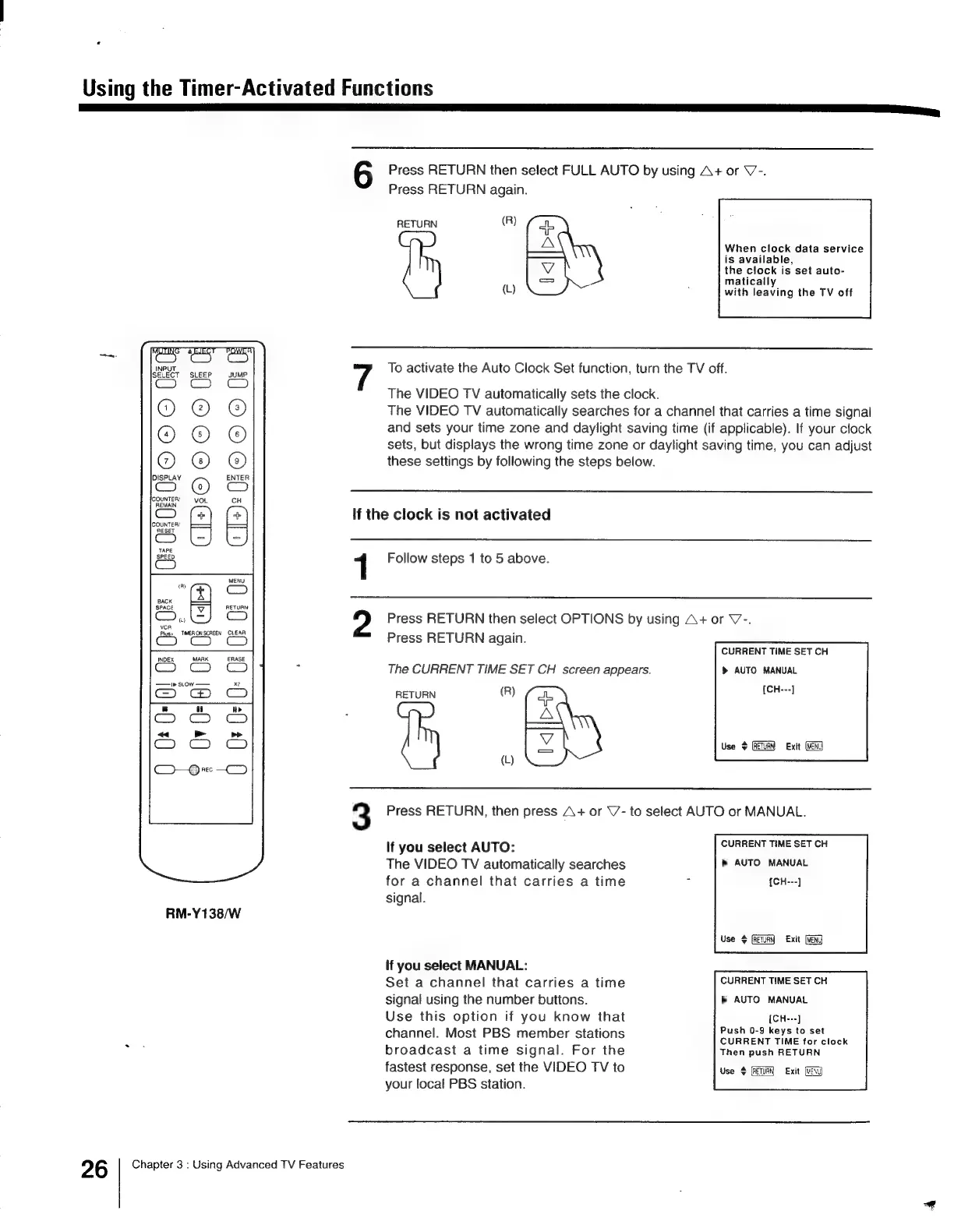
Press
RETURN
then
select
FULL
AUTO
by
using
A+
or
V’-.
Press
RETURN
again.
RETURN
(R)
ae
;
When
clock
data
service
is
available,
the
clock
is
set
auto-
matically
(L)
:
with
leaving
the
TV
off
7
To
activate
the
Auto
Clock
Set
function,
turn
the
TV
off.
The
VIDEO
TV
automatically
sets
the
clock.
The
VIDEO
TV
automatically
searches
for
a
channel
that
carries
a
time
signal
and
sets
your
time
zone
and
daylight
saving
time
(if
applicable).
If
your
clock
sets,
but
displays
the
wrong
time
zone
or
daylight
saving
time,
you
can
adjust
these
settings
by
following
the
steps
below.
If
the
clock
is
not
activated
1
Follow
steps
1
to
5
above.
Press
RETURN
then
select
OPTIONS
by
using
A+
or
V-.
Press
RETURN
again.
CURRENT
TIME
SET
CH
The
CURRENT
TIME
SET
CH
screen
appears.
>
AUTO
MANUAL
RETURN
(R)
(£0
seas,
ARTE,
|
RETURN
Exit
(L)
3
Press
RETURN,
then
press
A+
or
V’-
to
select
AUTO
or
MANUAL.
If
you
select
AUTO:
CURRENT
TIME
SET
CH
The
VIDEO
TV
automatically
searches
b
AUTO
MANUAL
for
a
channel
that
carries
a
time
5
{CH---]
signal.
Use
(RETRY
Exit
If
you
select
MANUAL:
Set
a
channel
that
carries
a
time
CURRENT
TIME
SET
CH
signal
using
the
number
buttons.
AUTO
MANUAL
Use
this
option
if
you
know
that
[CH---]
j
Push
0-9
keys
to
set
channel.
Most
PBS
member
stations
COOHENT
TIME
ies
cikek
broadcast
a
time
signal.
For
the
Then
push
RETURN
fastest
response,
set
the
VIDEO
TV
to
Use
&
Exit
your
local
PBS
station.

Other manuals for Sony Trinitron KV-13VM30

Related product manuals