EasyManua.ls Logo

Sony Trinitron KV-13VM30 - Page 27

Sony Trinitron KV-13VM30
116 pages
Print Icon
To Next Page IconTo Next Page
To Previous Page IconTo Previous Page
Loading...
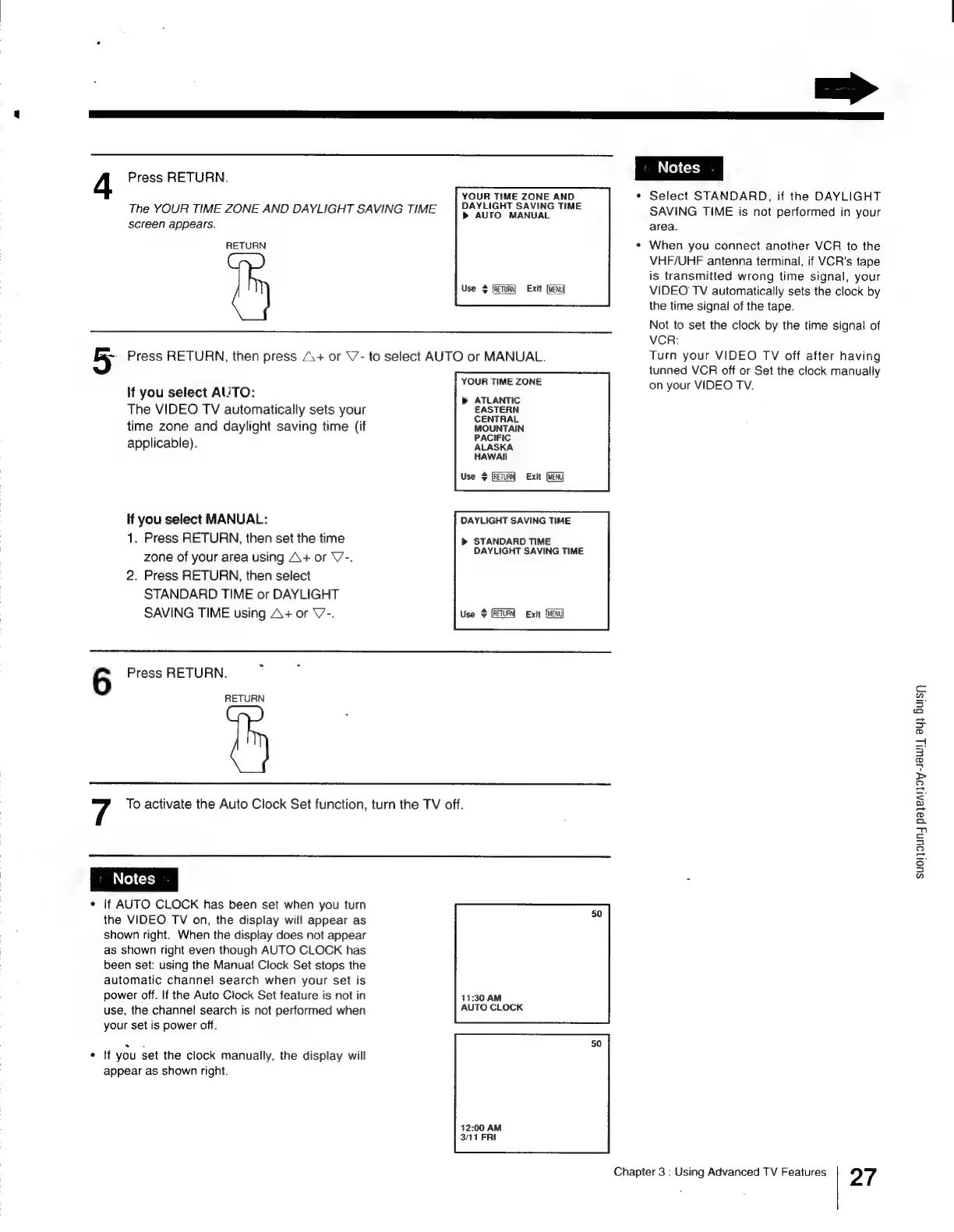
4
Press
RETURN.
The
YOUR
TIME
ZONE
AND
DAYLIGHT
SAVING
TIME
screen
appears.
RETURN
YOUR
TIME
ZONE
AND
DAYLIGHT
SAVING
TIME
AUTO
MANUAL
Use
$
(feTuRy
Exit
Lo
Press
RETURN,
then
press
A\+
or
\7-
to
select
AUTO
or
MANUAL.
lf
you
select
AUTO:
The
VIDEO
TV
automatically
sets
your
time
zone
and
daylight
saving
time
(if
applicable).
If
you
select
MANUAL:
1.
Press
RETURN,
then
set
the
time
zone
of
your
area
using
A+
or
V7-.
2.
Press
RETURN,
then
select
STANDARD
TIME
or
DAYLIGHT
SAVING
TIME
using
A+
or
V-.
YOUR
TIME
ZONE
>
ATLANTIC
EASTERN
CENTRAL
MOUNTAIN
PACIFIC
ALASKA
HAWAII
Use
4
GU
Exit
DAYLIGHT
SAVING
TIME
»
STANDARD
TIME
DAYLIGHT
SAVING
TIME
Use
+
Exit
6
Press
RETURN.
RETURN
7
To
activate
the
Auto
Clock
Set
function,
turn
the
TV
off.
¢
If
AUTO
CLOCK
has
been
set
when
you
turn
the
VIDEO
TV
on,
the
display
will
appear
as
shown
right.
When
the
display
does
not
appear
as
shown
right
even
though
AUTO
CLOCK
has
been
set:
using
the
Manua!
Clock
Set
stops
the
automatic
channel
search
when
your
set
is
power
off.
If
the
Auto
Clock
Set
feature
is
not
in
use,
the
channel
search
is
not
performed
when
your
set
is
power
off.
elt
you
set
the
clock
manually,
the
display
will
appear
as
shown
right.
11:30
AM
AUTO
CLOCK
12:00
AM
3/41
FRI
=>
*
Select
STANDARD,
if
the
DAYLIGHT
SAVING
TIME
is
not
performed
in
your
area.
When
you
connect
another
VCR
to
the
VHF/UHF
antenna
terminal,
if
VCR's
tape
is
transmitted
wrong
time
signal,
your
VIDEO
TV
automatically
sets
the
clock
by
the
time
signal
of
the
tape.
Not
to
set
the
clock
by
the
time
signal
of
VCR:
Turn
your
VIDEO
TV
off
after
having
tunned
VCR
off
or
Set
the
clock
manually
on
your
VIDEO
TV.
Chapter
3
:
Using
Advanced
TV
Features
27
SuOI]aUNY
payeAljoy-Jaw!|
a4}
Busy

Other manuals for Sony Trinitron KV-13VM30

Related product manuals