EasyManua.ls Logo

Sony Trinitron KV-13VM30 - Page 28

Sony Trinitron KV-13VM30
116 pages
Print Icon
To Next Page IconTo Next Page
To Previous Page IconTo Previous Page
Loading...
Using
the
Timer-Activated
Functions
=I
i>
a
OOO
Uk
SOOO
(h
© ©
([
CI)
rs
C5
counter’
CH
REMAIN
CO
7
COUNTER!
aaa
RESET
on
l=]
SPEED
cs
MENU
(R)
Ps)
BACK
SPACE
3
RETURN
Ou
amas)
vcr
Pluss
TIMERON
SCREEN
CLEAR
INOEX
MARK
ERASE
1
stow
——
x2
GS)
Co
“«<
>
>
OO
©
O--Ore
RM-Y138/W
To
change
or
correct
the
setting
before
completing
it
Press
BACK
SPACE
to
return
to
the
item
to
be
erased.
28
Chapter
3
:
Using
Advanced
TV
Features
Setting
the
Clock
-
MANUAL
CLOCK
SET
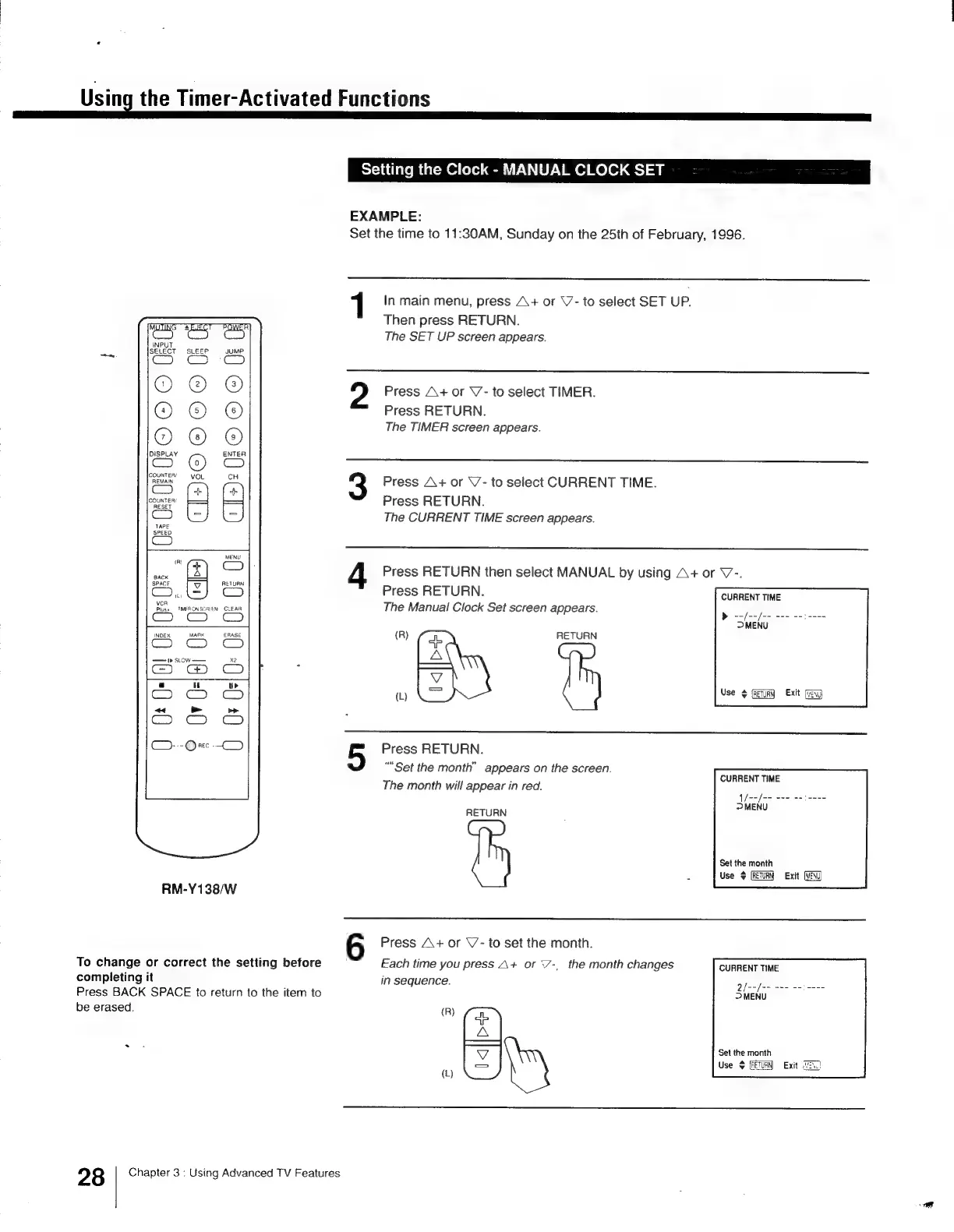
EXAMPLE:
Set
the
time
to
11:30AM,
Sunday
on
the
25th
of
February,
1996.
1
In
main
menu,
press
A+
or
\7-
to
select
SET
UP.
Then
press
RETURN.
The
SET
UP
screen
appears.
Press
A+
or
V7-
to
select
TIMER.
Press
RETURN.
The
TIMER
screen
appears.
Press
A+
or
\’-
to
select
CURRENT
TIME.
Press
RETURN.
The
CURRENT
TIME
screen
appears.
Press
RETURN
then
select
MANUAL
by
using
A+
or
V7-.
Press
RETURN.
CURRENT
TIME
The
Manual
Clock
Set
screen
appears.
(R)
Eat
RETURN
w
(=)
vee
¢
Et
Press
RETURN.
“Set
the
month”
appears
on
the
screen.
The
month
will
appear
in
red.
i
el
ee
>
MENU
CURRENT
TIME
Sens
RETURN
Set the
month
2
Use
$
(RETURN
Exit
6
Press
A+
or
\’-
to
set
the
month.
Each
time
you
press
A+
or
7-,
the
month
changes
CURRENT
TIME
in
sequence.
5
i
ee
ne
DMENU
{R)
a
A
lope
Set
the
month
Use
$
(RETURN
Exit
(2)
(L)

Other manuals for Sony Trinitron KV-13VM30

Related product manuals