EasyManua.ls Logo

Sony Trinitron KV-13VM30 - Page 30

Sony Trinitron KV-13VM30
116 pages
Print Icon
To Next Page IconTo Next Page
To Previous Page IconTo Previous Page
Loading...
Using
the
Timer-Activated
Functions
Setting
the
ON/OFF
TIMER
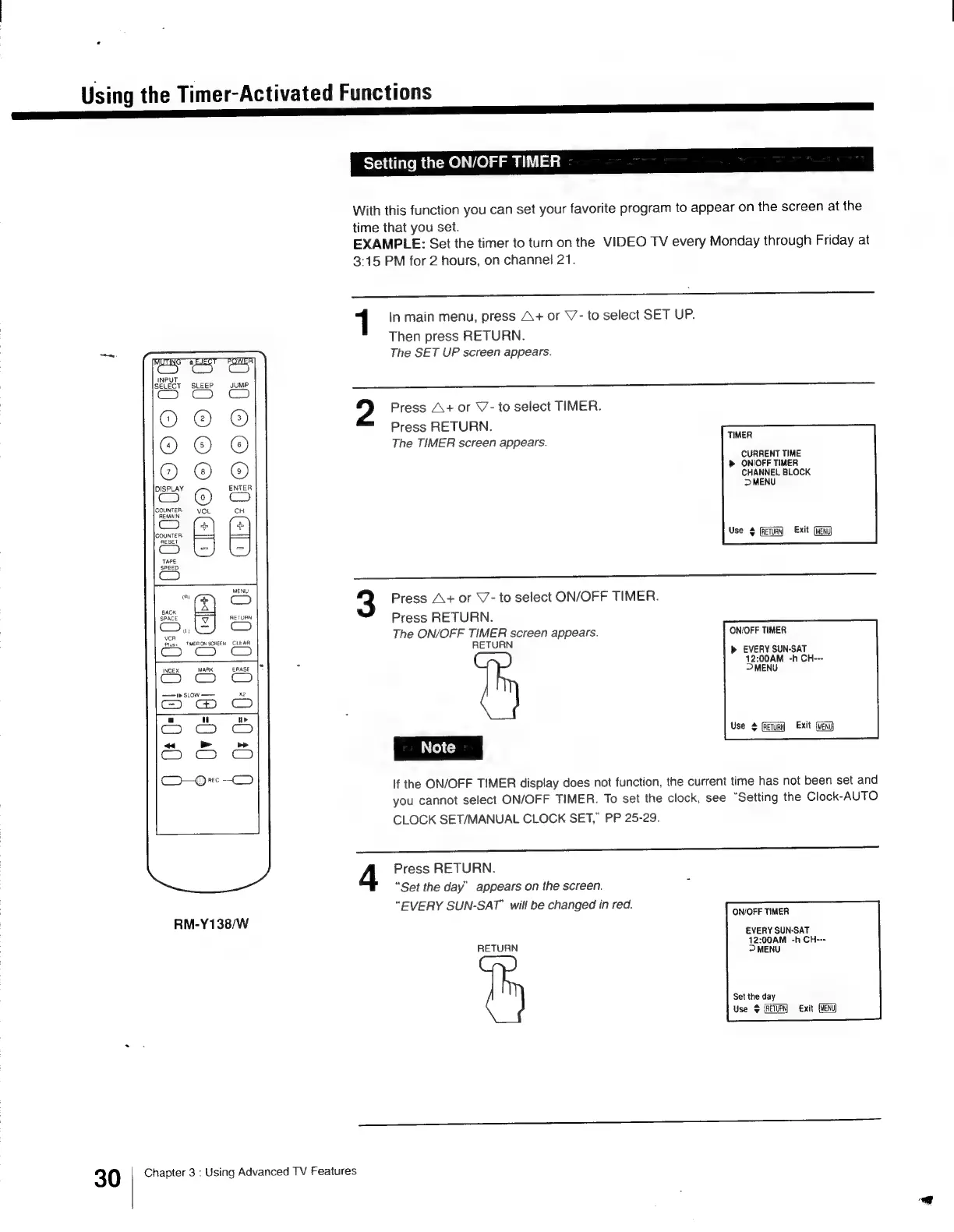
With
this
function
you
can
set
your
favorite
program
to
appear
on
the
screen
at
the
time
that
you
set.
EXAMPLE:
Set
the
timer
to
turn
on
the
VIDEO
TV
every
Monday
through
Friday
at
3:15
PM
for
2
hours,
on
channel
21.
1
In
main
menu,
press
A+
or
\7-
to
select
SET
UP.
Then
press
RETURN.
The
SET
UP
screen
appears.
Ge
ia
ac
a
in
»
ay
m m
ae
es
c
=
3
Press
A+
or
V7-
to
select
TIMER.
Press
RETURN.
The
TIMER
screen
appears.
TIMER
CURRENT
TIME
»
ON/OFF
TIMER
CHANNEL
BLOCK
>
MENU
©0200
QOOoOoT
28
3
02
0
2m
23
<
fe)
iad
o
x
o
Oe
pad
cm
2
CIs)
Use
$
(RETURN
Press
A+
or
V-
to
select
ON/OFF
TIMER.
Press
RETURN.
The
ON/OFF
TIMER
screen
appears.
ON/OFF
TIMER
RETURN
b>
EVERY
SUN-SAT
12:00AM
-h
CH---
>
MENU
ia)
CO
ver
Plus+
TIMERON
SCREEN
CLEAR
Ce).
GC)
INDEX
MARK
enase
|“
x2
——1»
sLowW
——
Use
$
(RETURN
Exit
(vENd
If
the
ON/OFF
TIMER
display
does
not
function,
the
current
time
has
not
been
set
and
you
cannot
select
ON/OFF
TIMER.
To
set
the
clock,
see
“Setting
the
Clock-AUTO
CLOCK
SET/MANUAL
CLOCK
SET,”
PP
25-29.
Press
RETURN.
“Set
the
day’
appears
on
the
screen.
“EVERY
SUN-SAT’
will
be
changed
in
red.
ON/OFF
TIMER
RM-Y138/W
EVERY
SUN-SAT
RETURN
ene
-h
CH---
Set the
day
Use
Exit
(Meni)
30
Chapter
3
:
Using
Advanced
TV
Features

Other manuals for Sony Trinitron KV-13VM30

Related product manuals