EasyManua.ls Logo

Sony Trinitron KV-13VM30 - Page 48

Sony Trinitron KV-13VM30
116 pages
Print Icon
To Next Page IconTo Next Page
To Previous Page IconTo Previous Page
Loading...
Timer
Recording
ay
©
©
©
Uk
C
[+20
BACK
SPACE
cis
wy
vcr
Plus+
TIMER
ON
SCREEN
INDEX
MARK
>
slow
RM-Y138/W
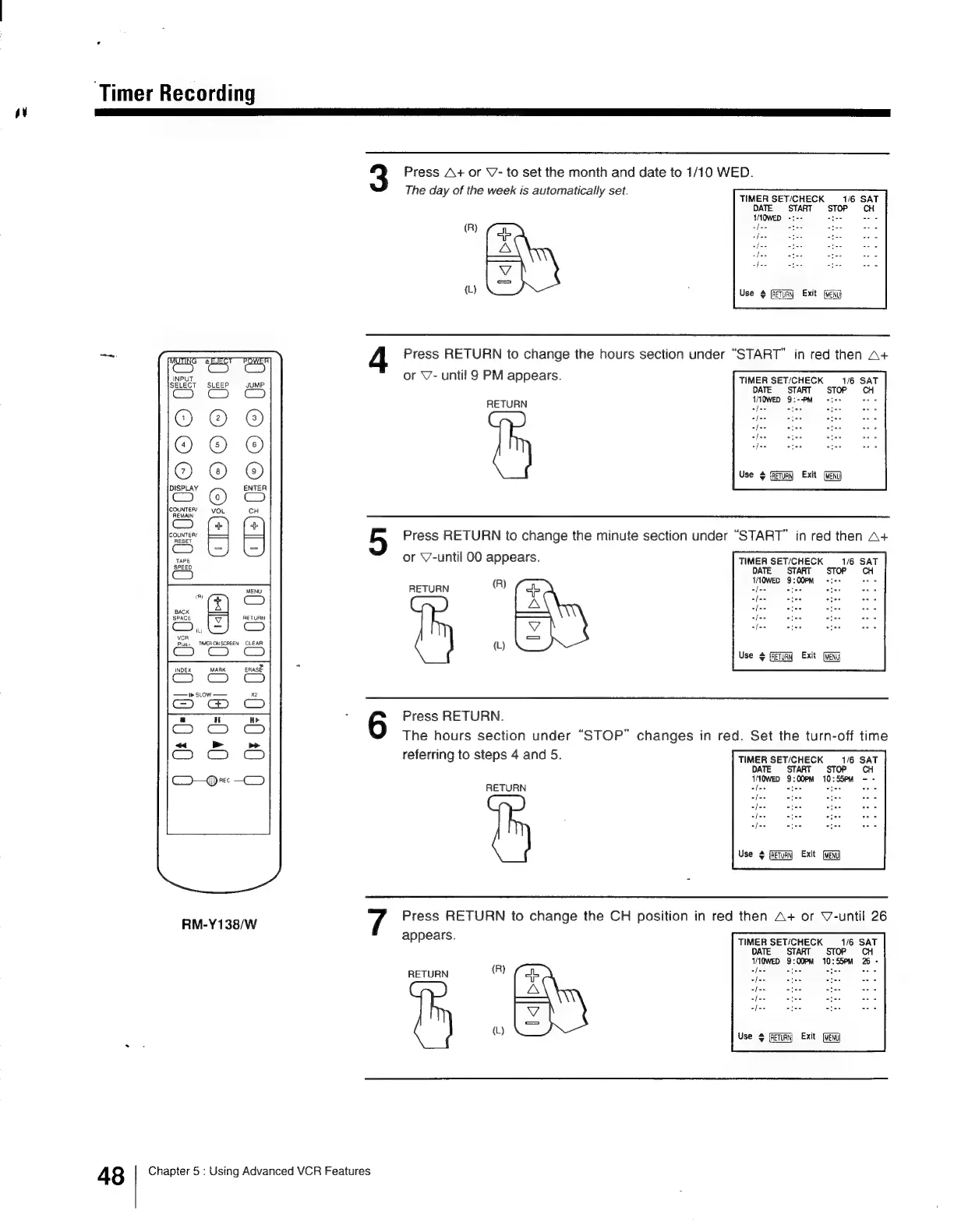
Press
A+
or
V-
to
set
the
month
and
date
to
1/10
WED.
The
day
of
the
week
is
automatically
set.
TIMER
SET/CHECK
1/6
SAT
DATE
START
STOP
CH
WIQWED
-:--
(R)
ofee
tee
es
Pa
fee
tee
{L)
Ey
;
Use
#
Guay
Exit
Press
RETURN
to
change
the
hours
section
under
“START”
in
red
then
A+
or
V7-
until
9
PM
appears.
TIMER
SETICHECK
1/6
SAT
DATE
START
STOP
CH
TOWED
9:--PM
+t
oes
afee
Sees
RETURN
I
fee
sfws
afee
Use
¢
Exit
(WENU
Press
RETURN
to
change
the
minute
section
under
“START”
in
red
then
A+
or
V-until
00
appears.
TIMER
SET/CHECK
1/6
SAT
DATE
START
STOP
CH
(R)
1/10WED
9:00PM
RETURN
ee
fee
ates
APE
afes
es
ees
(L)
Use
+
Exit
Press
RETURN.
The
hours
section
under
“STOP”
changes
in
red.
Set
the
turn-off
time
referring
to
steps
4
and
5.
TIMER
SETICHECK
1/6
SAT
DATE
START
STOP
CH
1M0wep
9:00PM
10:55PM
-
-
RETURN
afeey
~
catse
Ee
eda
Lfse
foe
afizs
/
Use
¢
(RETURN
Press
RETURN
to
change
the
CH
position
in
red
then
A+
or
V-until
26
appears.
TIMER
SET/CHECK
1/6
SAT
DATE.
START.
STOP
CH
VOWED
9:00PM
10:55>M
26
-
RETURN
(R)
ere
alee
eae Sie
BES
Use
(Return
Exit
[WENU
48
Chapter
5
:
Using
Advanced
VCR
Features

Other manuals for Sony Trinitron KV-13VM30

Related product manuals