EasyManua.ls Logo

Sony Trinitron KV-13VM30 - Page 49

Sony Trinitron KV-13VM30
116 pages
Print Icon
To Next Page IconTo Next Page
To Previous Page IconTo Previous Page
Loading...
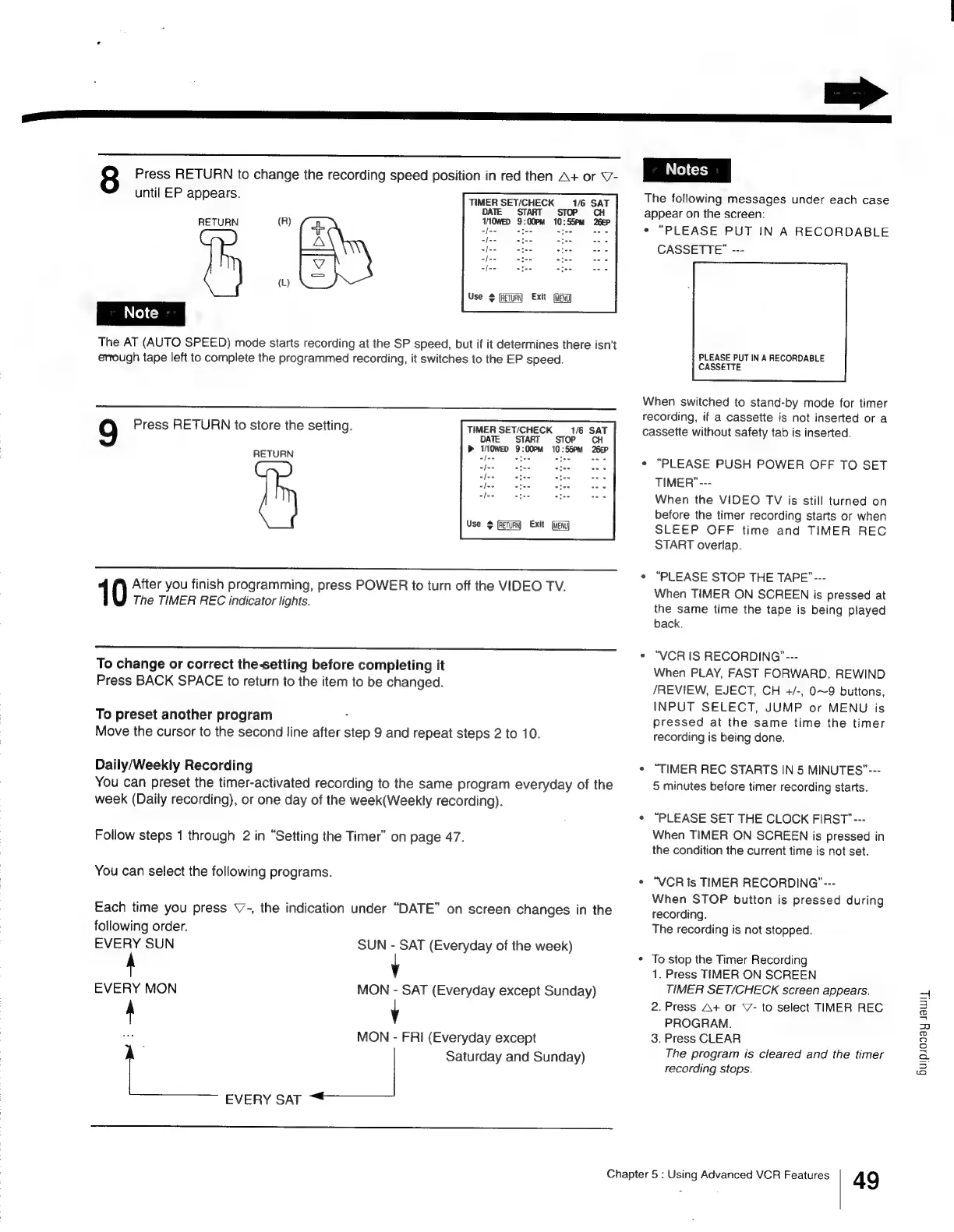
Press
RETURN
to
change
the
recording
speed
position
in
red
then
A+
or
V-
until
EP
appears.
aE
af
apes
sce
es
i
(L)
Use
©
(RETUR
Exit
ffizng
TIMER
SET/CHECK
DATE
START
16
SAT
STOP
CH
TOWED
9:00PM
10:55PM
26EP
RETURN
fat
:
The
AT
(AUTO
SPEED)
mode
starts
recording
at
the
SP
speed,
but
if it
determines
there
isn't
enough
tape
left
to
complete
the
programmed
recording,
it
switches
to
the
EP
speed.
Press
RETURN
to
store
the
setting.
TIMER
SETICHECK
1/6
SAT
TE
START
STOP
CH
»
IM0WED
9:00PM
10:55PM
26EP
RETURN
Use
$
filmy
Exit
1
After
you
finish
programming,
press
POWER
to
turn
off
the
VIDEO
TV.
The
TIMER
REC
indicator
lights.
To
change
or
correct
the-setting
before
completing
it
Press
BACK
SPACE
to
return
to
the
item
to
be
changed.
To
preset
another
program
?
Move
the
cursor
to
the
second
line
after
step
9
and
repeat
steps
2
to
10.
Daily/Weekly
Recording
You
can
preset
the
timer-activated
recording
to
the
same
program
everyday
of
the
week
(Daily
recording),
or
one
day
of
the
week(Weekly
recording).
Follow
steps
1
through
2
in
“Setting
the
Timer”
on
page
47.
You
can
select
the
following
programs.
Each
time
you
press
V7-,
the
indication
under
“DATE”
on
screen
changes
in
the
following
order.
EVERY
SUN
SUN
-
SAT
(Everyday
of
the
week)
y
EVERY
MON
MON
-
SAT
(Everyday
except
Sunday)
A
v
te
MON
-
FRI
(Everyday
except
Saturday
and
Sunday)
EVERY
SAT
~*
=>
The
following
messages
under
each
case
appear
on
the
screen:
«
“PLEASE
PUT
IN
A
RECORDABLE
CASSETTE”
---
PLEASE
PUT
IN
A
RECORDABLE
CASSETTE
When
switched
to
stand-by
mode
for
timer
recording,
if
a
cassette
is
not
inserted
or
a
cassette
without
safety
tab
is
inserted.
“PLEASE
PUSH
POWER
OFF
TO
SET
TIMER"---
When
the
VIDEO
TV
is
still
turned
on
before
the
timer
recording
starts
or
when
SLEEP
OFF
time
and
TIMER
REC
START
overlap.
¢
“PLEASE
STOP
THE
TAPE”---
When
TIMER
ON
SCREEN
is
pressed
at
the
same
time
the
tape
is
being
played
back.
*
“VCR
IS
RECORDING’
---
When
PLAY,
FAST
FORWARD,
REWIND
/REVIEW,
EJECT,
CH
+/-,
0~9
buttons,
INPUT
SELECT,
JUMP
or
MENU
is
pressed
at
the
same
time
the
timer
recording
is
being
done.
*
“TIMER
REC
STARTS
IN
5
MINUTES”---
5
minutes
before
timer
recording
starts.
«
“PLEASE
SET
THE
CLOCK
FIRST"---
When
TIMER
ON
SCREEN
is
pressed
in
the
condition
the
current
time
is
not
set.
*
“VCR
is
TIMER
RECORDING’”---
When
STOP
button
is
pressed
during
recording.
The
recording
is
not
stopped.
*
To
stop
the
Timer
Recording
1.
Press
TIMER
ON
SCREEN
TIMER
SET/CHECK
screen
appears.
2.
Press
A+
or
V-
to
select
TIMER
REC
PROGRAM.
3.
Press
CLEAR
The
program
is
cleared
and
the
timer
recording
stops.
Chapter
5
:
Using
Advanced
VCR
Features
49
Buipsooay
Jaw

Other manuals for Sony Trinitron KV-13VM30

Related product manuals