EasyManua.ls Logo

Sony TRINITRON KV-29C3A - Additional Information

Sony TRINITRON KV-29C3A
84 pages
Print Icon
To Next Page IconTo Next Page
To Previous Page IconTo Previous Page
Loading...
—9g9lL
—=
:
ec
TEESE
TELS
ETEE
SS
TEtETE
ET
TEUEES
ESE
Sep
ESS
Sb
be
he
ee
a
eee
Ls
;
i
eta
Eat
Asn
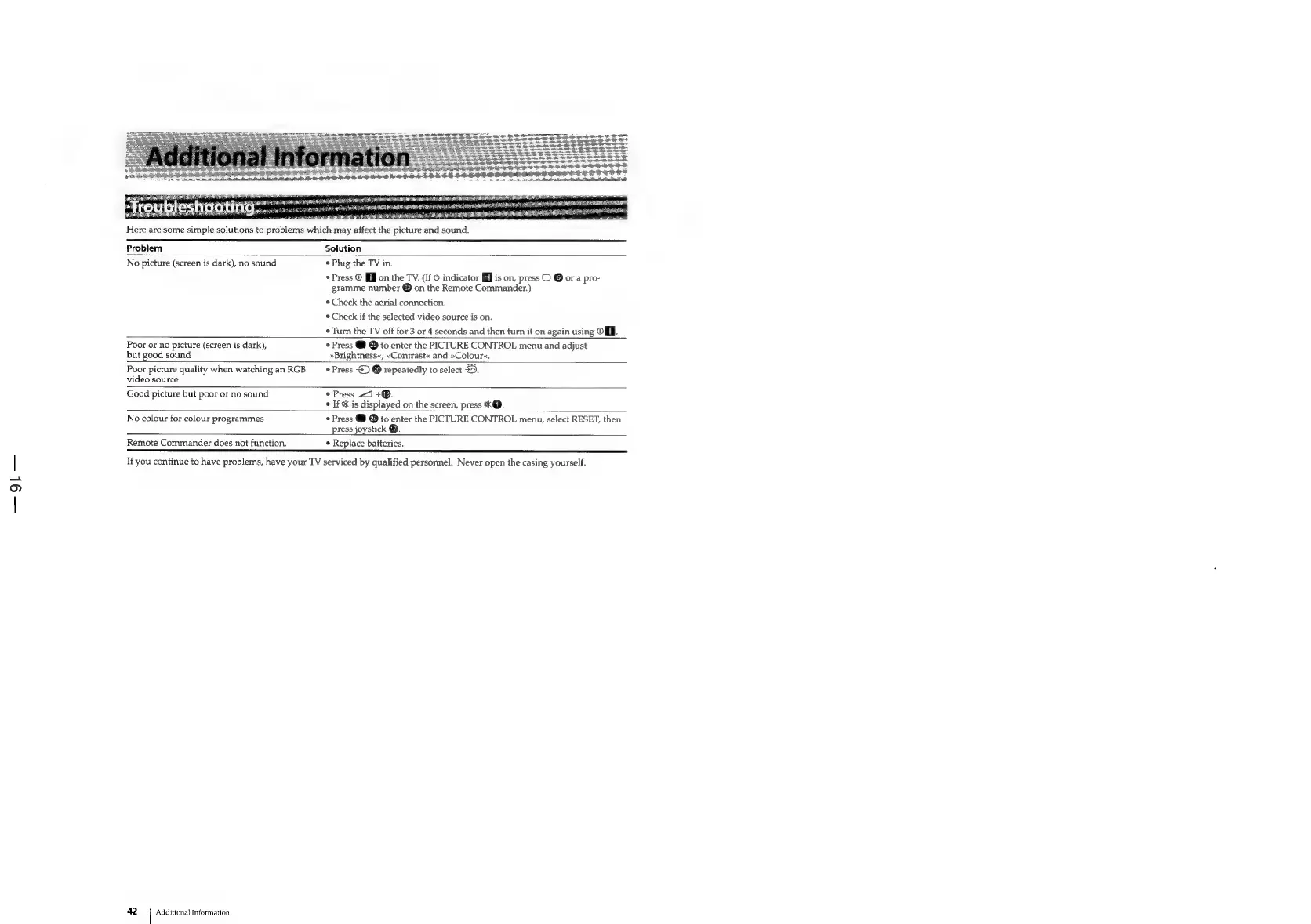
Pfroubleshaoting
Here
are
some
simple
solutions
to
problems
which
may
affect
the
picture
and
sound.
pies
nee
a A
ae
aR
a
EE
BERLINER
IER
LOSER
LIP
OES;
ee
¥
a
i
.
i
ogee
RATE
ISN
AOA
AES
ARTEL
ELIA
EER
SRS
aii
ss
5
ak
ae
ARIST
ITER
A
eee
ie
a
Leo
Re
PEP
SEK
BERS
Problem
Solution
No
picture
(screen
is
dark),
no
sound
*
Plug
the
TV
in.
Press
©
[J
on
the
TV.
(If
©
indicator
is
on,
press
O
Oora
pro-
gramme
number
®
on
the
Remote
Commander.)
¢
Check
the
aerial
connection.
*
Check
if
the
selected
video
source
is
on.
«Turn
the
TV
off
for
3
or
4
seconds
and
then
turn
it
on
again
using
OJ.
Poor
or
no
picture
(screen
is
dark),
*
Press
@
®
to
enter
the
PICTURE
CONTROL
menu
and
adjust
but
good
sound
»Brightness«,
»Contrast«
and
»Colour«.
Poor
picture
quality
when
watching
an
RGB
*
Press
©)
®
repeatedly
to
select
£9.
video
source
Good
picture
but
poor
or
no
sound
*
Press
<1
+®.
*
If
%K
is
displayed
on
the
screen,
press
*@.
No
colour
for
colour
programmes
*
Press
@
to
enter
the
PICTURE
CONTROL
menu,
select
RESET,
then
press
joystick
@.
Remote
Commander
does
not
function.
Replace
batteries.
If
you
continue
to
have
problems,
have
your
TV
serviced
by
qualified
personnel.
Never
open
the
casing
yourself.
42
Additional
Information

Related product manuals