EasyManua.ls Logo

Sony TRINITRON KV-29C3A - Basic Operation

Sony TRINITRON KV-29C3A
84 pages
Print Icon
To Next Page IconTo Next Page
To Previous Page IconTo Previous Page
Loading...
Step
11
RR
ere
nt
Goriheetirigs
th
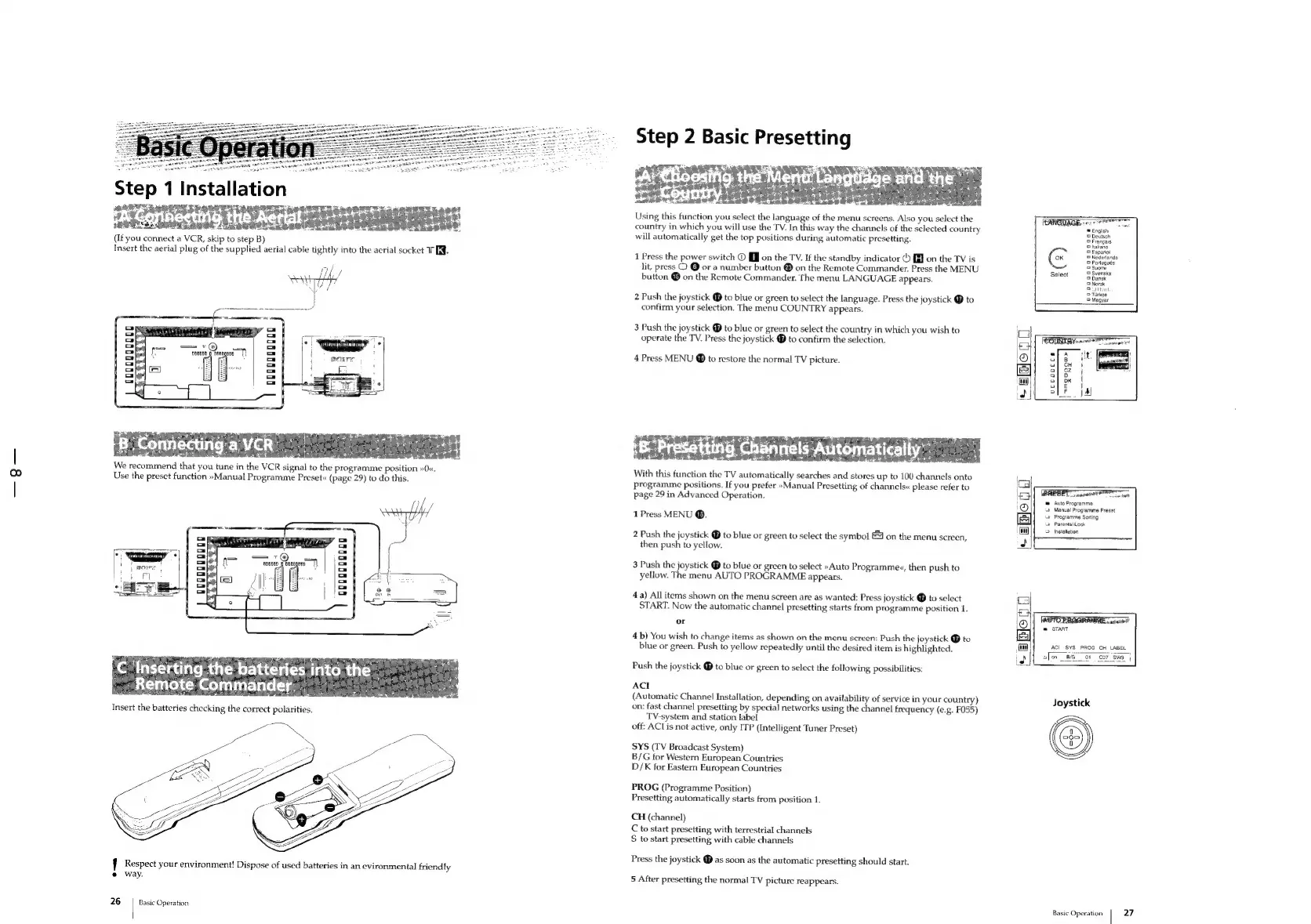
(If
you
connect
a
VCR,
skip
to
step
B)
Insert
the
aerial
plug
of
the
supplied
aerial
cable
tightly
into
the
aerial
socket
TE.
|
i
l
|
ik
~
“ar
+
f
Respect
your
environment!
Dispose
of
used
batteries
in
an
evironmental
friendly
®
way.
26
|
Basic
Operation
Step
2
Basic
Presetting
Using
this
function
you
select
the
language
of
the
menu
screens.
Also
you
select
the
country
in
which
you
will
use
the
TV.
In
this
way
the
channels
of
the
selected
country
will
automatically
get
the
top
positions
during
automatic
presetting.
1
Press
the
power
switch
©
[JJ
on
the
TV.
If
the
standby
indicator
©
iJ
on
the
TV
is
lit,
press
Q
@
or
a
number
button
®
on
the
Remote
Commander,
Press
the
MENU
button
®
on
the
Remote
Commander.
The
menu
LANGUAGE
appears.
2
Push
the
joystick
@
to
blue
or
green
to
select
the
language.
Press
the
joystick
@
to
confirm
your
selection.
The
menu
COUNTRY
appears.
3
Push
the
joystick
@
to
bluc
or
green
to
select
the
country
in
which
you
wish
to
operate
the
TV.
Press
the
joystick
®
to
confirm
the
selection.
4
Press
MENU
@
to
restore
the
normal
TV
picture.
With
this
function
the
TV
automatically
searches
and
stores
up
to
100
channels
onto
programme
positions.
If
you
prefer
»Manual
Presetting
of
channels«
please
refer
to
page
29
in
Advanced
Operation.
1
Press
MENU
®.
2
Push
the
joystick
@
to
blue
or
green
to
select
the
symbol
£4
on
the
menu
screen,
then
push
to
yellow.
3
Push
the
joystick
@
to
blue
or
green
to
select
»Auto
Programme«,
then
push
to
yellow.
The
menu
AUTO
PROGRAMME
appears.
4
a)
All
items
shown
on
the
menu
screen
are
as
wanted:
Press
joystick
@
to
select
START.
Now
the
automatic
channel
presetting
starts
from
programme
position
1.
or
4b)
You
wish
to
change
items
as
shown
on
the
menu
screen:
Push
the
joystick
@
to
blue
or
green.
Push
to
yellow
repeatedly
until
the
desired
item
is
highlighted.
Push
the
joystick
@
to
blue
or
green
to
select
the
following
possibilities:
ACI
(Automatic
Channel
Installation,
depending
on
availability
of
service
in
your
country)
on:
fast
channel
presetting
by
special
networks
using
the
channel
frequency
(e.g.
F055)
TV-system
and
station
label
off:
ACL
is
not
active,
only
ITP
(Intelligent
Tuner
Preset)
SYS
(TV
Broadcast
System)
B/G
for
Western
European
Countries
D/K
for
Eastern
European
Countries
PROG
(Programme
Position)
Presetting
automatically
starts
from
position
1.
CH
(channel)
C
to
start
presetting
with
terrestrial
channels
S
to
start
presetting
with
cable
channels
Press
the
joystick
@
as
soon
as
the
automatic
presetting
should
start.
5
After
presetting
the
normal
TV
picture
reappears.
=
English
©
Deutsch
3
Francais
5
Italiano
©
Espanol
©
Nedorlands
5
Portugues
5
Suom
©
Svenska
Select
aoe
©
Norsk
Betail
©
Turkee
uccocces
(PRESET
cape
Auto
Programme
Parental
Lock
.
a
Programme
Sorting
a
©
Installation
Basic
Operation
Manual
Programme
Preset
@
START
ACI
SYS
PROG
CH
LABEL
afon
BiG
oF
Cor,
27

Related product manuals