EasyManua.ls Logo

Sony TRINITRON KV-29C3A - Page 19

Sony TRINITRON KV-29C3A
84 pages
Print Icon
To Next Page IconTo Next Page
To Previous Page IconTo Previous Page
Loading...
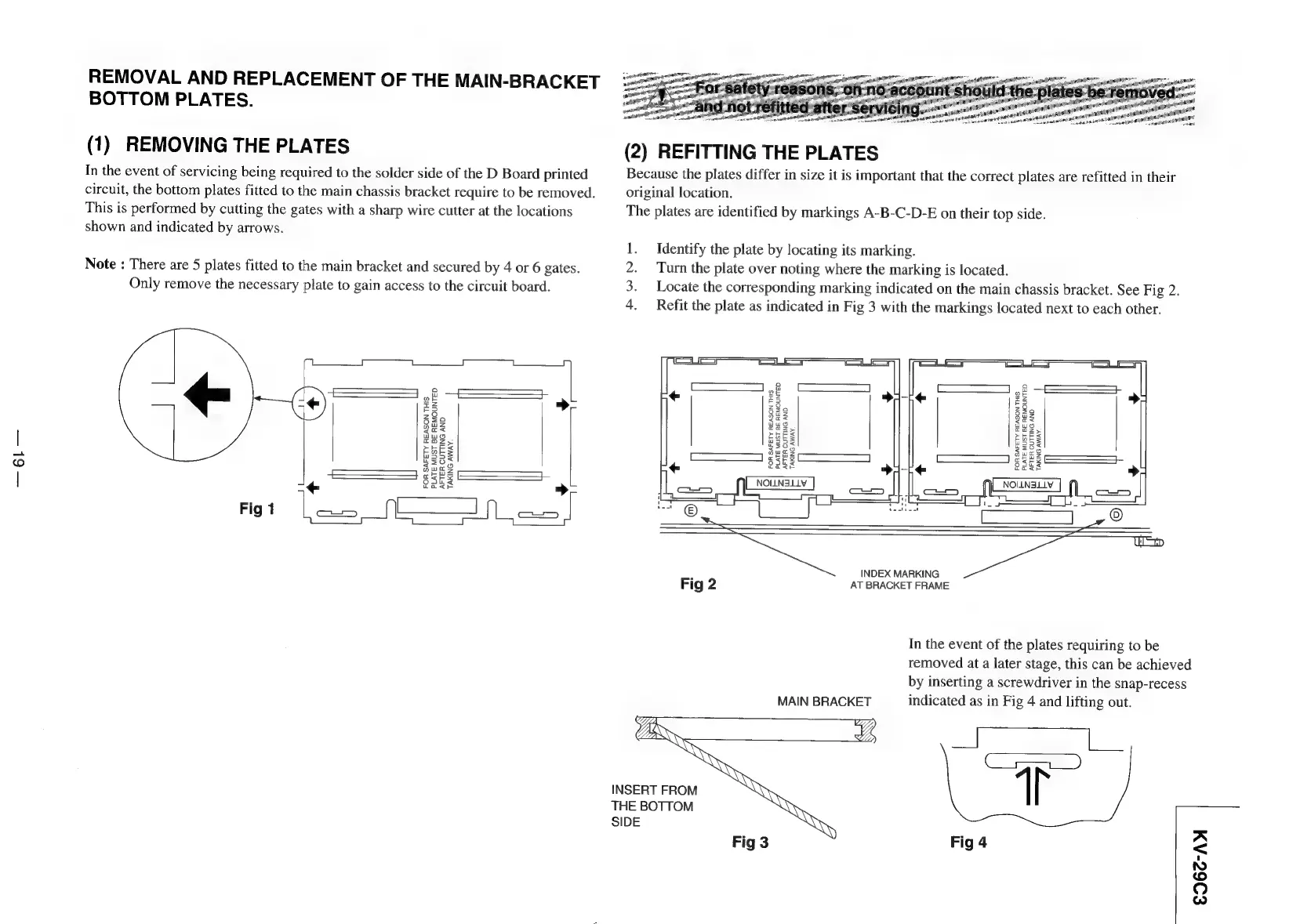
REMOVAL
AND
REPLACEMENT
OF
THE
MAIN-BRACKET
BOTTOM
PLATES.
(1)
REMOVING
THE
PLATES
(2)
REFITTING
THE
PLATES
In
the
event
of
servicing
being
required
to
the
solder
side
of
the
D
Board
printed
Because
the
plates
differ
in
size
it
is
important
that
the
correct
plates
are
refitted
in
their
circuit,
the
bottom
plates
fitted
to
the
main
chassis
bracket
require
to
be
removed.
original
location.
This
is
performed
by
cutting
the
gates
with
a
sharp
wire
cutter
at
the
locations
The
plates
are
identified
by
markings
A-B-C-D-E
on
their
top
side.
shown
and
indicated
by
arrows.
Identify
the
plate
by
locating
its
marking.
Turn
the
plate
over
noting
where
the
marking
is
located.
Locate
the
corresponding
marking
indicated
on
the
main
chassis
bracket.
See
Fig
2.
Refit
the
plate
as
indicated
in
Fig
3
with
the
markings
located
next
to
each
other.
Note
:
There
are
5
plates
fitted
to
the
main
bracket
and
secured
by
4
or
6
gates.
Only
remove
the
necessary
plate
to
gain
access
to
the
circuit
board.
RWNE
C1
I
1
iL
FL
a
CO)
8
aaa
+
2S
23
gf
SS.
>
bs
23
z8
5
z3
$29
Baz
22
eax
Qa
623
wWug
uu@
Za2
cms,
Toz,
eat
~BES
>
BES
wag
G35
G35
cozy
£So<
£S05
GBES
es
CC
ee
Z209
+
oaks
a
fake
ees
————————}
|
SSS
SSr¥
NOLLN3LLV
NOILNSLLY
“+
ta<r
>
co
ce
cE
Fig
1
gre.
Teas
see
.
INDEX
MARKING
Fig
2
AT
BRACKET
FRAME
In
the
event
of
the
plates
requiring
to
be
removed
at
a
later
stage,
this
can
be
achieved
by
inserting
a
screwdriver
in
the
snap-recess
MAIN
BRACKET
indicated
as
in
Fig
4
and
lifting
out.
zs
eee
ee
ee)
T
INSERT
FROM
THE
BOTTOM
SIDE
Fig
3
Fig
4
£962-AM

Related product manuals